SaaS Pricing Best Practices: What Actually Works
A practical guide to SaaS pricing strategy — covering pricing models, value metrics, tier structure, freemium vs. free trial, and mistakes that leave revenue on the table.
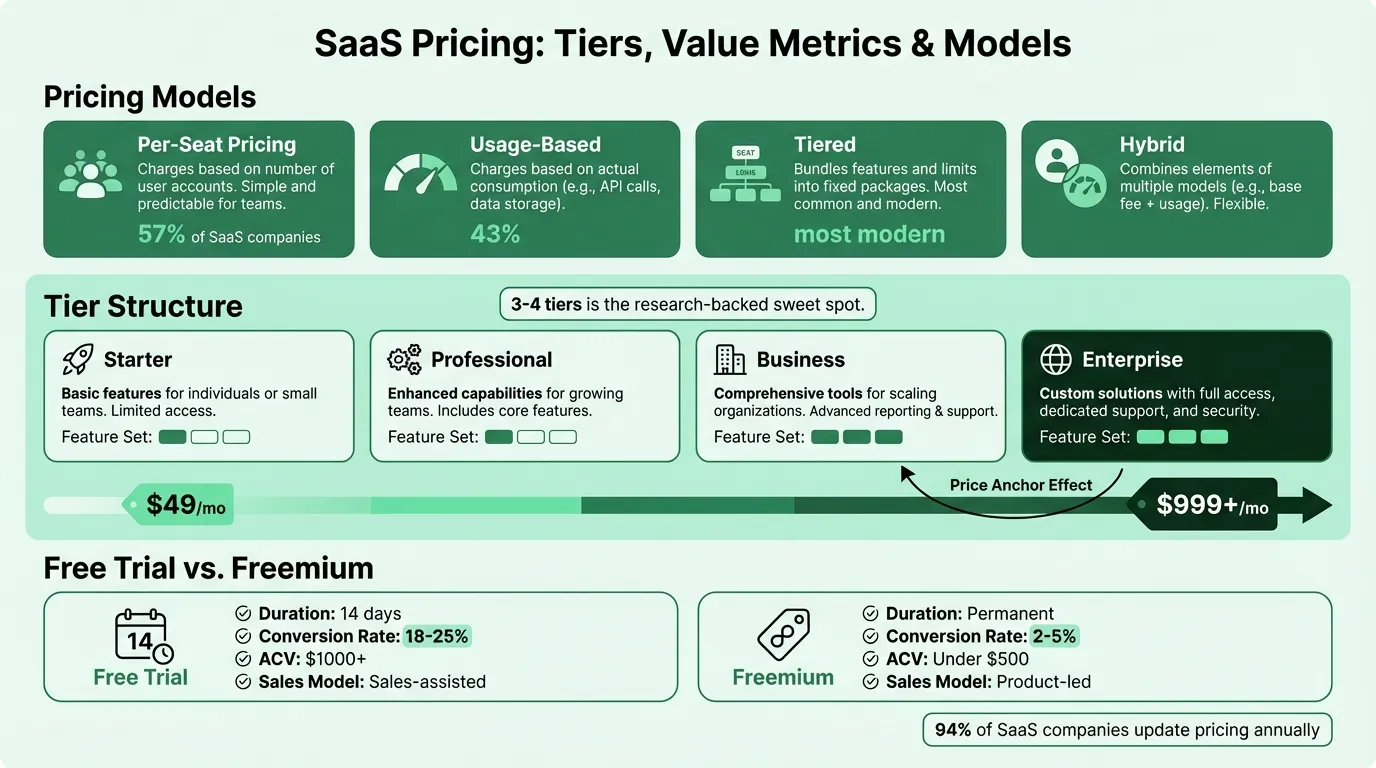
SaaS pricing is one of the few business decisions that directly affects every deal you close, every customer you retain, and how your revenue grows over time. Get it right and pricing becomes a growth lever. Get it wrong and you'll either leave significant revenue on the table or create friction that slows adoption.
Most founders treat pricing as a one-time decision made at launch — usually based on what competitors charge or what "feels right." That approach systematically underperforms. Here's what actually works.
Pick the Right Pricing Model First
Your pricing model is the structure — how you charge, not how much. It determines what your billing relationship with customers looks like and, critically, whether customers feel like the price is fair as they use more of your product.
Per-seat pricing charges based on the number of users on an account. It's the most common model — used by about 57% of SaaS companies — and it's easy to understand. Salesforce, Slack, and Zoom all use per-seat pricing. The downside: it creates an incentive to limit seat count to save money, which actively discourages adoption. If your product's value doesn't scale linearly with user count, per-seat pricing misaligns your revenue with the value you deliver.
Usage-based pricing charges based on consumption — API calls, storage, contacts, messages sent. Stripe charges per transaction, Twilio per SMS, AWS per compute hour. This model aligns cost directly with value and lowers the barrier to entry. The tradeoff: revenue becomes less predictable, and customers may throttle usage to control costs. About 43% of SaaS companies now use usage-based pricing in some form.
Tiered pricing offers multiple packages at different price points targeting different customer segments. This is the de facto structure for most modern SaaS products. Dropbox, HubSpot, and Canva all use tiered pricing. The key is designing tiers around customer segments and their jobs to be done — not just stacking features in ascending order.
Flat-rate pricing is a single price for everyone. Basecamp charges $299/month regardless of user count. Simple and predictable, but it leaves money on the table with high-value customers and doesn't scale well as your customer base diversifies.
Hybrid models combine elements of the above — typically a base subscription fee plus a usage component. AI and ML tools frequently use this structure (base plan + credit/token usage). About 61% of SaaS companies now employ some form of hybrid pricing, up from 49% two years ago.
Choose the Right Value Metric
Your value metric is what you charge per unit of. Choosing the wrong one is the most expensive pricing mistake SaaS companies make.
The test is simple: does more usage directly translate to more value for the customer? If yes, that's your metric. If your tool saves time, the metric might be users or projects. If it drives revenue, the metric might be contacts, transactions, or revenue processed. If it's a communication tool, it might be messages or seats.
Research suggests that 8 out of 10 companies using per-seat pricing should be using a different value metric. Per-seat pricing works when teams genuinely need more seats to get more value — think collaboration tools or communication platforms. It doesn't work well when a single power user gets all the value, or when value scales with activity rather than headcount.
A few examples of well-matched value metrics:
| Company | Value Delivered | Value Metric |
|---|---|---|
| Dropbox | File storage and access | Gigabytes stored |
| HubSpot | Managing more contacts/leads | Contacts in CRM |
| Stripe | Processing more revenue | % of transaction value |
| Mailchimp | Reaching more subscribers | Contacts and sends |
| Snowflake | Running more data queries | Compute credits |
If your pricing metric doesn't show up in this table, ask: does charging more for this unit feel fair to the customer as they grow? If they'd feel penalized rather than proportionally charged, you have the wrong metric. Run different pricing scenarios against your cost structure with the SaaS profit margin calculator.
Design Your Tier Structure Deliberately
Most SaaS pricing pages have three to four tiers, and that's not accidental. Fewer tiers limit your ability to capture revenue from different customer segments. More tiers cause decision paralysis that reduces conversions.
The average SaaS company has 3.5 publicly listed tiers plus a custom enterprise option. MarTech products average 3.8 tiers; FinTech products average 2.8 tiers. Three named tiers with an enterprise option handles most customer segments without creating analysis paralysis.
Don't just stack features. The most common tier design mistake is building each tier as "more features than the previous one." Instead, design each tier around a specific customer profile. Starter: solo operators or small teams validating the product. Professional: growing teams who need collaboration and reporting features. Business/Enterprise: organizations that need compliance, security, integrations, or admin controls.
Use anchoring. The highest-priced tier on your page sets the mental reference point, making other tiers feel reasonable by comparison. Displaying enterprise pricing — even if it's custom — shifts the anchor and increases conversions to your professional tier without any other changes.
Make the recommended tier obvious. Most pricing pages highlight one tier ("Most popular" or "Best value"). This isn't decoration — it reduces cognitive load and increases conversion. Research on the decoy effect shows that a well-positioned middle option can increase uptake of your target tier by 35–50%.
Annual vs. monthly toggle. Offering a 15–20% discount for annual plans is standard practice. Annual plans improve your cash flow, reduce churn risk (locked-in customer), and give you a natural upsell conversation at renewal. Most SaaS companies display the annualized monthly price (e.g., "$49/month, billed $588/year") to make the number feel smaller. Annual prepays also create deferred revenue on the balance sheet -- see our SaaS balance sheet example for how that liability works.
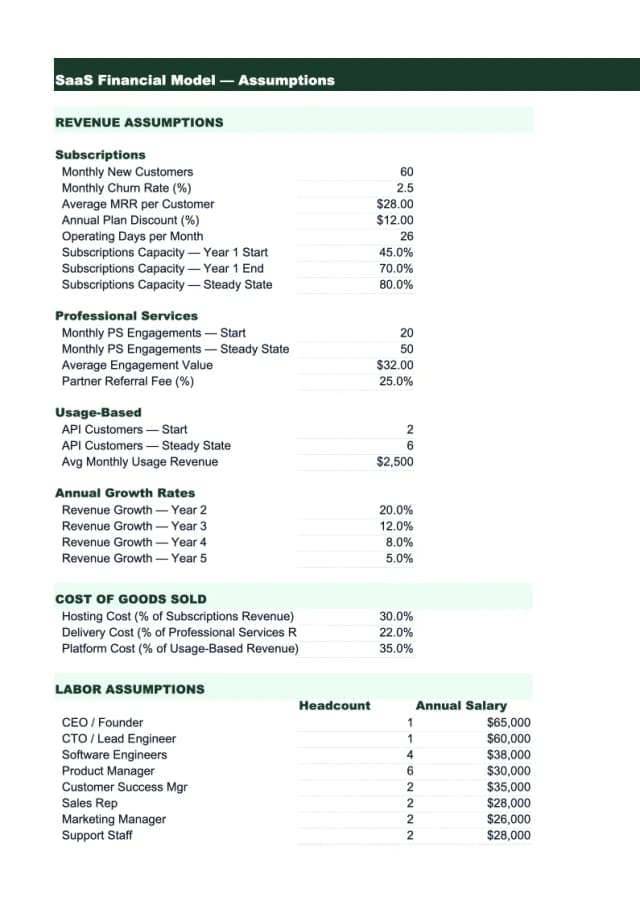
Need a ready-made financial model template for your saas?
Download a pre-built spreadsheet with industry-specific categories, formulas, and formatting.
Freemium vs. Free Trial
Both are mechanisms for letting customers experience your product before paying. They serve different purposes and convert very differently.
Free trials — time-limited access to the full product — convert at 18–25% (opt-in, no credit card required) to paid. They work best for complex B2B products where the sales process benefits from urgency, and for higher ACV products ($1,000+ per year) where sales is involved. The recommended trial length is 14 days. Long enough to experience value; short enough to create real urgency.
Freemium — a permanently free tier with usage or feature limits — converts at 2–5% to paid (exceptional products hit 7–10%). The numbers look weak compared to free trials, but freemium works through volume. Products like Slack, Canva, and Notion generate massive top-of-funnel awareness through freemium that wouldn't be possible with a time-limited trial model. Freemium succeeds when the product is intuitive, viral (users invite others), cheap to serve at scale, and the value is demonstrable quickly.
The decision comes down to your product's complexity, ACV, and go-to-market motion:
| Free Trial | Freemium | |
|---|---|---|
| Best ACV | $1,000+/year | Under $500/year |
| Go-to-market | Sales-assisted or transactional | Product-led, self-serve |
| Conversion to paid | 18–25% | 2–5% |
| Volume required | Lower | Higher |
| Examples | Most B2B SaaS tools | Slack, Canva, Dropbox, Notion |
Many companies use both: freemium for SMB/self-serve, and a trial for enterprise features. Zoom, HubSpot, and Notion all run hybrid free/trial models.
Pricing as an Ongoing Process
The single most underappreciated best practice: pricing is not a one-time decision. Markets change, your product improves, and customer segments shift. In 2024, over 3,500 top SaaS companies made 339 pricing and packaging changes — 126 price adjustments and 213 packaging updates. That's roughly one pricing change every two days, across the industry.
Research shows 94% of SaaS pricing leaders update pricing and packaging at least once a year. But 75% of SaaS companies have annual price escalators below 3% — barely keeping pace with inflation, and nowhere near capturing the value improvements they've shipped.
Signs you should revisit your pricing:
- Customer acquisition cost has risen but pricing hasn't changed
- Customers routinely pay instantly with no negotiation (usually means you're underpriced)
- Your sales team is discounting to close nearly every deal
- Expansion revenue is low despite customers who heavily use the product
- Churn clusters at a specific tier or price point
What to review:
- Your value metric — does it still match how customers get value?
- Your tier limits — are the thresholds set in a way that feels fair as customers grow?
- Your pricing page — are the tiers clearly differentiated? Is the recommended option obvious?
- Your discounting norms — if reps are discounting 30–40% routinely, your list price isn't real
Track price realization by customer segment. Only 29% of SaaS businesses do this. If you're not measuring what customers actually pay vs. list price, you can't manage it. For the accounting side of how pricing flows into your financials, see our SaaS accounting best practices guide.
What to Track
Pricing decisions need feedback loops. The metrics worth monitoring:
- Average Revenue Per Account (ARPA): Is it growing over time? Flat or declining ARPA after product improvements is a signal that pricing isn't capturing the value you've added.
- Expansion MRR: Revenue from upsells and tier upgrades as a percentage of total MRR. Healthy SaaS companies see 15–25% of monthly revenue from expansion. Our SaaS income statement example shows how expansion revenue flows through the P&L.
- Free trial or freemium conversion rate: Benchmarks above. If you're below the 2–5% freemium threshold or below 15% for opt-in trials, investigate the pricing page and onboarding, not just the product.
- Churn by tier: If a specific tier churns at twice the rate of others, that's a value-to-price misalignment at that package.
- Time to convert: How long from trial start (or freemium signup) to paid conversion? Longer times often indicate the product isn't showing enough value quickly enough — or the pricing page isn't compelling at the moment of conversion.
A SaaS KPI dashboard helps tie these metrics together without spreadsheet sprawl. The SaaS KPI Dashboard Template tracks MRR, churn, ARPA, and retention in a single view designed for SaaS operators. For income statement tracking — revenue by tier, gross margin, operating expense — the SaaS Income Statement Template gives you the financial structure specific to subscription businesses.
The Practical Starting Point
If you're building or revising your SaaS pricing, the sequence matters:
- Identify your value metric — what unit of usage most directly correlates with value delivered?
- Define your customer segments — who are the meaningfully different groups you serve, and what does each need?
- Design tiers around segments, not features — each tier is a customer profile, not a feature list
- Set prices based on value, not cost — your hosting costs are irrelevant to what customers will pay
- Choose freemium or free trial based on your ACV and go-to-market motion
- Build in annual pricing with a visible discount
- Schedule a quarterly review — pricing is never finished
SaaS pricing is one of the few levers that can increase revenue without increasing CAC. Getting it wrong is expensive; getting it right compounds over time. Presenting pricing to the board? Deckary builds consulting-grade slides.
Last updated: March 25, 2026
Frequently Asked Questions
Related Articles
Auto Repair Pricing Guide: How to Price Your Shop Profitably
How auto repair shop owners should price labor and parts — covering labor rate calculation, flat-rate hours, parts markup matrices, diagnostic fees, and the metrics that matter.
Cleaning Service Pricing Guide: How to Price Your Business Profitably
A practical guide to cleaning service pricing — covering hourly vs. flat rate vs. per square foot models, price benchmarks by service type, labor cost math, and the common mistakes that keep cleaning businesses from hitting their margin targets.
Construction Pricing Guide: How to Price Your Work Profitably
How contractors should price construction work — covering labor burden, overhead recovery, material markup, pricing methods, and the mistakes that quietly erode margin.
Electrical Pricing Guide: How to Price Your Work Profitably
How electricians and electrical contractors should price their work — covering hourly rates, flat-rate pricing, overhead recovery, material markup, and common mistakes that erode margin.
Hotel Sales Forecast: A Practical Example and Guide
How to build a hotel sales forecast — covering rooms, F&B, events revenue, key metrics like RevPAR and ADR, booking pace, and the rolling forecast structure that keeps you ahead.
Landscaping Pricing Guide: How to Price Your Work Profitably
A practical guide to landscaping pricing — covering hourly rates, per-square-foot benchmarks, overhead recovery, and the markup math that determines whether you're making money.