Event Planning Project Budget Template
Track every vendor contract, client payment, and budget line item for each event you plan — with phase-by-phase cost tracking, client payment milestones, and budget vs actual in one spreadsheet.
What's Inside This Event Planning Project Budget Template
This template includes 5 worksheets, each designed for a specific part of your event planning financial workflow:
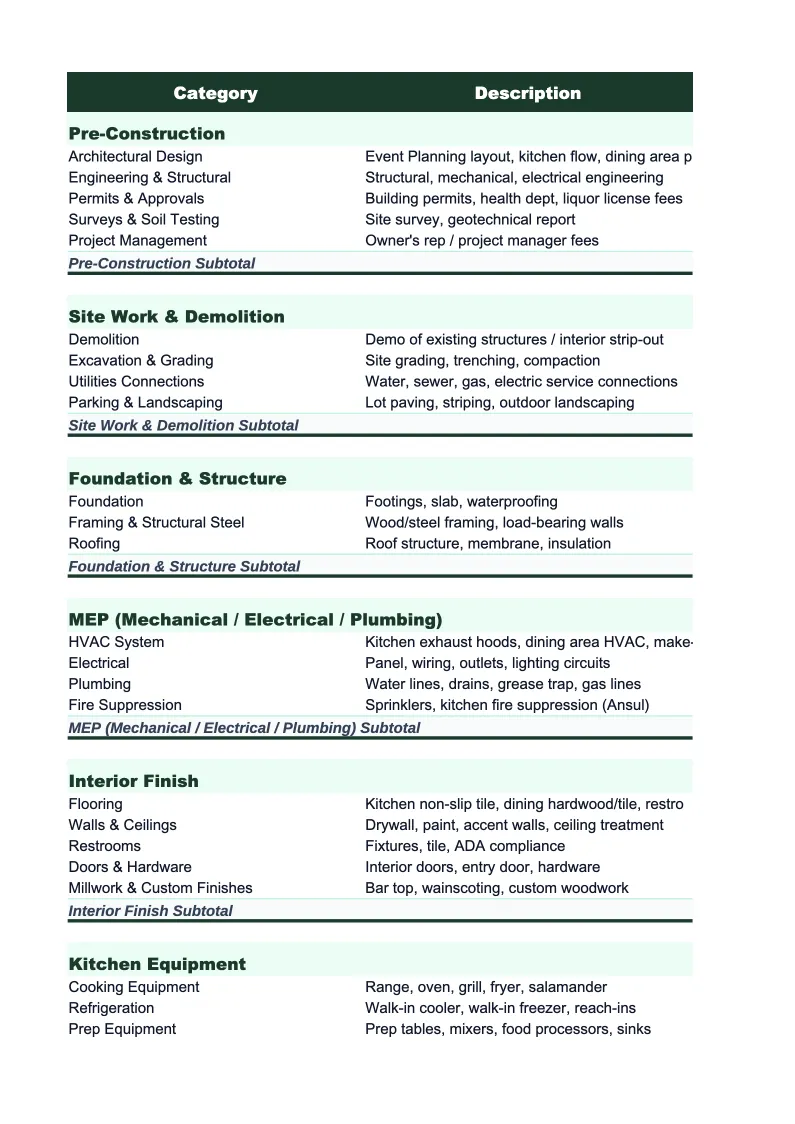
Project Budget
The main worksheet for a single event project.
Client Payment Schedule
Event planners typically collect client payment in installments tied to planning milestones.
Budget vs Actual
The operational tracking sheet used throughout the planning process.
Vendor Contracts & Payments
A complete log of every vendor involved in the event.
Run of Show & Milestones
A planning timeline that maps key milestones from booking through event day.
Event Planning Project Budget Template Features
- Per-event project budget with all standard vendor categories pre-loaded
- Client payment schedule with installment tracking and late-payment flags
- Budget vs actual with contracted-but-unpaid column for true committed cost visibility
- Vendor contracts and payments log with 30-day payment due alerts
- Run of show and milestone tracker for the full planning arc
- Planning fee line isolated from vendor pass-throughs for clear margin visibility
How to Use This Event Planning Project Budget Spreadsheet
Set up a new file for each event as soon as a client contract is signed. Enter the client name, event name, event date, venue, and total approved budget on the Project Budget sheet. Then work through the budget categories with the client — in person, over a call, or by sharing the file via Google Drive — entering estimated amounts for each vendor category based on their priorities and your market knowledge. At this stage, many figures are rough estimates; the goal is a complete budget picture that accounts for every category before contracts are signed, so the client can see immediately if their budget is realistic and you can identify where trade-offs are needed. Your coordination fee goes on its own line, clearly separated from vendor costs, so there's no ambiguity about what you earn versus what flows through to vendors.
As vendor agreements are signed, update the Budget vs Actual sheet with contracted amounts and add each vendor to the Vendor Contracts & Payments log. This three-sheet workflow — project budget for planning conversations, budget vs actual for tracking, vendor log for payment execution — is what keeps an event financially on track. Whenever the client requests an upgrade or a vendor price changes, update both sheets and note the reason in the variance comment column. In the final four to six weeks before the event, open the vendor log weekly and check the 30-day payment alert column. Final balances for venues, caterers, and AV companies stack up heavily in the last few weeks, and missing a payment can put a vendor relationship at risk on the eve of the event.
15 minutes from download to your first event project budget
Download the template, enter the client details and vendor categories, and walk into every client meeting with a complete budget picture — not a guess.
Why Every Event Planner Needs a Per-Project Budget Template
Event planners lose margin in two predictable ways: vendor costs that creep beyond the client-approved budget without a formal change order, and client payment delays that put the planner in the position of floating vendor deposits from their own cash. Both problems are common, and both are manageable — but only if you're tracking them systematically for every project. Most planners who are just getting organized start with a loose spreadsheet that doesn't separate their fee from vendor costs, which makes it nearly impossible to know, on any given event, whether they're making the margin they quoted. A per-event project budget file, set up at booking and updated throughout the planning process, eliminates that ambiguity and turns a financial guess into a clear number.
The financial structure of an event planning project is defined by the pass-through model. A corporate gala with a $120,000 client budget might involve $90,000 in vendor costs and a $30,000 planning fee. The planner's actual revenue is the $30,000, and their margin is what remains after coordinator wages, overhead, and any costs they absorb. That distinction gets lost without disciplined project tracking. Event planners who maintain per-event financial records know their effective margin on every project and can identify which event types — by budget tier, format, or client industry — are genuinely most profitable. That's the data that informs smarter pricing and scope decisions over time.
Event Planning Industry at a Glance
Financial templates built for event planners and event management businesses — from independent coordinators to full-service agencies handling weddings, corporate events, and conferences.
Revenue Drivers
- Planning and coordination fees
- Day-of coordination
- Vendor commissions or markups
- Design and decor services
- Event production fees
Key Cost Categories
- Venue rental
- Catering and bar service
- Staffing and labor
- Decor and florals
- AV and lighting equipment
- Photography and videography
- Transportation and logistics
Typical Margins
Gross: 40-60% · Net: 10-25%
Seasonality
Peak season in spring (April-June) and fall (September-November) for weddings; corporate events spike in Q1 and Q4.
Key Performance Indicators
Event Planning Project Budget Template FAQ
More Event Planning Templates
Event Planning Balance Sheet Template for Excel
$29
Event Planning Budget Template for Excel
$29
Event Planning Business Plan Template for Excel
$39
Event Planning Cash Flow Template for Excel
$29
Event Planning Expense Tracker Template for Excel
$29
Event Planning Financial Model Template for Excel
$29
Event Planning Income Statement Template for Excel
$29
Event Planning Invoice Template for Excel
$29
Event Planning KPI Dashboard Template for Excel
$29
Event Planning P&L Template for Excel
$29
Event Planning Pro Forma Template for Excel
$29
Event Planning Sales Forecast Template for Excel
$29
Event Planning Business Valuation Template for Excel
$29
More Project Budget Templates
Event Planning Project Budget Template
$29