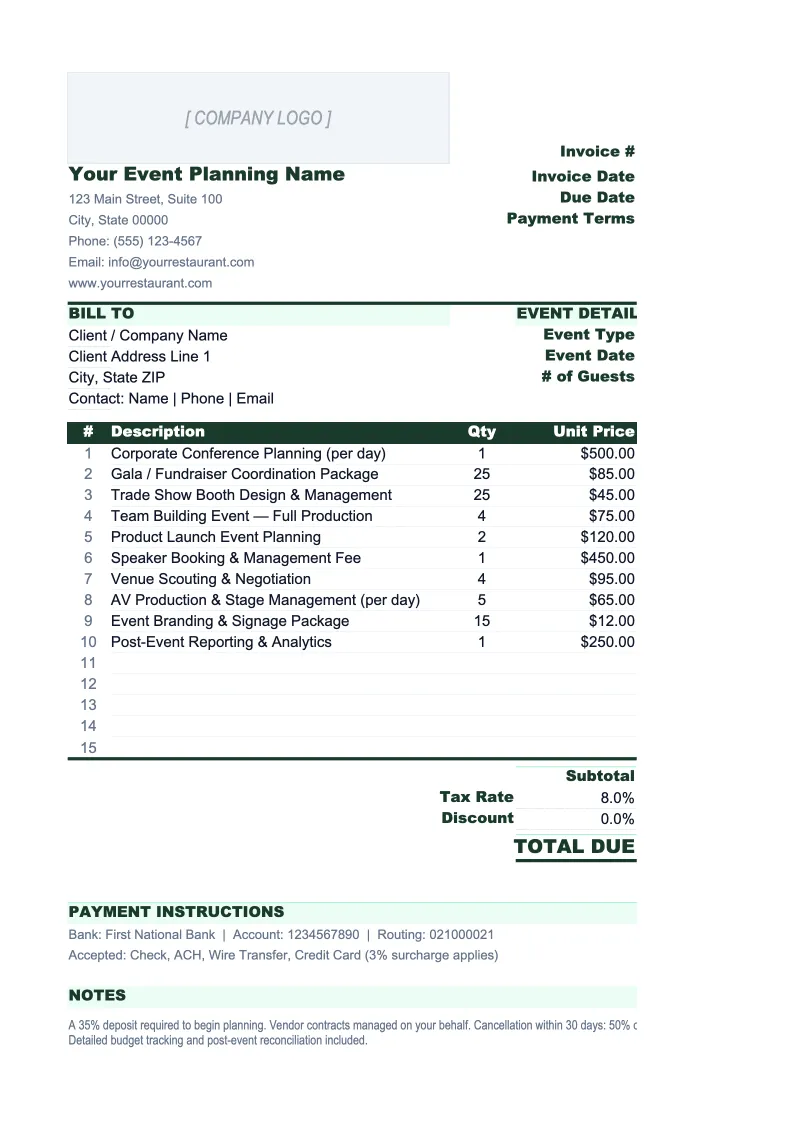
Event Planning Invoice Template
Invoice clients for planning fees, vendor pass-throughs, and milestone payments — with deposit tracking, an event log, and itemized cost breakdowns that clients can follow.
What's Inside This Event Planning Invoice Template
This template includes 5 worksheets, each designed for a specific part of your event planning financial workflow:
Invoice
The client-facing invoice sheet structured for how event planners actually bill.
Invoice Log
A running record of every invoice issued, organized by event and client.
Client & Event List
A combined directory of clients and their associated events.
Vendor Pass-Throughs
A dedicated tracker for all vendor costs associated with each event.
Deposit Schedule
A payment milestone tracker that maps out the agreed deposit and payment schedule for each event.
Event Planning Invoice Template Features
- Line items for planning fees, vendor pass-throughs, and day-of coordination on a single invoice
- Deposit deduction that automatically calculates remaining balance due
- Vendor pass-through tracker with markup percentage calculations
- Invoice log showing outstanding balance by event and client
- Payment milestone tracker for deposit schedules and staged billing
- Client and event directory with dropdown auto-fill on invoice sheet
How to Use This Event Planner Invoice Spreadsheet
Setup takes about 20 minutes. Download the .xlsx file and open it in Excel or Google Sheets — no macros needed. Start with the Client & Event List sheet: add your current clients with billing addresses and payment terms, and enter each active event with its date, type, and agreed fee structure. Then open the Vendor Pass-Throughs sheet and add the vendors you're working with for each event, including the cost and your markup rate. Once those two sheets are populated, the Invoice sheet works via dropdowns and most fields populate automatically.
To create an invoice, go to the Invoice sheet and enter the invoice number, select the client from the dropdown, and fill in the event details. In the line items section, enter your planning fees (hourly or flat as agreed), then pull vendor pass-through totals from the Vendor Pass-Throughs sheet into the appropriate line items. Enter the deposit already received in the deposit deduction row and the balance due calculates automatically. Print or export to PDF to send. Log the invoice in the Invoice Log with the amount and set the status to 'Outstanding' or 'Deposit Received' depending on what you've collected.
Send your next event invoice in under 10 minutes
Set up your client list and vendor tracker once, then invoice for any event — planning fees, pass-throughs, deposits, and all — with every calculation handled automatically.
Why Event Planners Need a Dedicated Invoice Template
Event planners get burned on invoicing because their billing structure is more complex than most service businesses. A single event might involve your coordination fee, 8-12 vendor pass-throughs at different markup rates, multiple deposit milestones spread over 6-12 months, and a final reconciliation after the event. Using a generic invoice template for that complexity creates two problems: clients can't follow what they're being charged for, and you lose track of what's been paid versus what's outstanding. Both lead to disputes and delayed collections — which matter a lot when your business runs on cash timing.
The standard billing approach for event planners is a combination of flat fee or percentage-of-budget for coordination plus cost-plus on vendor pass-throughs. Flat fees for weddings typically run $1,500-$5,000 for partial planning and $3,500-$8,500+ for full-service coordination, depending on market and event size. Markup on vendor costs ranges from 10-20% depending on what's standard in your market and what's disclosed in your contract. Whatever your structure, your invoice needs to be itemized clearly enough that clients can see exactly what they're paying for — a single line item labeled 'event services: $12,000' will generate questions; a properly itemized invoice usually doesn't.
Event Planning Industry at a Glance
Financial templates built for event planners and event management businesses — from independent coordinators to full-service agencies handling weddings, corporate events, and conferences.
Revenue Drivers
- Planning and coordination fees
- Day-of coordination
- Vendor commissions or markups
- Design and decor services
- Event production fees
Key Cost Categories
- Venue rental
- Catering and bar service
- Staffing and labor
- Decor and florals
- AV and lighting equipment
- Photography and videography
- Transportation and logistics
Typical Margins
Gross: 40-60% · Net: 10-25%
Seasonality
Peak season in spring (April-June) and fall (September-November) for weddings; corporate events spike in Q1 and Q4.
Key Performance Indicators
Event Planning Invoice Template FAQ
More Event Planning Templates
Event Planning Balance Sheet Template for Excel
$29
Event Planning Budget Template for Excel
$29
Event Planning Business Plan Template for Excel
$39
Event Planning Cash Flow Template for Excel
$29
Event Planning Expense Tracker Template for Excel
$29
Event Planning Financial Model Template for Excel
$29
Event Planning Income Statement Template for Excel
$29
Event Planning KPI Dashboard Template for Excel
$29
Event Planning P&L Template for Excel
$29
Event Planning Pro Forma Template for Excel
$29
Event Planning Project Budget Template for Excel
$29
Event Planning Sales Forecast Template for Excel
$29
Event Planning Business Valuation Template for Excel
$29
Event Planning Invoice Template
$29