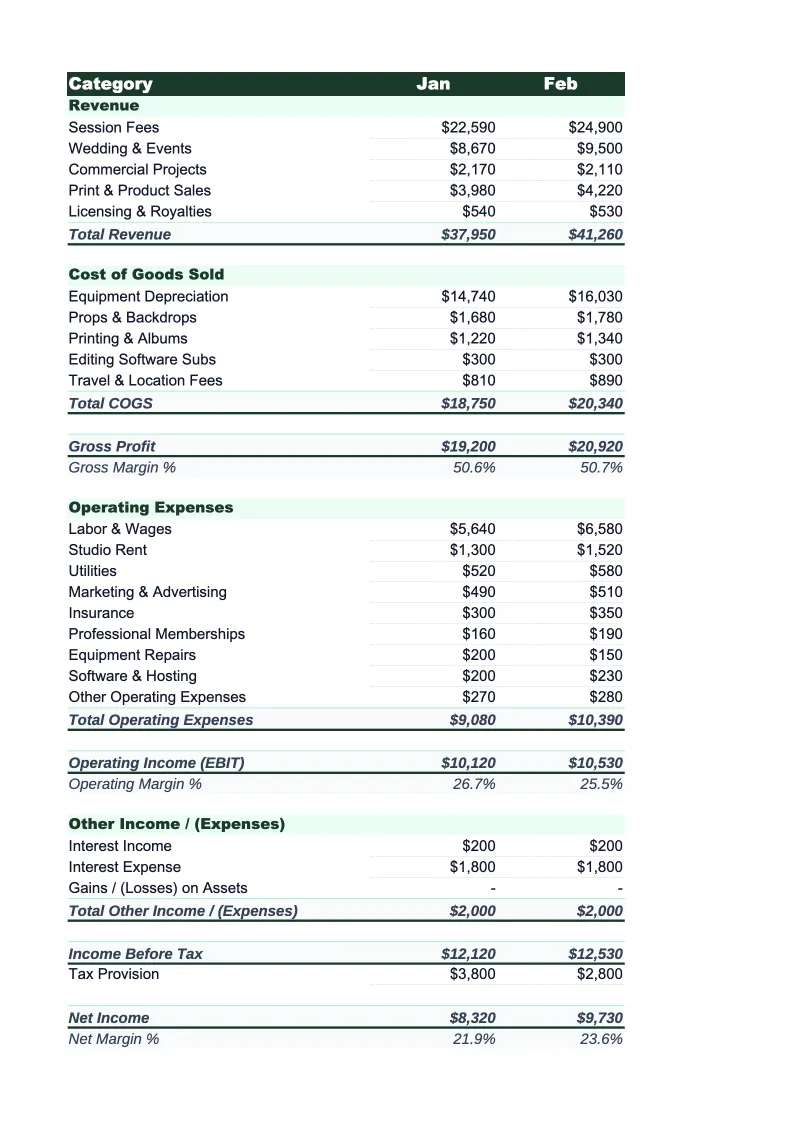
Photography Income Statement Template
Report your photography business's revenue and expenses with an income statement built for how photographers actually earn and spend — from session fees and print sales to equipment depreciation and lab costs.
What's Inside This Photography Income Statement Template
This template includes 4 worksheets, each designed for a specific part of your photography financial workflow:
Monthly Income Statement
The core worksheet where you record each month's revenue and expenses using photography-specific line items.
Annual Summary
A 12-month rollup that aggregates data from each monthly sheet automatically.
Year-over-Year Comparison
Compare this year's income statement line by line against last year's actuals.
Dashboard
A one-page visual summary with pre-built charts covering revenue by stream, COGS vs.
Photography Income Statement Template Features
- Revenue split by session type, print sales, licensing, and digital downloads
- COGS line items for lab costs, albums, second shooter fees, and gallery platform commissions
- Equipment depreciation and editing software subscription expense tracking
- Gross margin, net margin, and CODB per session auto-calculations
- 12-month annual rollup with year-over-year comparison sheet
- Visual dashboard with revenue stream breakdown and margin trend charts
How to Use This Photography Income Statement Spreadsheet
Getting started takes about 15 minutes. Download the .xlsx file and open it in Excel or Google Sheets — no macros or plugins required. Start with the Monthly Income Statement sheet and review the pre-loaded revenue and expense categories. Most photographers keep the core structure as-is and adjust a few line items to match their specific service mix — for instance, adding a boudoir or real estate photography revenue line, or removing album sales if you don't offer them.
Once the categories match your business, enter revenue and expenses for the current month. If you don't track expenses in real time, pull your bank statement and credit card statement for the month and work through each line item. The COGS section is where most photographers spend the most time — enter your lab costs, album orders, second shooter pay, and gallery platform fees for the month. Everything else rolls up to gross profit and net income automatically. Copy the structure forward for remaining months and fill them in as the year progresses.
15 minutes from download to your first income statement
Download the template, enter your revenue and expenses, and see your photography business's gross margin, net income, and CODB in one place.
Why Every Photography Business Needs an Income Statement
Photography is a service business with product economics layered on top of it. A wedding or portrait session generates service revenue, but print orders, album packages, and licensing deals behave more like product sales with their own cost of goods. That makes a standard income statement structure — one that separates service revenue from product revenue and COGS from operating expenses — genuinely useful for understanding where your money actually comes from and where it goes. Most photographers who skip this never realize how much their lab and printing costs are eating into print sale margins.
The numbers that matter most in a photography income statement are gross margin and net margin. Gross margin — revenue minus direct job costs like lab fees, second shooter pay, and album costs — should typically land between 55% and 70% for a well-run photography business. Net margin, after all operating expenses, typically falls between 15% and 35% depending on whether you carry a studio and how aggressively you invest in marketing and equipment. Photographers with high print attach rates and strong licensing income tend to run better gross margins than those who sell session-only digital packages, because print and licensing carry solid margins once your lab relationships are established.
Photography Industry at a Glance
Financial templates built for photographers and photography studios — from solo portrait photographers to commercial studios. Pre-loaded with session fees, licensing line items, print product categories, and industry-standard KPIs.
Revenue Drivers
- Session bookings
- Print & product sales
- Image licensing fees
- Digital download packages
- Second shooter add-ons
Key Cost Categories
- Equipment purchase & depreciation
- Editing software subscriptions
- Gallery delivery platform fees
- Studio rent
- Lab & printing costs (COGS)
- Equipment & liability insurance
- Marketing & advertising
- Travel & location expenses
Typical Margins
Gross: 50-70% · Net: 15-35%
Seasonality
Peak seasons: spring (April–June) and fall (September–November) for portraits and weddings. December busy for holiday portraits. January–February typically slowest.
Key Performance Indicators
Photography Income Statement Template FAQ
More Photography Templates
Photography Balance Sheet Template for Excel
$29
Photography Budget Template for Excel
$29
Photography Business Plan Template for Excel
$39
Photography Cash Flow Template for Excel
$29
Photography Expense Tracker Template for Excel
$29
Photography Financial Model Template for Excel
$29
Photography Invoice Template for Excel
$29
Photography KPI Dashboard Template for Excel
$29
Photography P&L Template for Excel
$29
Photography Business Pro Forma Template for Excel
$29
Photography Project Budget Template for Excel
$29
Photography Sales Forecast Template for Excel
$29
Photography Business Valuation Template for Excel
$29
More Income Statement Templates
Accounting Firm Income Statement Template for Excel
$29
Auto Repair Income Statement Template for Excel
$29
Car Wash Income Statement Template for Excel
$29
Church Income Statement Template for Excel
$29
Cleaning Service Income Statement Template for Excel
$29
Coffee Shop Income Statement Template for Excel
$29
Photography Income Statement Template
$29