Photography Invoice Template
Bill clients for session fees, licensing rights, print products, and travel — all in one professional invoice built for photographers.
What's Inside This Photography Invoice Template
This template includes 3 worksheets, each designed for a specific part of your photography financial workflow:
Invoice
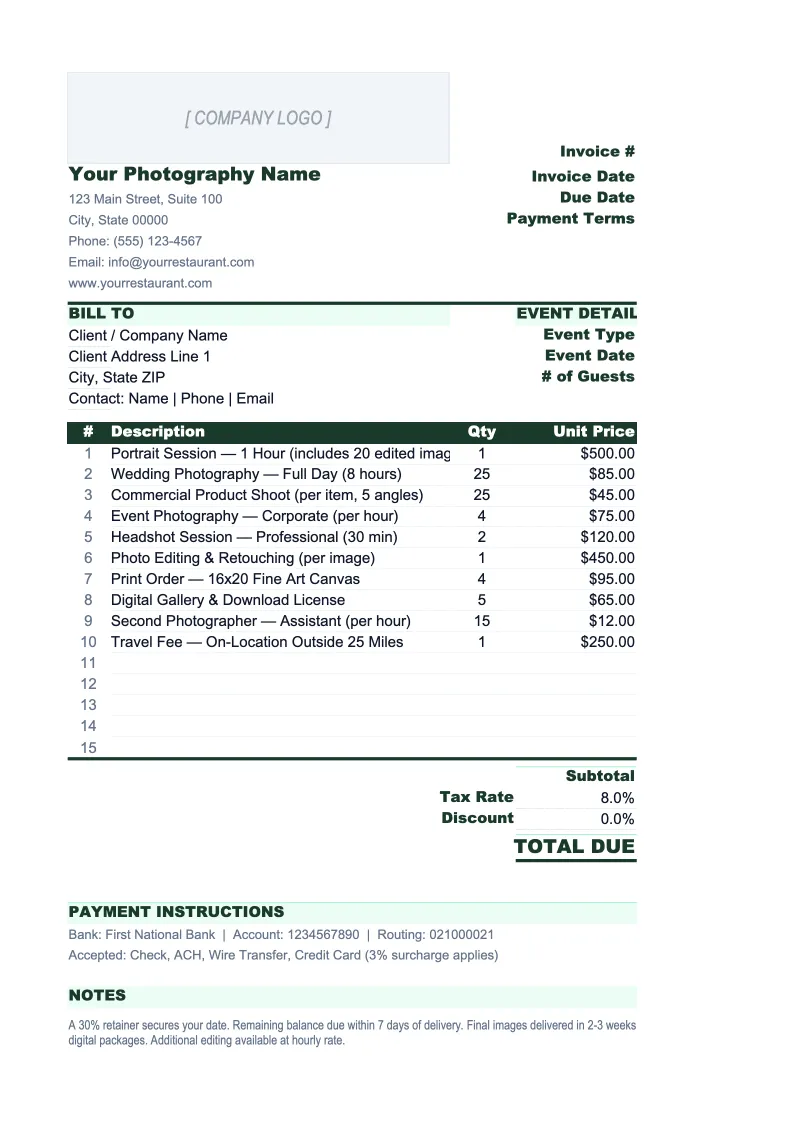
A professional, print-ready invoice with a logo placeholder, studio name and contact block, and a full client 'Bill To' section.
Invoice Log
A running tracker for every invoice you send.
Retainer Tracker
Photography bookings almost always require a non-refundable retainer at the time of signing.
Photography Invoice Template Features
- Pre-built line items for session fees, licensing, prints, travel, and second shooter
- Retainer and deposit deduction calculated automatically before the total due
- Image licensing section with usage type and duration fields for commercial jobs
- Invoice Log with job-type dropdown, payment status, and days-outstanding formula
- Retainer Tracker to manage booked jobs before the balance invoice is sent
- Configurable tax rate field — handles states that tax photography goods differently
How to Use This Photography Invoice Spreadsheet
Download the .xlsx file and open it in Excel or Google Sheets. Start on the Invoice sheet: fill in your studio name, address, and contact details in the header — these stay the same on every invoice, so set them once. Add your client's billing information and the job details (shoot date, location, job type), then work through the line items. The categories are already there: session fee, editing, licensing, prints, travel, second shooter. Delete the rows you don't need for a given job and fill in what applies. The subtotal, tax, and total formulas update automatically.
For any job that took a retainer, enter the deposit amount in the designated field — the template subtracts it from the total and shows the balance due. For commercial jobs, fill in the licensing section: describe the usage type (social media only, regional print, national advertising, etc.) and the license duration. This detail matters both for pricing accuracy and for protecting your rights — a client who pays for a one-year social media license can't use the images in a national ad campaign without a new invoice.
15 minutes from download to your first invoice
Download the template, add your studio details, and send a professional invoice that covers session fees, licensing, prints, and travel — all in one place.
Why Photographers Need an Invoice Template Built for Their Business
Photography invoicing is more complex than most service businesses because a single job can have three separate billable components: the creative fee for your time on set, the post-production fee for editing, and a licensing fee for how the client plans to use the images. Many photographers — especially those doing commercial work for the first time — undercharge because they either don't know to charge for licensing or they bundle it invisibly into the session fee. These are distinct costs with different pricing logic, and an invoice that separates them protects you legally and helps clients understand what they're actually paying for.
The retainer structure is another thing that sets photography apart. A portrait or wedding photographer can only be in one place on any given date — a cancelled booking is unrecoverable lost revenue. The industry standard of collecting 25–50% upfront as a non-refundable retainer exists for good reason, but it creates a billing workflow that a generic invoice doesn't support. You need to track who has paid their retainer, who still owes a balance, and when that balance is due — all before the shoot date. Missing a balance collection before a wedding is the kind of administrative failure that costs thousands.
Photography Industry at a Glance
Financial templates built for photographers and photography studios — from solo portrait photographers to commercial studios. Pre-loaded with session fees, licensing line items, print product categories, and industry-standard KPIs.
Revenue Drivers
- Session bookings
- Print & product sales
- Image licensing fees
- Digital download packages
- Second shooter add-ons
Key Cost Categories
- Equipment purchase & depreciation
- Editing software subscriptions
- Gallery delivery platform fees
- Studio rent
- Lab & printing costs (COGS)
- Equipment & liability insurance
- Marketing & advertising
- Travel & location expenses
Typical Margins
Gross: 50-70% · Net: 15-35%
Seasonality
Peak seasons: spring (April–June) and fall (September–November) for portraits and weddings. December busy for holiday portraits. January–February typically slowest.
Key Performance Indicators
Photography Invoice Template FAQ
More Photography Templates
Photography Balance Sheet Template for Excel
$29
Photography Budget Template for Excel
$29
Photography Business Plan Template for Excel
$39
Photography Cash Flow Template for Excel
$29
Photography Expense Tracker Template for Excel
$29
Photography Financial Model Template for Excel
$29
Photography Income Statement Template for Excel
$29
Photography KPI Dashboard Template for Excel
$29
Photography P&L Template for Excel
$29
Photography Business Pro Forma Template for Excel
$29
Photography Project Budget Template for Excel
$29
Photography Sales Forecast Template for Excel
$29
Photography Business Valuation Template for Excel
$29
Photography Invoice Template
$29