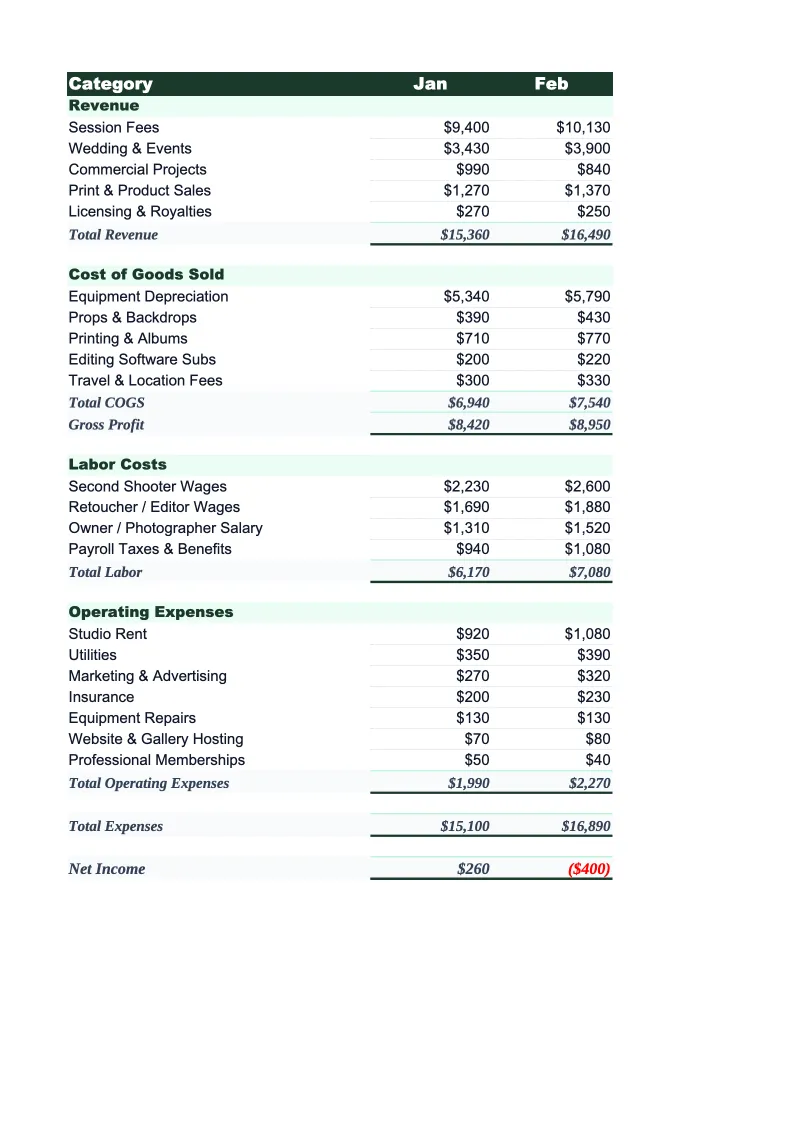
Photography Budget Template
Plan and track your photography business finances with a budget template built for photographers. Pre-loaded with session income, equipment, lab costs, and industry KPIs.
What's Inside This Photography Budget Template
This template includes 4 worksheets, each designed for a specific part of your photography financial workflow:
Monthly Budget
The core planning sheet where you enter each month's projected revenue and expenses.
Annual Summary
A 12-month rollup that pulls from each monthly sheet and shows your full-year revenue, expenses by category, and net profit in a single view.
Budget vs Actual
Track your planned numbers against what actually came in.
KPI Dashboard
A visual summary with pre-built charts and key metrics tailored to photography businesses.
Photography Budget Template Features
- Revenue tracking split by session type, print sales, licensing, and digital downloads
- Equipment depreciation line with annual cost spread across months
- Lab and printing costs tracked separately from other COGS
- Average revenue per client (ARPC) auto-calculated on the dashboard
- Cost of doing business (CODB) per session calculation built in
- Seasonality-aware annual summary showing spring/fall peak vs. slow season
How to Use This Photography Budget Spreadsheet
Getting started takes about 15 minutes. Download the .xlsx file and open it in Excel or Google Sheets — no macros or add-ons required. Start with the Monthly Budget sheet: review the pre-loaded income and expense categories, then adjust them to match how your business is structured. Most photographers keep the core categories intact and add a line or two for anything specific to their niche — second shooter fees, destination travel surcharges, or a specific software subscription.
Once the categories are set, enter your projected revenue and expenses for each month. If you have last year's booking history, use that as your starting point and adjust for price increases or changes in booking volume. The Annual Summary and KPI Dashboard update automatically as you fill in monthly data — by the time you've entered two or three months, you'll have a clear picture of where your income is coming from and whether your expenses are tracking to plan.
15 minutes from download to your first photography budget
Download the template, plug in your session income and expenses, and see your photography business's full financial picture — monthly budget, annual rollup, and variance tracking included.
Why Every Photography Business Needs a Budget Template
Photography businesses have a deceptively complex financial structure. Revenue looks simple on the surface — session fees and maybe print sales — but in practice it comes from half a dozen sources that behave differently: portrait sessions, weddings, commercial contracts, licensing fees, and product sales each have different margins, different payment timing, and different expense drivers. Without a budget that separates these, it's easy to feel busy while staying unprofitable. Photographers routinely undercharge for sessions because they haven't calculated their true cost of doing business per hour.
A proper photography budget tracks the numbers that actually drive profitability in this industry. Equipment is a major fixed cost that most photographers don't budget for explicitly — a camera body that costs $3,500 and lasts four years should show up as about $875 per year in your budget, not as a surprise expense when it breaks. Lab and printing costs are your true COGS for print-based photographers and should be tracked against print sales revenue, not lumped in with general expenses. And software subscriptions — Adobe Creative Cloud, gallery delivery platforms, CRM tools, and editing plugins — add up quickly for a solo photographer and are easy to underestimate.
Photography Industry at a Glance
Financial templates built for photographers and photography studios — from solo portrait photographers to commercial studios. Pre-loaded with session fees, licensing line items, print product categories, and industry-standard KPIs.
Revenue Drivers
- Session bookings
- Print & product sales
- Image licensing fees
- Digital download packages
- Second shooter add-ons
Key Cost Categories
- Equipment purchase & depreciation
- Editing software subscriptions
- Gallery delivery platform fees
- Studio rent
- Lab & printing costs (COGS)
- Equipment & liability insurance
- Marketing & advertising
- Travel & location expenses
Typical Margins
Gross: 50-70% · Net: 15-35%
Seasonality
Peak seasons: spring (April–June) and fall (September–November) for portraits and weddings. December busy for holiday portraits. January–February typically slowest.
Key Performance Indicators
Photography Budget Template FAQ
More Photography Templates
Photography Balance Sheet Template for Excel
$29
Photography Business Plan Template for Excel
$39
Photography Cash Flow Template for Excel
$29
Photography Expense Tracker Template for Excel
$29
Photography Financial Model Template for Excel
$29
Photography Income Statement Template for Excel
$29
Photography Invoice Template for Excel
$29
Photography KPI Dashboard Template for Excel
$29
Photography P&L Template for Excel
$29
Photography Business Pro Forma Template for Excel
$29
Photography Project Budget Template for Excel
$29
Photography Sales Forecast Template for Excel
$29
Photography Business Valuation Template for Excel
$29
Photography Budget Template
$29