Photography Cash Flow Template
Track and project cash flow for your photography business — with deposit and final payment timing, print lab COGS, gallery platform fees, and a 13-week projection built around the retainer-heavy, seasonally lumpy cash cycles photographers actually manage.
What's Inside This Photography Cash Flow Template
This template includes 4 worksheets, each designed for a specific part of your photography financial workflow:
13-Week Cash Flow
A rolling 13-week cash projection covering the most actionable planning window for a photography business.
Monthly Cash Flow
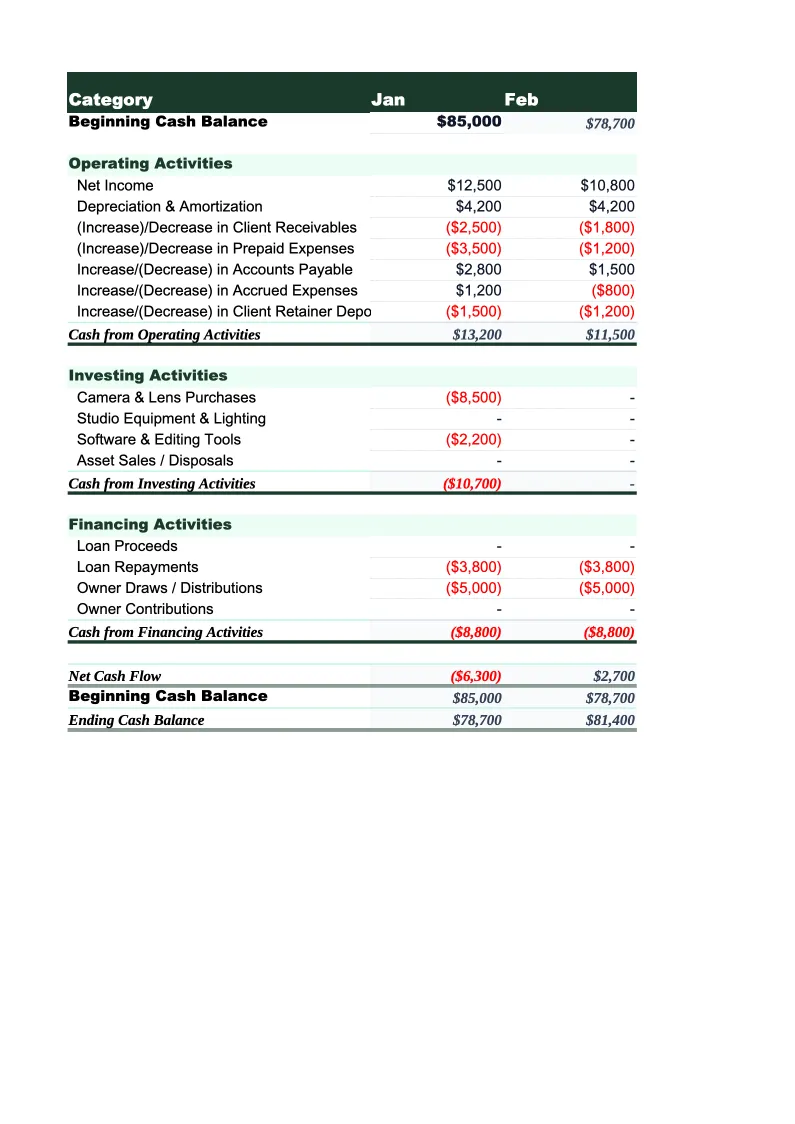
A 12-month indirect-method cash flow statement organized into operating, investing, and financing activities.
Session & Payment Tracker
A dedicated sheet for tracking every booked session from deposit through final payment and print order close-out — the cash flow engine behind the 13-week projection.
Annual Summary
A full-year rollup of revenue by category, COGS, operating cash flow, and the KPIs that photography business owners, accountants, and potential buyers use to evaluate a photography business.
Photography Cash Flow Template Features
- 13-week cash projection with retainer deposits, final balance payments, and print order payouts tracked as separate inflows — each arriving on a different schedule relative to the session date
- Session & Payment Tracker covering every booking from deposit through final payment and print order close-out, with ARPC and print attach rate calculated automatically
- Deferred revenue adjustment in the monthly indirect cash flow — so the model reflects the timing difference between deposit receipt and session delivery
- Print lab invoice tracking (Bay Photo, WHCC, Mpix) as a distinct outflow category with payment timing mapped against gallery delivery dates and client order activity
- CODB-per-hour calculation showing exactly what a photographer must charge per shooting hour to cover all business expenses before owner compensation
- Seasonal deposit vs. delivery payment gap chart showing the working capital float photographers must manage between spring booking season and fall delivery season
How to Use This Photography Business Cash Flow Spreadsheet
Download the .xlsx file and open it in Excel or Google Sheets. Start with the Session & Payment Tracker — enter every currently booked session: the client name, session type, date, deposit already collected, final balance amount and due date, and the gallery delivery date if it's scheduled. For sessions already delivered, add any print order totals and whether the lab invoices have been paid. This step takes 20–30 minutes for most active photographers and immediately shows you total deposits collected for future work, total final balances outstanding, and upcoming print payouts from gallery platforms. That three-number summary is your starting cash position for the 13-week projection and tells you more about your near-term cash than a bank balance alone — a photographer with $8,000 in the bank and $12,000 in outstanding final balances is in a very different position than one with $8,000 and no receivables.
Move to the 13-Week Cash Flow sheet and fill in weekly inflows and outflows. Use the Session & Payment Tracker as your source: deposit amounts for bookings due to be paid in the next 13 weeks go into the deposit row, final balance payments go into the balance due row based on their contract due dates, and expected print payout dates from Pixieset or ShootProof go into the print order row (most platforms batch payouts weekly or monthly — check your platform settings and enter those on the actual payout dates, not the order dates). Enter your fixed monthly expenses in the weeks they're due: Adobe CC and gallery platform subscriptions, studio rent, equipment loan payments, insurance installments, and marketing spend. For print lab invoices, enter them in the week you expect to submit the order to the lab — typically 1–3 days after a client completes a gallery order.
15 minutes from download to your first cash flow projection
Download the template, enter your booked sessions and deposit schedule, and see your photography business's full cash picture — 13-week projection, session payment tracker, and annual summary included.
Why Photographers Need a Dedicated Cash Flow Template
Photography businesses have a cash flow structure unlike almost any other service business: revenue arrives in multiple disconnected tranches — a deposit at booking, a balance at delivery, and trailing print sales weeks or months later — while expenses arrive on fixed monthly schedules that don't slow down during the off-season. A wedding photographer who books a $3,500 wedding in February collects a $1,000 deposit immediately, waits six months to shoot the wedding in August, collects the $2,500 balance at the wedding or shortly after, delivers the gallery in September, and then receives $400 in album and print orders in October and November. That single booking generates four cash events spread across nine months. Multiply that by 25–40 weddings per year across overlapping booking cycles and you have a cash flow structure that is nearly impossible to manage from a bank balance alone — you need a system that maps when each tranche arrives.
The metric most photographers ignore until it becomes a problem is CODB per hour — Cost of Doing Business per shooting hour. Most photographers calculate their pricing by thinking about what they want to earn, adding a rough margin for expenses, and arriving at a session fee. That approach is backwards. The right starting point is calculating total annual business costs — software, gear depreciation, studio costs, insurance, marketing, travel, lab costs, and all other expenses — and dividing by the number of shooting hours you sell per year. That number is the floor below which every session loses money. A photographer with $24,000 in annual expenses who shoots 150 hours per year has a CODB of $160 per hour; a 4-hour portrait session must generate at least $640 before a single dollar of profit is possible. When you know your CODB, pricing decisions become straightforward — you're not guessing, you're covering costs and adding a target margin.
Photography Industry at a Glance
Financial templates built for photographers and photography studios — from solo portrait photographers to commercial studios. Pre-loaded with session fees, licensing line items, print product categories, and industry-standard KPIs.
Revenue Drivers
- Session bookings
- Print & product sales
- Image licensing fees
- Digital download packages
- Second shooter add-ons
Key Cost Categories
- Equipment purchase & depreciation
- Editing software subscriptions
- Gallery delivery platform fees
- Studio rent
- Lab & printing costs (COGS)
- Equipment & liability insurance
- Marketing & advertising
- Travel & location expenses
Typical Margins
Gross: 50-70% · Net: 15-35%
Seasonality
Peak seasons: spring (April–June) and fall (September–November) for portraits and weddings. December busy for holiday portraits. January–February typically slowest.
Key Performance Indicators
Photography Business Cash Flow Template FAQ
More Photography Templates
Photography Balance Sheet Template for Excel
$29
Photography Budget Template for Excel
$29
Photography Business Plan Template for Excel
$39
Photography Expense Tracker Template for Excel
$29
Photography Financial Model Template for Excel
$29
Photography Income Statement Template for Excel
$29
Photography Invoice Template for Excel
$29
Photography KPI Dashboard Template for Excel
$29
Photography P&L Template for Excel
$29
Photography Business Pro Forma Template for Excel
$29
Photography Project Budget Template for Excel
$29
Photography Sales Forecast Template for Excel
$29
Photography Business Valuation Template for Excel
$29
Photography Cash Flow Template
$29