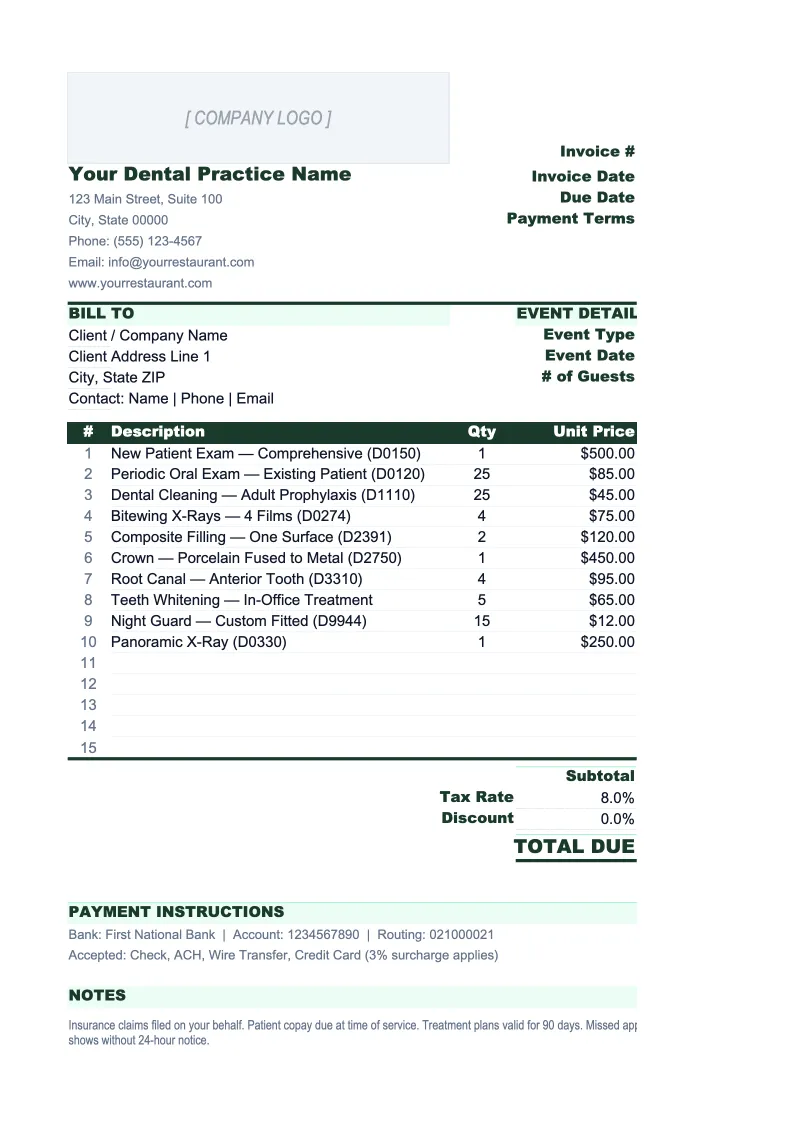
Dental Practice Invoice Template
Invoice patients, track insurance claims, and monitor accounts receivable — all in one dental-specific Excel template built around how dental billing actually works.
What's Inside This Dental Practice Invoice Template
This template includes 5 worksheets, each designed for a specific part of your dental practice financial workflow:
Patient Invoice
The core invoice sheet where you document each patient visit.
Service Fee Schedule
A reference sheet pre-populated with the most common dental procedures organized by category — preventive (exams, X-rays, cleanings), restorative (fillings, crowns, root canals), surgical (extractions, implants), and cosmetic (whitening, veneers).
Insurance Claim Tracker
A log for tracking every submitted insurance claim from filing through payment.
AR Aging Report
A patient-level accounts receivable aging summary that categorizes outstanding balances into four buckets: current (0-30 days), 31-60 days, 61-90 days, and 90+ days.
Monthly Collections Summary
A month-by-month dashboard that tracks production, adjustments, and collections for the full year.
Dental Practice Invoice Template Features
- Patient invoice with CDT procedure code fields and auto-calculated patient balance
- Service fee schedule with common procedures, CDT codes, and contracted PPO fee fields
- Insurance claim tracker with EOB recording and outstanding balance calculation
- AR aging report with 0-30, 31-60, 61-90, and 90+ day buckets
- Monthly collections summary with collection rate calculation
- Formatted for PDF export with practice info and payment instructions
How to Use This Dental Practice Invoice Spreadsheet
Start by opening the Service Fee Schedule sheet and entering your standard fees and contracted PPO rates for the procedures you perform most often. This sheet is your reference library — having it pre-filled means you'll pull accurate CDT codes and fees into every patient invoice without looking them up. For a typical general practice, this takes 20-30 minutes on setup and rarely needs updating outside of your annual fee schedule review.
For each patient visit, open the Patient Invoice sheet and complete the header fields (patient name, date of birth, date of service, provider name and NPI). Then add each procedure performed as a line item — pull the CDT code and fee from your Service Fee Schedule, enter the insurance adjustment for PPO patients, and the patient balance calculates automatically. When you've filed the insurance claim, log it in the Insurance Claim Tracker so you have a running record of what's outstanding and what's been paid.
15 minutes from download to your first patient invoice
Download the template, add your fee schedule, and start tracking insurance claims and patient balances with a spreadsheet built for dental billing.
Why Dental Practices Need a Dedicated Invoice Template
Dental billing is more complex than most small business invoicing because every transaction involves three parties: the patient, one or more insurance carriers, and the practice. A cleaning billed at $175 might result in a $60 PPO write-off, a $95 insurance payment arriving three weeks later, and a $20 patient co-pay collected at the time of service. Managing that three-way reconciliation without a structured system leads to overlooked balances, claim follow-up falling through the cracks, and a collection rate that quietly erodes practice profitability.
The key financial metrics in a dental practice are collection rate, overhead percentage, and AR aging. A healthy practice collects 96-99% of adjusted production (gross fees minus PPO write-offs). Total overhead should land between 59-65% of collections — the largest buckets being staff salaries (25-30%), lab fees (6-8%), and dental supplies (5-6%). AR aging should show less than 10% of total receivables in the 90+ day bucket; when that number creeps above 15-20%, it signals a collections process problem or an insurer payment issue that needs investigation. Tracking these numbers monthly, not quarterly, is what separates practices that hit their income targets from those that perpetually wonder where their production went.
Dental Practice Industry at a Glance
Financial templates built for dental practices — from solo general dentists to multi-provider offices. Pre-loaded with CDT billing categories, insurance adjustment tracking, and the KPIs that matter to practice owners.
Revenue Drivers
- Patient exam and hygiene visits
- Restorative procedures (fillings, crowns, root canals)
- Implants and prosthetics
- Specialty services (whitening, Invisalign)
- Insurance reimbursements and fee-for-service collections
Key Cost Categories
- Staff salaries and benefits
- Dental supplies (chairside materials)
- Lab fees (outsourced crown and denture fabrication)
- Rent and facility
- Equipment and depreciation
- Marketing and patient acquisition
- Practice management software and billing systems
- Professional services (accounting, legal)
Typical Margins
Gross: 75-80% · Net: 30-40%
Seasonality
Summer peak driven by children's appointments before school year; year-end surge as patients use expiring insurance benefits; January restorative surge as annual maximums reset.
Key Performance Indicators
Dental Practice Invoice Template FAQ
More Dental Practice Templates
Dental Practice Balance Sheet Template for Excel
$29
Dental Practice Budget Template for Excel
$29
Dental Practice Business Plan Template for Excel
$39
Dental Practice Cash Flow Template for Excel
$29
Dental Practice Expense Tracker Template for Excel
$29
Dental Practice Financial Model Template for Excel
$29
Dental Practice Income Statement Template for Excel
$29
Dental Practice KPI Dashboard Template for Excel
$29
Dental Practice P&L Template for Excel
$29
Dental Practice Pro Forma Template for Excel
$29
Dental Practice Project Budget Template for Excel
$29
Dental Practice Sales Forecast Template for Excel
$29
Dental Practice Valuation Template for Excel
$29
Dental Practice Invoice Template
$29