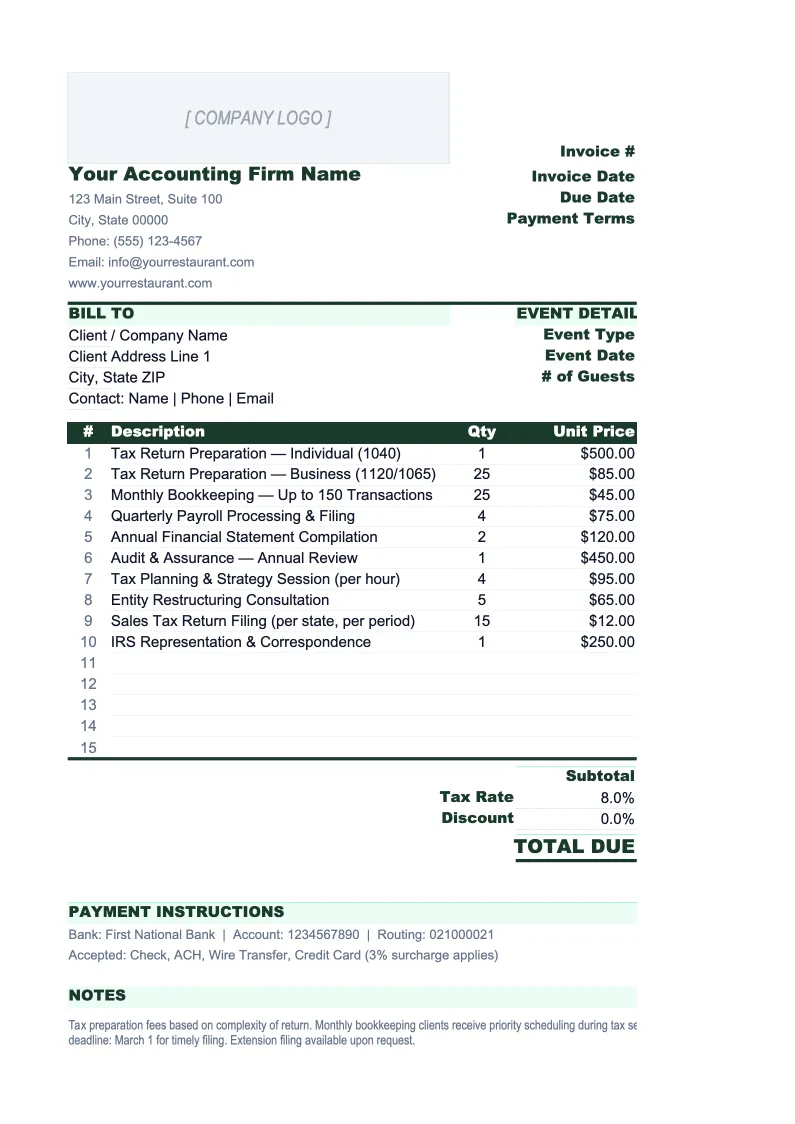
Accounting Firm Invoice Template
Invoice clients for tax prep, bookkeeping, advisory, and hourly work — with a retainer tracker, service rate card, and a log of every outstanding balance.
What's Inside This Accounting Firm Invoice Template
This template includes 5 worksheets, each designed for a specific part of your accounting firm financial workflow:
Invoice
The printable billing document where you build each client invoice.
Invoice Log
A running register of every invoice issued across all clients.
Client List
A client directory that feeds the Invoice sheet via dropdown.
Service Rate Card
A lookup table of standard service descriptions and billing rates that feeds the Invoice sheet via dropdown.
Retainer Tracker
Tracks prepaid retainer and monthly CAS (client accounting services) balances by client.
Accounting Firm Invoice Template Features
- Handles hourly billing, fixed-fee engagements, and expense pass-throughs on one invoice
- Retainer tracker for CAS and advisory clients on monthly fixed fees
- Service rate card pre-loaded with accounting services (tax prep, bookkeeping, advisory, payroll)
- Invoice log with realization rate calculation and overdue flagging
- Client list with engagement type and billing requirement tracking
- Configurable tax rate, late fee policy, and ACH/wire payment instructions
How to Use This Accounting Firm Invoice Spreadsheet
Setup takes about 20 minutes. Download the .xlsx file and open it in Excel or Google Sheets. Start with the Client List sheet — add each active client with their billing contact, address, engagement type, and any special billing requirements. Then move to the Service Rate Card and enter your standard services and rates: individual return preparation, business returns, monthly bookkeeping, payroll, advisory. Once those two lookup tables are populated, creating invoices is mostly dropdowns. If you bill retainer clients, also set up their entries in the Retainer Tracker before you start issuing invoices.
To create an invoice, go to the Invoice sheet and enter the invoice number (a format like INV-2026-001 keeps the log sortable), select the client from the dropdown, and enter the billing period. Fill in the line items for time-based work by selecting the service type from the rate card dropdown, entering hours, and letting the formula calculate the amount. Add any fixed-fee items in the fixed-fee section and any filing fees or software costs in the expense pass-through section. Set the payment due date — Net 14 is the standard recommendation for most accounting work — and export to PDF to send. Log the invoice in the Invoice Log immediately after sending.
Send your next client invoice in under 10 minutes
Set up your client list and rate card once, then bill for tax prep, bookkeeping, retainers, and expenses from a single workbook.
Why Accounting Firms Need a Structured Invoice Template
Accounting firms lose revenue through two channels that a structured invoice template directly addresses: billing errors that create client disputes and delayed collections that inflate accounts receivable. A CPA firm operating at 75–85% billable utilization and billing $150–$400 per hour has very little room to let invoices sit. An invoice with incorrect client details, a missing PO reference, or an ambiguous line item description will go back and forth for two weeks before payment is authorized — time that costs more than the disputed amount. The foundation of a clean billing process is a template that pulls client details and rates from lookup tables rather than relying on manual entry.
Accounting firm invoices need to handle billing complexity that generic templates aren't built for. A single client might have a fixed-fee annual tax return, hourly billing for a notice response, a monthly bookkeeping retainer, and reimbursable expenses for filing fees — all potentially on the same invoice or across related invoices in a quarter. The structure of this template keeps those billing types in separate sections with distinct subtotals, which is what clients expect when they ask for itemization and what makes invoices defensible when questioned. The Service Rate Card enforces consistent pricing across all staff who create invoices, which matters once a firm has more than two or three people issuing bills.
Accounting Firm Industry at a Glance
Financial templates built for accounting firms and CPA practices — from solo practitioners to multi-partner firms. Pre-loaded with billable hour tracking, realization rate calculations, and service categories that reflect how accounting firms actually bill.
Revenue Drivers
- Tax preparation and planning
- Audit and assurance
- Bookkeeping and client accounting services (CAS)
- Advisory and fractional CFO services
- Payroll processing
Key Cost Categories
- Professional staff salaries and benefits
- Administrative staff
- Occupancy and rent
- Technology and software (tax, practice management)
- Malpractice (E&O) insurance
- Marketing and business development
- CPE and professional development
- Subcontractors and offshore staff
Typical Margins
Gross: 50-65% · Net: 20-35%
Seasonality
Heavy busy season January through April 15; secondary crunch in September through October 15 for extensions. Slowest months are July and August.
Key Performance Indicators
Accounting Firm Invoice Template FAQ
More Accounting Firm Templates
Accounting Firm Balance Sheet Template for Excel
$29
Accounting Firm Budget Template for Excel
$29
Accounting Firm Business Plan Template for Excel
$39
Accounting Firm Cash Flow Template for Excel
$29
Accounting Firm Expense Tracker Template for Excel
$29
Accounting Firm Financial Model Template for Excel
$29
Accounting Firm Income Statement Template for Excel
$29
Accounting Firm KPI Dashboard Template for Excel
$29
Accounting Firm P&L Template for Excel
$29
Accounting Firm Pro Forma Template for Excel
$29
Accounting Firm Project Budget Template for Excel
$29
Accounting Firm Sales Forecast Template for Excel
$29
Accounting Firm Valuation Template for Excel
$29
Accounting Firm Invoice Template
$29