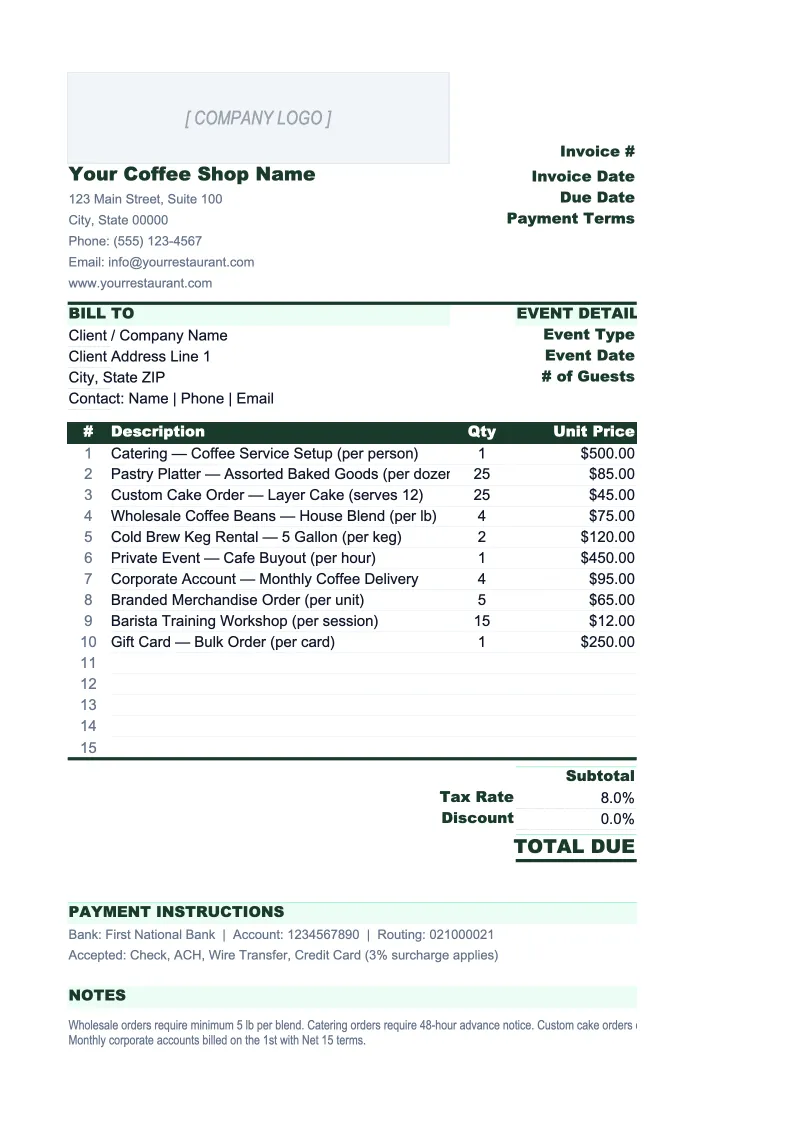
Coffee Shop Invoice Template
Invoice wholesale accounts, office coffee service clients, and catering events with a template built for coffee businesses — per-lb bean pricing, recurring order tracking, and a log of every outstanding bill.
What's Inside This Coffee Shop Invoice Template
This template includes 5 worksheets, each designed for a specific part of your coffee shop financial workflow:
Invoice
The main printable invoice for wholesale bean orders, office coffee service accounts, and catering engagements.
Invoice Log
A running register of every invoice issued to wholesale buyers, office accounts, and catering clients.
Client Accounts
A directory of your wholesale buyers, office coffee service clients, and regular catering customers that populates the Invoice sheet via dropdown.
Products & Rates
A lookup table of your wholesale beans, retail products, catering packages, and service rates that drives the Invoice sheet dropdowns.
Recurring Orders
A tracker for standing weekly and monthly office coffee service accounts — the recurring revenue side of the business that most generic invoice templates have no structure for.
Coffee Shop Invoice Template Features
- Per-lb and per-kg pricing for wholesale bean orders with roast and variety tracking
- Office coffee service account directory with negotiated pricing per client
- Recurring order tracker that flags accounts due for invoicing
- Catering package line items with per-person and flat-rate billing options
- Invoice log with outstanding balance and overdue flagging across all account types
- Products & Rates lookup table — update a price once and it flows to all future invoices
How to Use This Coffee Shop Invoice Spreadsheet
Setup takes about 20 minutes. Download the .xlsx file and open it in Excel or Google Sheets — no macros or plugins required. Start with the Products & Rates sheet: enter your wholesale bean varieties with per-lb prices, any catering packages, equipment rental rates, and delivery fees. Then populate the Client Accounts sheet with your active wholesale buyers and office service accounts. Once those two reference tables are in place, creating any invoice is a matter of selecting from dropdowns rather than typing from scratch — client details and product prices fill in automatically.
To create an invoice, go to the Invoice sheet, enter the invoice number and order date, and select the client from the dropdown. In the line items section, pick each product from the Products & Rates dropdown, enter the quantity or weight ordered, and the unit and price fill in automatically. If the client has a standard delivery fee, add that as a flat line item. Enter any prepayment already received and the balance due updates immediately. Print or export to PDF to send — the layout is formatted cleanly for email or printing.
Send your next wholesale invoice in under 10 minutes
Set up your product list and client accounts once, then invoice any wholesale buyer, office service account, or catering client — with per-lb pricing, recurring order tracking, and a full receivables log.
Why Coffee Shops Need a Dedicated Invoice Template
Most coffee shops think of invoicing as something restaurants do, not cafes. But any shop that sells wholesale beans to restaurants, delivers weekly to office accounts, or caters corporate meetings is running a B2B revenue stream that needs a proper invoicing system. The problem is that generic invoice templates are built for service businesses billing by the hour. They have no concept of per-lb pricing, recurring weekly orders, or the difference between a wholesale account on Net 30 and an office service client who prepays monthly. The result is that most coffee shop operators invoice these accounts from memory or a Word document, which means inconsistent pricing, missed billing cycles, and receivables that go untracked for weeks.
Coffee shop invoicing has a few moving parts that don't apply to typical service businesses. Wholesale pricing is usually tiered — your per-lb rate for a restaurant buying 20 lbs a week is different from a direct consumer buying a 1-lb bag, and those negotiated rates need to be stored somewhere they won't get confused. Green coffee prices fluctuate, which means your roasted bean costs change seasonally and your invoice pricing needs to reflect current rates rather than prices you set a year ago. And for office coffee service accounts, the billing cycle is the critical piece — a client on a 10-lb weekly subscription who doesn't get invoiced for a month is effectively getting free coffee while you carry the inventory cost.
Coffee Shop Industry at a Glance
Financial templates built for coffee shops and cafes — from single-location espresso bars to multi-location roasters. Pre-loaded with beverage cost categories, wholesale account structures, and industry KPIs.
Revenue Drivers
- Espresso & specialty drinks
- Drip coffee & batch brew
- Food & pastry sales
- Wholesale bean sales
- Office coffee service accounts
- Catering & event service
Key Cost Categories
- Coffee beans & specialty ingredients (COGS)
- Dairy & alternative milks
- Food/pastry COGS
- Labor
- Rent & occupancy
- Equipment maintenance & repair
- Packaging & supplies
- Marketing
Typical Margins
Gross: 60-70% · Net: 5-15%
Seasonality
Strongest in fall and winter when hot drink demand peaks; slower in summer unless cold brew and iced drink sales are high. Morning rush (6–10am) drives the majority of daily revenue.
Key Performance Indicators
Coffee Shop Invoice Template FAQ
More Coffee Shop Templates
Coffee Shop Balance Sheet Template for Excel
$29
Coffee Shop Budget Template for Excel
$29
Coffee Shop Business Plan Template for Excel
$39
Coffee Shop Cash Flow Template for Excel
$29
Coffee Shop Expense Tracker Template for Excel
$29
Coffee Shop Financial Model Template for Excel
$29
Coffee Shop Income Statement Template for Excel
$29
Coffee Shop KPI Dashboard Template for Excel
$29
Coffee Shop P&L Template for Excel
$29
Coffee Shop Pro Forma Template for Excel
$29
Coffee Shop Project Budget Template for Excel
$29
Coffee Shop Sales Forecast Template for Excel
$29
Coffee Shop Valuation Template for Excel
$29
Coffee Shop Invoice Template
$29