Consulting Budget Template
Plan and track your consulting firm's finances with a budget built for project-based, retainer, and hourly billing — with utilization rate and margin tracking included.
What's Inside This Consulting Budget Template
This template includes 5 worksheets, each designed for a specific part of your consulting financial workflow:
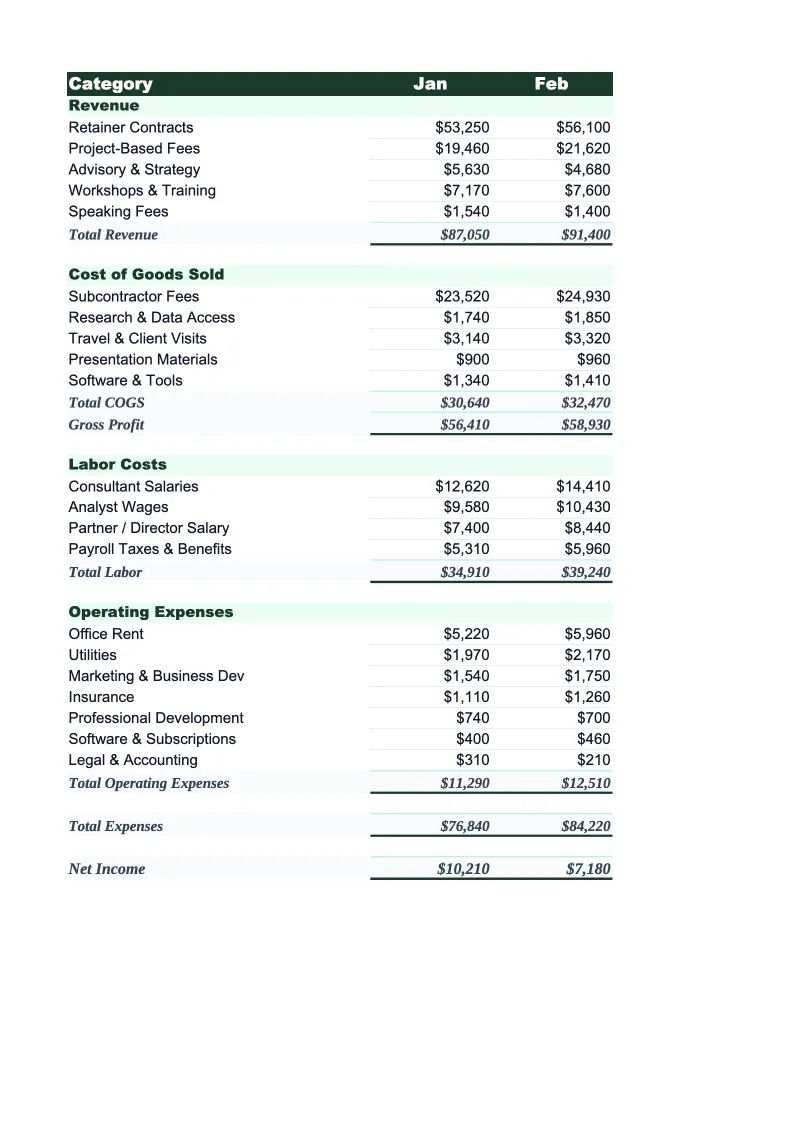
Monthly Budget
The core planning sheet where you map out projected revenue and expenses for each month.
Annual Summary
A 12-month rollup that pulls automatically from each monthly sheet.
Budget vs Actual
Enter your actual revenue and expenses alongside your planned figures and the sheet calculates dollar and percentage variance for every line item.
Utilization Tracker
Track billable hours by consultant or engagement type alongside total available hours to calculate your billable utilization rate each month.
Dashboard
A visual summary with pre-built charts showing monthly revenue by billing type, expense trends, gross and net margin, and utilization rate over time.
Consulting Budget Template Features
- Revenue split by hourly, retainer, and fixed-fee billing types
- Monthly budget with 12-month annual rollup
- Budget vs actual variance tracking with color-coded flags
- Billable utilization rate calculation by consultant or month
- Effective hourly rate tracking across engagements
- Gross and net margin auto-calculation with visual dashboard
How to Use This Consulting Budget Spreadsheet
Getting started takes about 15 minutes. Download the .xlsx file and open it in Excel or Google Sheets — no macros or plugins needed. Start with the Monthly Budget sheet: review the pre-loaded revenue and expense categories and adjust them to match how your firm is structured. Most consultants keep 80–90% of the categories as-is and add a few lines for firm-specific costs like software tools or niche professional association fees.
Once the categories look right, enter your projected revenue and expenses for the current month. If you're not sure what to project, start with committed retainers as your base revenue, then add in likely hourly billings and any fixed-fee projects you've already scoped. On the expense side, your contractor costs should be the first thing you fill in — they're often your largest variable expense and the hardest to forecast. The Annual Summary and Dashboard update automatically as you work through each month.
15 minutes from download to your first budget
Download the template, plug in your retainers and projected hours, and see your consulting firm's full financial picture — monthly budget, utilization tracker, and variance reporting included.
Why Every Consulting Firm Needs a Budget Template
Consulting firms face a budgeting challenge most industries don't: revenue is lumpy. A single retainer not renewed can drop monthly revenue by 20%, and a large fixed-fee project landing can double it. Without a budget that separates recurring retainer income from project-based work, it's easy to mistake a one-time revenue spike for sustainable growth — or to not notice how exposed your cash flow is until you're already in a slow quarter. The only way to see the actual shape of your revenue is to plan it by billing type.
The cost structure of a consulting firm is deceptively simple on the surface — most of your money goes to people and travel — but it rewards close tracking. Contractor and subcontractor fees are your biggest variable cost, and their relationship to revenue directly determines your gross margin. For most firms, target gross margin is 50–70%, and it slides fast when you over-staff a project or use contractors at rates that don't leave room for markup. The other number worth tracking closely is billable utilization: if your consultants are billing less than 60–65% of available hours, you're paying for capacity that isn't generating revenue.
Consulting Industry at a Glance
Financial templates built for consulting firms and independent consultants. Pre-loaded with billing structures for hourly, retainer, and project-based engagements.
Revenue Drivers
- Hourly billing
- Monthly retainers
- Fixed-fee project work
- Expense reimbursements
Key Cost Categories
- Contractor/subcontractor fees
- Travel and accommodation
- Software and tools
- Professional development
- Marketing and business development
- Office and administrative overhead
Typical Margins
Gross: 50-80% · Net: 20-40%
Seasonality
Q1 tends to be slow as clients finalize budgets; Q4 often sees a surge in project closes. Summer can dip for firms serving corporate clients.
Key Performance Indicators
Consulting Budget Template FAQ
More Consulting Templates
Consulting Balance Sheet Template for Excel
$29
Consulting Business Plan Template for Excel
$39
Consulting Cash Flow Template for Excel
$29
Consulting Expense Tracker Template for Excel
$29
Consulting Financial Model Template for Excel
$29
Consulting Income Statement Template for Excel
$29
Consulting Invoice Template for Excel
$29
Consulting KPI Dashboard Template for Excel
$29
Consulting P&L Template for Excel
$29
Consulting Pro Forma Template for Excel
$29
Consulting Project Budget Template for Excel
$29
Consulting Sales Forecast Template for Excel
$29
Consulting Business Valuation Template for Excel
$29
Consulting Budget Template
$29