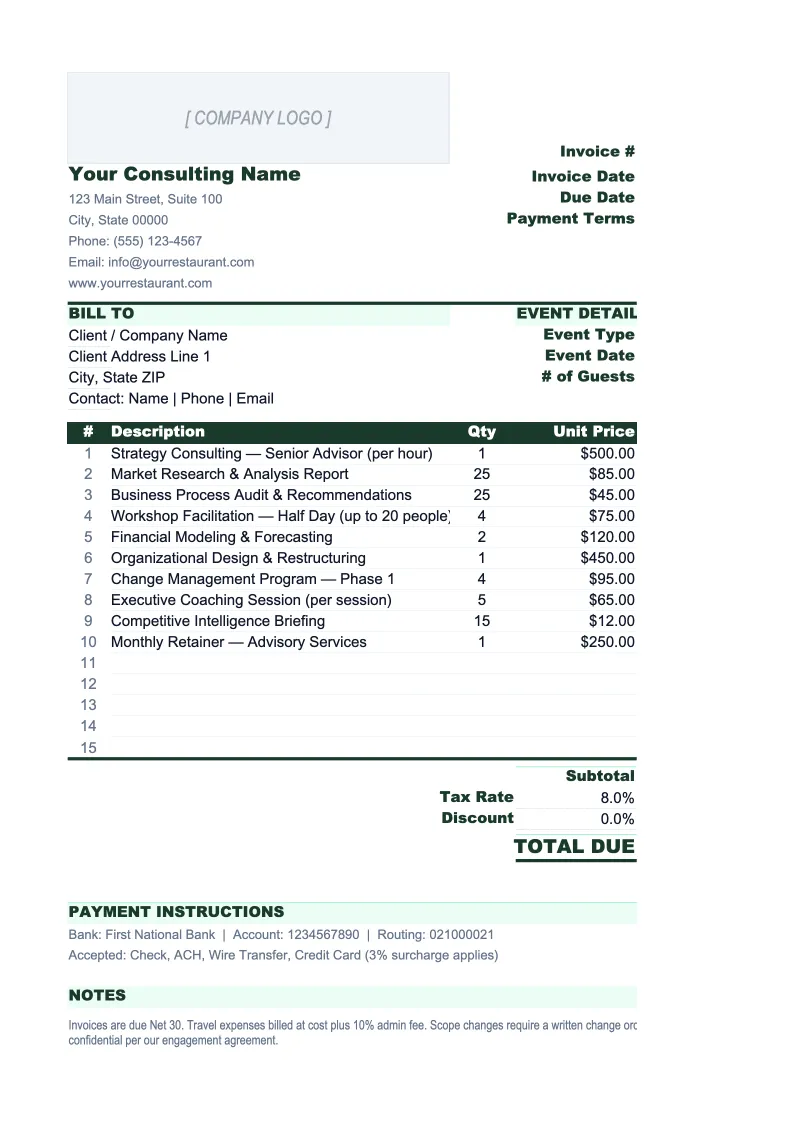
Consulting Invoice Template
Invoice clients for hourly work, retainers, and fixed-fee projects — with automatic totals, expense tracking, and a log of every invoice you've sent.
What's Inside This Consulting Invoice Template
This template includes 5 worksheets, each designed for a specific part of your consulting financial workflow:
Invoice
The printable invoice sheet where you build and send each bill.
Invoice Log
A running register of every invoice you've issued.
Client List
A client directory that feeds the Invoice sheet via dropdown.
Rate Card
A lookup table of your standard service descriptions and billing rates.
Expenses Log
A dedicated tracker for reimbursable expenses separate from your service billing.
Consulting Invoice Template Features
- Supports hourly, daily rate, retainer, and fixed-fee line items on a single invoice
- Auto-calculates subtotals, configurable tax rate, discounts, and total due
- Client dropdown that auto-fills billing address and payment terms
- Invoice log with outstanding balance and overdue flagging
- Rate card lookup table to enforce consistent billing rates
- Separate expenses log for reimbursable pass-through costs
How to Use This Consulting Invoice Spreadsheet
Setup takes about 20 minutes. Download the .xlsx file and open it in Excel or Google Sheets. Start with the Client List sheet — add each of your current clients with their billing address, contact, and default payment terms. Then move to the Rate Card sheet and enter your standard service types and rates. Once those two lookup tables are populated, the Invoice sheet will work with dropdowns rather than manual entry, and every invoice you create from that point forward will pull the right information automatically.
To create an invoice, go to the Invoice sheet and enter the invoice number (use a consistent format like INV-2026-001), select the client from the dropdown, and set the billing period. In the line items section, enter each service: select the service description from the Rate Card dropdown, enter the hours or units, and the amount calculates itself. Add any reimbursable expenses in the expenses section, apply your tax rate if applicable, and the total due updates instantly. Print or export to PDF to send. The whole process takes five minutes once your Rate Card and Client List are set up.
Send your next invoice in under 5 minutes
Set up your client list and rate card once, then create any invoice in minutes — with automatic totals, expense tracking, and a full log of outstanding payments.
Why Consultants Need a Proper Invoice Template
Consultants lose money on invoicing in two ways: billing errors that clients dispute, and slow follow-up on late payments. A disorganized invoicing process — emailing ad hoc documents, tracking payments in a separate notebook, forgetting to add expenses — creates the conditions for both. The average consulting firm operating at 68-75% billable utilization has no margin to leave money on the table through invoice disputes or collections delays. A structured invoice template removes both problems by standardizing what goes on every invoice and giving you a single place to track what's been paid.
Consulting invoices need to handle billing complexity that most generic templates ignore. A single month of work might include 40 hours billed at your standard rate, a two-day on-site workshop billed at a daily rate, a fixed-fee deliverable milestone, and $800 in travel expenses. Generic invoice templates force you to compress all of that into a single undifferentiated line item section, which either creates client confusion or requires you to attach a separate expense report. A consulting-specific template keeps services and expenses in distinct sections with their own subtotals — which is what most corporate clients expect to see, and what makes the invoice defensible if questioned.
Consulting Industry at a Glance
Financial templates built for consulting firms and independent consultants. Pre-loaded with billing structures for hourly, retainer, and project-based engagements.
Revenue Drivers
- Hourly billing
- Monthly retainers
- Fixed-fee project work
- Expense reimbursements
Key Cost Categories
- Contractor/subcontractor fees
- Travel and accommodation
- Software and tools
- Professional development
- Marketing and business development
- Office and administrative overhead
Typical Margins
Gross: 50-80% · Net: 20-40%
Seasonality
Q1 tends to be slow as clients finalize budgets; Q4 often sees a surge in project closes. Summer can dip for firms serving corporate clients.
Key Performance Indicators
Consulting Invoice Template FAQ
More Consulting Templates
Consulting Balance Sheet Template for Excel
$29
Consulting Budget Template for Excel
$29
Consulting Business Plan Template for Excel
$39
Consulting Cash Flow Template for Excel
$29
Consulting Expense Tracker Template for Excel
$29
Consulting Financial Model Template for Excel
$29
Consulting Income Statement Template for Excel
$29
Consulting KPI Dashboard Template for Excel
$29
Consulting P&L Template for Excel
$29
Consulting Pro Forma Template for Excel
$29
Consulting Project Budget Template for Excel
$29
Consulting Sales Forecast Template for Excel
$29
Consulting Business Valuation Template for Excel
$29
Consulting Invoice Template
$29