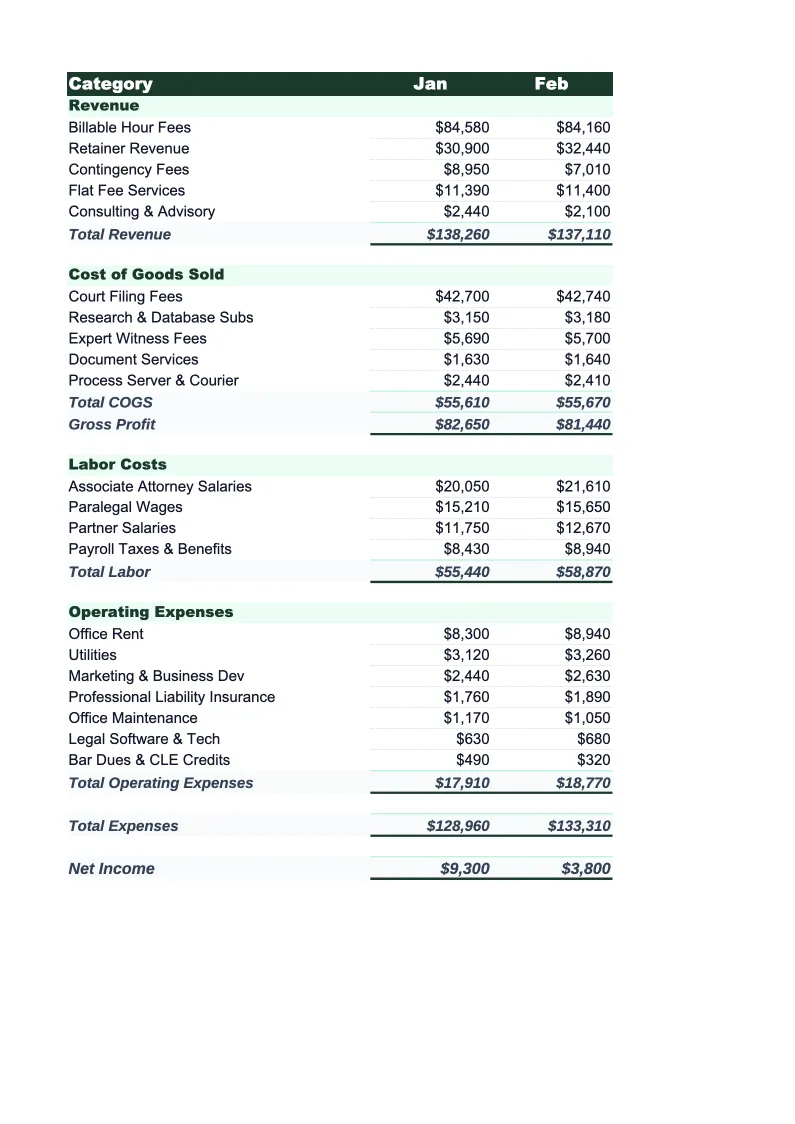
Law Firm Budget Template
Plan and track your law firm's finances with a budget template built for legal practices. Pre-loaded with billable revenue types, attorney compensation, and overhead categories.
What's Inside This Law Firm Budget Template
This template includes 4 worksheets, each designed for a specific part of your law firm financial workflow:
Monthly Budget
The core planning sheet where you budget each month's revenue and expenses.
Annual Summary
A 12-month rollup that pulls from each monthly sheet automatically.
Budget vs Actual
Compare your planned numbers against what actually happened.
Dashboard
A visual summary with pre-built charts showing revenue by matter type, expense category breakdown, monthly net profit trend, and overhead as a percentage of revenue.
Law Firm Budget Template Features
- Revenue split by matter type: hourly, flat fee, retainer, and contingency
- Attorney compensation and draw schedules tracked separately from staff salaries
- Malpractice insurance, bar dues, and legal research subscription line items
- Monthly budget with 12-month annual rollup
- Budget vs actual variance tracking with color-coded alerts
- Visual dashboard with overhead ratio and revenue trend charts
How to Use This Law Firm Budget Spreadsheet
Getting started takes about 15 minutes. Download the .xlsx file and open it in Excel or Google Sheets — no macros, plugins, or add-ons required. Open the Monthly Budget sheet first and review the pre-loaded revenue and expense categories. Most small and mid-size firms will recognize 80–90% of the line items immediately and only need to adjust a few to match their specific practice areas or compensation structure.
Once the categories look right, enter your projected revenue and expenses for the current month. If you're not sure where to start, pull last month's bank statements and billing reports and use those as your baseline — you don't need perfect numbers on day one. Fill in the revenue targets by matter type (hourly, flat fee, retainer, contingency), then work through the expense side starting with compensation, which is typically the largest cost. The Annual Summary and Dashboard update automatically as you fill in monthly data.
15 minutes from download to your first law firm budget
Download the template, plug in your numbers, and see your firm's full financial picture — monthly budget, annual rollup, and variance tracking included.
Why Every Law Firm Needs a Budget Template
Law firms have a budgeting problem that most industries don't: revenue is unpredictable by design. Hourly billings depend on how many matters are active and whether attorneys hit their targets. Flat fees and retainers are more predictable but don't always land in the month they're earned. Contingency recoveries can distort any given month significantly. Without a budget that accounts for these different revenue streams separately, it's nearly impossible to tell whether a good month reflects strong firm performance or just an unusual payment cycle.
On the expense side, law firm costs break into three distinct buckets that behave very differently. Attorney compensation — including partner draws, associate salaries, and performance bonuses — is typically 40–60% of revenue and drives most budget conversations. Staff costs (paralegals, legal assistants, administrators) are more fixed and easier to plan. Overhead — malpractice insurance, Westlaw and LexisNexis subscriptions, bar dues, CLE, office rent, and technology — tends to be stable but often grows quietly year over year as subscriptions and insurance premiums tick up. A good law firm budget makes all three visible and sets clear targets for each.
Law Firm Industry at a Glance
Financial templates built for law firms and legal practices — from solo practitioners to mid-size firms. Pre-loaded with billing rate structures, matter tracking, and trust account categories.
Revenue Drivers
- Billable hours (hourly engagements)
- Flat fee matters
- Retainer agreements
- Contingency fee recoveries
Key Cost Categories
- Attorney compensation & draws
- Paralegal & staff salaries
- Malpractice insurance
- Legal research subscriptions (Westlaw, LexisNexis)
- Office rent & overhead
- Bar dues, CLE & licensing
Typical Margins
Gross: 40-60% · Net: 15-35%
Seasonality
Q4 typically busiest for transactional and corporate practices (year-end deals); litigation practices are more event-driven. January is slower across most practice areas.
Key Performance Indicators
Law Firm Budget Template FAQ
More Law Firm Templates
Law Firm Balance Sheet Template for Excel
$29
Law Firm Business Plan Template for Excel
$39
Law Firm Cash Flow Template for Excel
$29
Law Firm Expense Tracker Template for Excel
$29
Law Firm Financial Model Template for Excel
$29
Law Firm Income Statement Template for Excel
$29
Law Firm Invoice Template for Excel
$29
Law Firm KPI Dashboard Template for Excel
$29
Law Firm P&L Template for Excel
$29
Law Firm Pro Forma Template for Excel
$29
Law Firm Project Budget Template for Excel
$29
Law Firm Sales Forecast Template for Excel
$29
Law Firm Valuation Template for Excel
$29
Law Firm Budget Template
$29