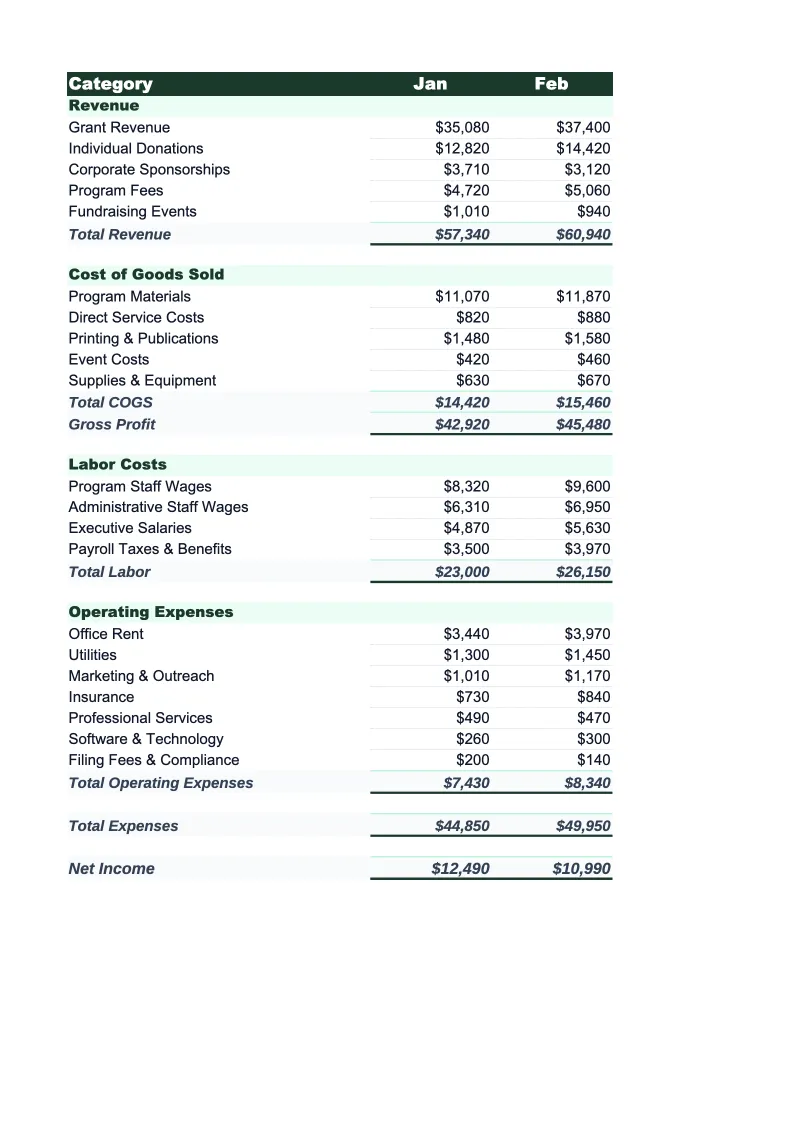
Nonprofit Budget Template
Plan and track your nonprofit's finances with a budget built for fund accounting — pre-loaded with grant categories, program expense tracking, and the ratios that donors and boards actually ask about.
What's Inside This Nonprofit Budget Template
This template includes 5 worksheets, each designed for a specific part of your nonprofit financial workflow:
Annual Budget
The main planning worksheet where you lay out your full-year revenue and expenses by category.
Program Breakdown
A worksheet that allocates your budget across individual programs or projects.
Grant Tracker
A dedicated worksheet for tracking every active and pending grant in one place.
Budget vs Actual
A monthly comparison sheet where you enter actual revenue received and expenses incurred alongside your budget for that month.
Dashboard
A one-page visual summary with the metrics that boards, auditors, and major donors review most closely.
Nonprofit Budget Template Features
- Revenue split across grants, donations, fees, events, and sponsorships
- Three-category expense structure matching IRS Form 990 reporting
- Program-by-program cost allocation with cost-per-beneficiary calculation
- Grant tracker with spend-to-date, restrictions, and reporting deadlines
- Monthly budget vs actual with variance highlighting
- Dashboard with program expense ratio and fundraising efficiency
How to Use This Nonprofit Budget Spreadsheet
Getting started takes about 15 minutes. Download the .xlsx file and open it in Excel or Google Sheets — no macros or plugins required. Begin with the Annual Budget sheet: review the pre-loaded revenue and expense categories and adjust them to match your organization's chart of accounts. Most nonprofits keep the structure as-is and rename a handful of line items to match their specific programs or grant categories. If your fiscal year runs July through June rather than January through December, update the column headers on the Budget vs Actual sheet — everything else stays the same.
Once the categories are set up, enter your projected revenue by source and your planned expenses by category and program. For grant income, use confirmed award letters as your baseline and flag pending applications separately so you're not planning against money you haven't received. Move to the Program Breakdown sheet and allocate staff time and direct costs to each program — this is worth doing carefully because it's the data you'll pull when a funder asks for a program-specific budget. Add your active grants to the Grant Tracker sheet with their deadlines and restrictions so you have a single place to monitor compliance.
15 minutes from download to your first nonprofit budget
Download the template, plug in your grant awards and program costs, and get the program expense ratios and board-ready dashboard your organization needs.
Why Every Nonprofit Needs a Budget Template
Nonprofit budgeting has a different set of pressures than for-profit budgeting. Revenue is unpredictable — grants arrive late, annual fund campaigns come in under goal, and government contracts sometimes reimburse months after services are delivered. At the same time, nonprofits face scrutiny on how they spend that revenue that most businesses don't: charity watchdogs like Charity Navigator and GuideStar publish your expense ratios publicly, major donors ask for program breakdowns before they give, and auditors review whether restricted grant funds were spent only on allowable expenses. A well-structured budget is the foundation of all of it.
The standard nonprofit budget organizes expenses into three buckets that match IRS Form 990 reporting: program services (the actual work of the mission), management and general (administration, finance, governance), and fundraising. Charity watchdogs generally look for program services to represent at least 65–75% of total expenses — the higher, the better. Fundraising costs are typically expected to stay below 15–20% of funds raised. These aren't hard rules, but they're the benchmarks that donors and grant reviewers apply when they evaluate your organization. This template calculates those ratios automatically so you can see where you land and make spending decisions accordingly.
Nonprofit Industry at a Glance
Financial templates built for nonprofit organizations — from community foundations to service-delivery charities. Pre-loaded with fund accounting categories, grant tracking, and program expense ratios.
Revenue Drivers
- Grants (government & foundation)
- Individual donations
- Program fees
- Membership dues
- Special events
- Corporate sponsorships
Key Cost Categories
- Personnel & benefits
- Program expenses
- Administrative overhead
- Fundraising costs
- Occupancy
- Equipment & technology
Typical Margins
Gross: N/A · Net: 2-5% operating surplus
Seasonality
Grant cycles create Q1 and Q4 revenue spikes; year-end giving peaks in December. Fiscal years often run July–June rather than calendar year.
Key Performance Indicators
Nonprofit Budget Template FAQ
More Nonprofit Templates
Nonprofit Balance Sheet Template for Excel
$29
Nonprofit Business Plan Template for Excel
$39
Nonprofit Cash Flow Template for Excel
$29
Nonprofit Expense Tracker Template for Excel
$29
Nonprofit Financial Model Template for Excel
$29
Nonprofit Income Statement Template for Excel
$29
Nonprofit Invoice Template for Excel
$29
Nonprofit KPI Dashboard Template for Excel
$29
Nonprofit P&L Template for Excel
$29
Nonprofit Pro Forma Template for Excel
$29
Nonprofit Project Budget Template for Excel
$29
Nonprofit Sales Forecast Template for Excel
$29
Nonprofit Valuation Template for Excel
$29
Nonprofit Budget Template
$29