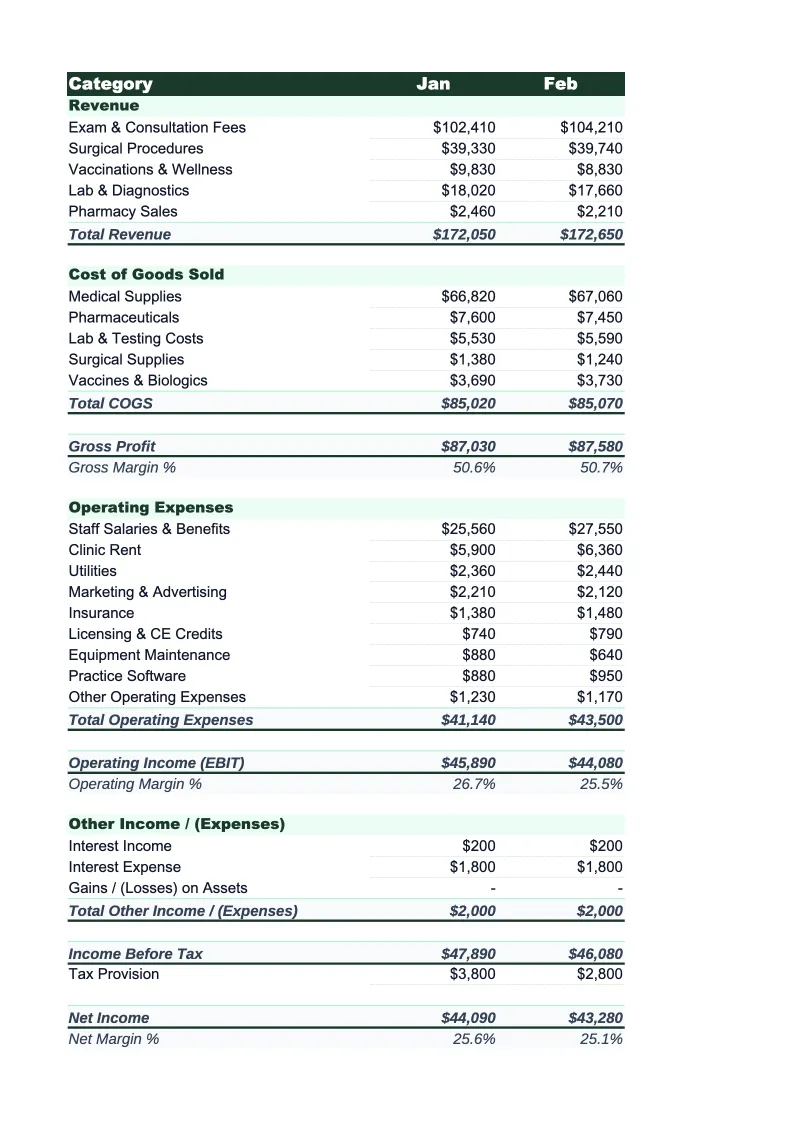
Veterinary Income Statement Template
Track revenue, pharmacy costs, and overhead for your veterinary practice — with an income statement built around how vet clinics actually bill and operate.
What's Inside This Veterinary Income Statement Template
This template includes 4 worksheets, each designed for a specific part of your veterinary financial workflow:
Monthly Income Statement
The core worksheet reporting each month's revenue, cost of goods sold, and operating expenses.
Annual Summary
A 12-month rollup that pulls from each monthly sheet automatically, showing full-year revenue, COGS, gross profit, operating expenses, and net income in one view.
Service Line Breakdown
A revenue and contribution breakdown by service department — wellness, surgery, pharmacy, diagnostics, dental, and emergency.
Dashboard
A visual summary with pre-built charts covering the KPIs that matter most to veterinary practice owners: monthly revenue trend, gross margin and net margin by month, COGS as a percentage of revenue, staff payroll as a percentage of revenue, and average client transaction trend.
Veterinary Income Statement Features
- Revenue split by wellness, surgery, pharmacy, diagnostics, dental, and emergency
- Pharmacy and medication COGS tracked separately from supplies and lab fees
- Staff cost percentage and COGS percentage auto-calculated each month
- Service line gross contribution breakdown to identify high-margin departments
- 12-month annual rollup with revenue and margin trend charts
- Dashboard with average client transaction and revenue per service line
How to Use This Veterinary Income Statement Spreadsheet
Download the .xlsx file and open it in Excel or Google Sheets — no macros or plugins required. Start with the Monthly Income Statement sheet and review the pre-loaded service categories and expense line items. Most veterinary practices will recognize the structure immediately; adjust category names to match how your practice management software (AVImark, eVetPractice, Cornerstone) exports revenue. Rename any service line — for example, if you want to split 'diagnostics' into in-house lab and outside reference lab — and the formulas will carry the change forward automatically. The initial setup takes about 15–20 minutes.
Each month, pull your revenue report from your practice management software and enter totals by service category. Enter COGS line items — medications dispensed, medical and surgical supplies, outside reference lab invoices — in the COGS section so your gross profit calculates correctly. Then enter operating expenses: payroll, rent, utilities, equipment, and overhead. If you want to track by service department, also fill in the Service Line Breakdown sheet. The Dashboard and Annual Summary update automatically as you enter monthly data.
15 minutes from download to your first income statement
Download the template, enter your revenue and expense data, and see your veterinary practice's full financial picture — including gross margin, COGS percentage, and net income by month.
Why Every Veterinary Practice Needs an Income Statement Template
Veterinary practices typically run gross margins of 74–78%, which looks healthy until you account for the staff costs that make those margins possible. Veterinarian and technician salaries commonly consume 40–45% of revenue on their own, leaving 30–35% to cover rent, equipment, marketing, and profit. That narrow band between gross margin and net income is why so many vet clinics feel profitable on a busy day but struggle to show meaningful net income at year-end. An income statement structured around how veterinary revenue actually flows makes the picture clear.
The two benchmarks worth tracking in any veterinary practice are COGS as a percentage of revenue and staff payroll as a percentage of revenue. COGS — primarily medications, supplies, and outside lab fees — should run 20–26% of revenue for a well-managed practice; clinics with heavy pharmacy sales or high reference lab usage may run higher. Staff payroll should sit at 40–45%; above 50% is a warning sign of overstaffing or under-production. Tracking these against revenue by service line also reveals where margin is strongest — surgery and wellness exams typically carry better margins than pharmacy sales, which are often priced close to cost to remain competitive with retail pet pharmacies.
Veterinary Industry at a Glance
Financial templates built for veterinary practices — from small animal clinics to multi-location hospitals. Pre-loaded with exam, surgery, pharmacy, and diagnostic categories.
Revenue Drivers
- Wellness exams and preventive care
- Surgical procedures
- Pharmacy and medication sales
- Diagnostics and lab work
- Dental procedures
- Emergency and urgent care
Key Cost Categories
- Medications and pharmaceuticals (COGS)
- Medical and surgical supplies
- Veterinarian salaries
- Technician and support staff wages
- Facility rent and utilities
- Diagnostic equipment and lab fees
Typical Margins
Gross: 74-78% · Net: 10-15%
Seasonality
Spring and fall peaks for wellness visits and heartworm testing; summer uptick in emergency visits; relatively stable year-round compared to many industries.
Key Performance Indicators
Veterinary Income Statement Template FAQ
More Veterinary Templates
Veterinary Practice Balance Sheet Template for Excel
$29
Veterinary Budget Template for Excel
$29
Veterinary Business Plan Template for Excel
$39
Veterinary Practice Cash Flow Template for Excel
$29
Veterinary Expense Tracker Template for Excel
$29
Veterinary Practice Financial Model Template for Excel
$29
Veterinary Invoice Template for Excel
$29
Veterinary Practice KPI Dashboard Template for Excel
$29
Veterinary Practice P&L Template for Excel
$29
Veterinary Pro Forma Template for Excel
$29
Veterinary Project Budget Template for Excel
$29
Veterinary Sales Forecast Template for Excel
$29
Veterinary Practice Valuation Template for Excel
$29
More Income Statement Templates
Accounting Firm Income Statement Template for Excel
$29
Auto Repair Income Statement Template for Excel
$29
Car Wash Income Statement Template for Excel
$29
Church Income Statement Template for Excel
$29
Cleaning Service Income Statement Template for Excel
$29
Coffee Shop Income Statement Template for Excel
$29
Veterinary Income Statement Template
$29