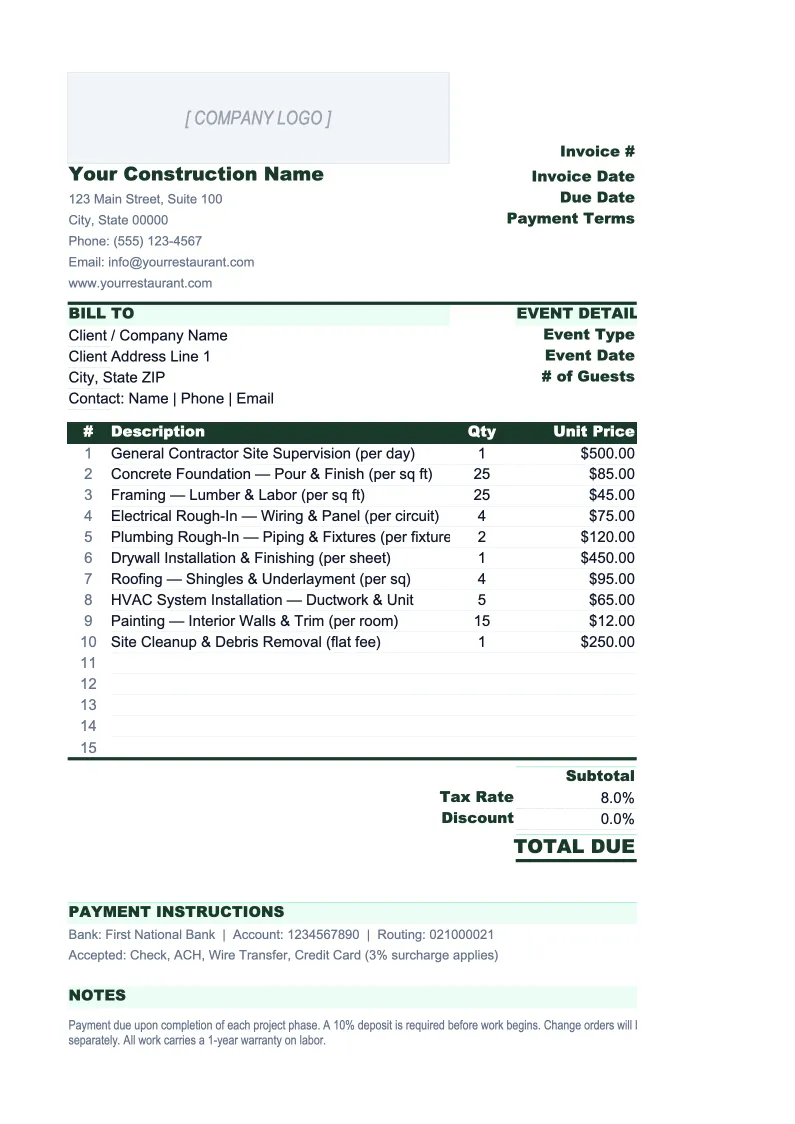
Construction Invoice Template
Invoice clients for construction work with progress billing, retainage tracking, change orders, and a full schedule of values — all in one Excel workbook.
What's Inside This Construction Invoice Template
This template includes 5 worksheets, each designed for a specific part of your construction financial workflow:
Invoice
The print-ready invoice sheet formatted for construction billing.
Schedule of Values
An AIA-style schedule of values that breaks the total contract value into line items by work scope or phase — site preparation, foundation, framing, mechanical, electrical, plumbing, finishes, and so on.
Invoice Log
A running register of every invoice issued for every project.
Change Order Log
A dedicated tracker for all change orders across your projects.
Retainage Tracker
A project-by-project summary of retainage withheld to date, retainage released upon substantial completion, and retainage still outstanding.
Construction Invoice Template Features
- AIA-style schedule of values with percentage-complete tracking per scope
- Retainage calculation (configurable 5% or 10%) on each draw invoice
- Change order log that rolls approved amounts into billing entitlement
- Invoice log across multiple projects with overdue flagging
- Separate labor, materials, and subcontractor line item columns
- Retainage tracker showing outstanding holdback across all active jobs
How to Use This Construction Invoice Spreadsheet
Setup takes about 25 minutes for your first project. Download the .xlsx file and open it in Excel or Google Sheets. Start with the Schedule of Values sheet — enter your contract line items and allocate the total contract value across each scope of work. This becomes the foundation for every draw invoice you send. Then review the Invoice sheet header and update it with your company name, license number, and address. Set the retainage percentage (typically 5% or 10%) in the configuration cell at the top of the Invoice sheet — that rate will apply to every invoice automatically.
To create an invoice for a draw, go to the Invoice sheet and enter the project details, invoice number, and billing period. In the line items, reference the Schedule of Values to determine your billing entitlement for the period — enter the amount you're billing for each scope, and the sheet calculates the retainage holdback and net amount due. If you have approved change orders to bill, pull the amounts from the Change Order Log. When the invoice is complete, log it in the Invoice Log with an Outstanding status. Print or export to PDF to send with your lien waiver.
Send your next draw request in under 10 minutes
Set up your schedule of values once, then create any draw invoice in minutes — with retainage tracking, change order billing, and a full log of outstanding payments across all your projects.
Why Contractors Need a Proper Invoice Template
Construction invoicing is more complex than almost any other industry. A single draw invoice might include progress billing on three scopes of work at different completion percentages, a change order approved last month that hasn't been billed yet, materials delivered to site but not yet installed, and a subcontractor pass-through. The retainage holdback reduces your cash received by 5–10% on every invoice until project closeout. Generic invoice templates have no structure for any of this — they treat construction like a consulting engagement, with a flat list of services and an amount due. The result is invoices that owners dispute, retainage that gets forgotten, and change orders that never get billed.
The schedule of values is the central document in construction invoicing. It maps the total contract value to specific scopes of work, and each draw invoice is a claim against that schedule. Owners, lenders, and project managers use the schedule of values to verify that your billing is proportional to work actually completed — billing 80% against a scope that's 40% done is the fastest way to create a payment dispute. AIA G702 and G703 forms are the standard in commercial construction, and this template follows that same structure without requiring you to buy or use AIA software. Every draw invoice you create references the schedule and shows the cumulative billed-to-date per scope, which gives owners exactly what they need to approve payment quickly.
Construction Industry at a Glance
Financial templates built for construction companies — from general contractors to specialty trades. Pre-loaded with job costing categories, bid tracking, and project-based financials.
Revenue Drivers
- Project contracts
- Change orders
- Service & maintenance
- Material markups
Key Cost Categories
- Materials
- Labor (direct)
- Subcontractors
- Equipment rental
- Permits & insurance
- Overhead
Typical Margins
Gross: 20-35% · Net: 2-7%
Seasonality
Peak activity spring through fall; winter slowdown in northern climates. Year-end push to close projects.
Key Performance Indicators
Construction Invoice Template FAQ
More Construction Templates
Construction Balance Sheet Template for Excel
$29
Construction Budget Template for Excel
$29
Construction Business Plan Template for Excel
$39
Construction Cash Flow Template for Excel
$29
Construction Expense Tracker Template for Excel
$29
Construction Financial Model Template for Excel
$29
Construction Income Statement Template for Excel
$29
Construction KPI Dashboard Template for Excel
$29
Construction P&L Template for Excel
$29
Construction Pro Forma Template for Excel
$29
Construction Project Budget Template for Excel
$29
Construction Sales Forecast Template for Excel
$29
Construction Business Valuation Template for Excel
$29
Construction Invoice Template
$29