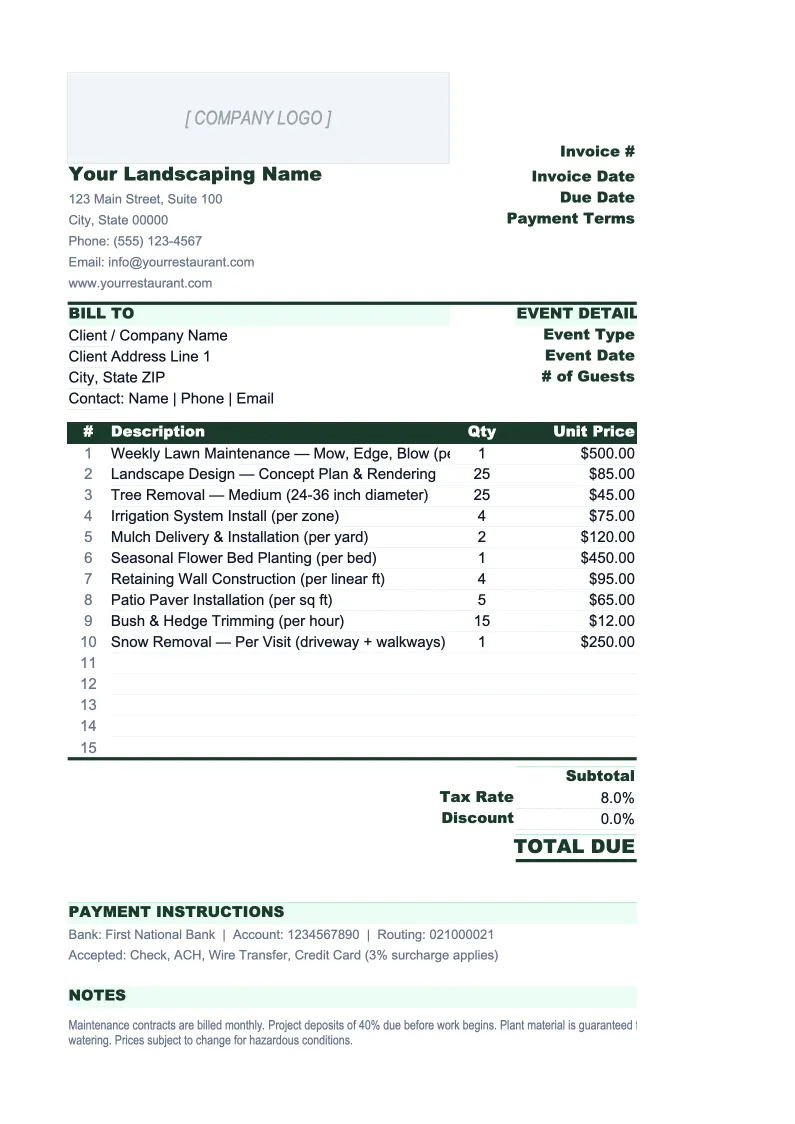
Landscaping Invoice Template
Invoice landscaping clients faster with a template built for how landscape businesses actually bill — with separate sections for recurring maintenance, project labor, and materials.
What's Inside This Landscaping Invoice Template
This template includes 4 worksheets, each designed for a specific part of your landscaping financial workflow:
Invoice
The customer-facing invoice form with fields for client name, service address, billing address, and a job or contract reference number.
Estimate
A pre-job estimate sheet in the same format as the invoice, designed to be filled out before work begins and compared to the final invoice after project completion.
Invoice Log
A running record of every invoice created, with columns for invoice number, date, client name, service address, service type (maintenance, installation, tree service, irrigation, snow removal), materials total, labor total, surcharges, tax, total billed, and payment status.
Settings
A configuration sheet where you enter your company information once — business name, address, phone, email, contractor license number, and pesticide applicator license number if applicable — so it populates on every invoice automatically.
Landscaping Invoice Template Features
- Three billing sections per invoice: recurring services, project labor, and materials — each with independent subtotals
- Estimate sheet matches the invoice format for side-by-side job cost comparison after project completion
- Materials section with quantity, unit, unit price, and extended cost for plants, mulch, pavers, and other materials
- Invoice Log for tracking paid/unpaid status across maintenance clients and project accounts
- License number fields (contractor, pesticide applicator) that populate automatically on every invoice
- Configurable disposal fee and fuel surcharge — flat dollar or percentage of labor
How to Use This Landscaping Invoice Spreadsheet
Start with the Settings sheet — enter your company name, address, phone, email, and any required license numbers. Set your standard billing rates for each crew type (maintenance, installation, irrigation), your tax rate, and your disposal or fuel surcharge. This takes about ten minutes and everything flows into the invoice automatically from that point forward. Then open the Estimate sheet and fill in your pricing for an upcoming job before the work starts.
When a job is ready to invoice, open the Invoice sheet and fill in the client details and job reference at the top. Work through the three sections in order: first list any recurring maintenance services with their flat rates, then itemize project labor with hours and crew rates, then list all materials purchased for the job with quantities and unit prices. The subtotals, surcharge, tax, and total all calculate automatically. When you're ready, export the sheet as a PDF to email to the client or print for delivery.
15 minutes from download to your first invoice
Download the template, enter your company details, and start invoicing clients with a layout that handles maintenance, projects, and materials in one sheet.
Why Landscaping Companies Need a Proper Invoice Template
Landscaping billing is more complicated than most trade invoices because a single job can involve three different pricing structures at once: flat-rate recurring services, time-and-material project work, and itemized materials with markup. A mowing invoice for a residential client is simple. A full landscape renovation for a commercial property — design hours, installation crew days, thousands of dollars in plants and stone, plus a maintenance contract starting after installation — is not. Generic invoice templates force you to cram all of this into a single undifferentiated line-item table, which produces invoices that are hard for clients to understand and even harder to reconcile against your job costs.
Materials billing deserves particular attention in landscaping. Most operators mark up plant and hardscape materials 30–50% over wholesale cost, and that markup is a meaningful part of total revenue. But material costs fluctuate — nursery prices change seasonally, stone and paver costs shift with demand, and fuel surcharges on delivered materials vary by season. Tracking materials as separate line items on each invoice lets you reconcile your markup against actual invoiced amounts rather than estimating it. On large install jobs, a material cost variance of even 10–15% can eliminate your entire profit margin, which is exactly the situation the Estimate-to-Invoice comparison in this template is designed to catch.
Landscaping Industry at a Glance
Financial templates built for landscaping companies — from lawn maintenance crews to full-service landscape design and installation firms. Pre-loaded with service categories, material line items, and project billing structures.
Revenue Drivers
- Recurring maintenance contracts
- Landscape installation projects
- Hardscaping (patios, walls, walkways)
- Tree services and irrigation
- Snow and ice removal
Key Cost Categories
- Plants and nursery materials
- Hardscape materials (pavers, stone, block)
- Crew labor (direct field wages)
- Equipment and vehicle fleet
- Payroll taxes and insurance
- Subcontractors
Typical Margins
Gross: 40-55% · Net: 8-15%
Seasonality
Strongly seasonal in northern markets — peak April through October, near-zero outdoor work in January and February. Year-round operations in southern and Pacific markets.
Key Performance Indicators
Landscaping Invoice Template FAQ
More Landscaping Templates
Landscaping Balance Sheet Template for Excel
$29
Landscaping Budget Template for Excel
$29
Landscaping Business Plan Template for Excel
$39
Landscaping Cash Flow Template for Excel
$29
Landscaping Expense Tracker Template for Excel
$29
Landscaping Financial Model Template for Excel
$29
Landscaping Income Statement Template for Excel
$29
Landscaping KPI Dashboard Template for Excel
$29
Landscaping P&L Template for Excel
$29
Landscaping Pro Forma Template for Excel
$29
Landscaping Project Budget Template for Excel
$29
Landscaping Sales Forecast Template for Excel
$29
Landscaping Business Valuation Template for Excel
$29
Landscaping Invoice Template
$29