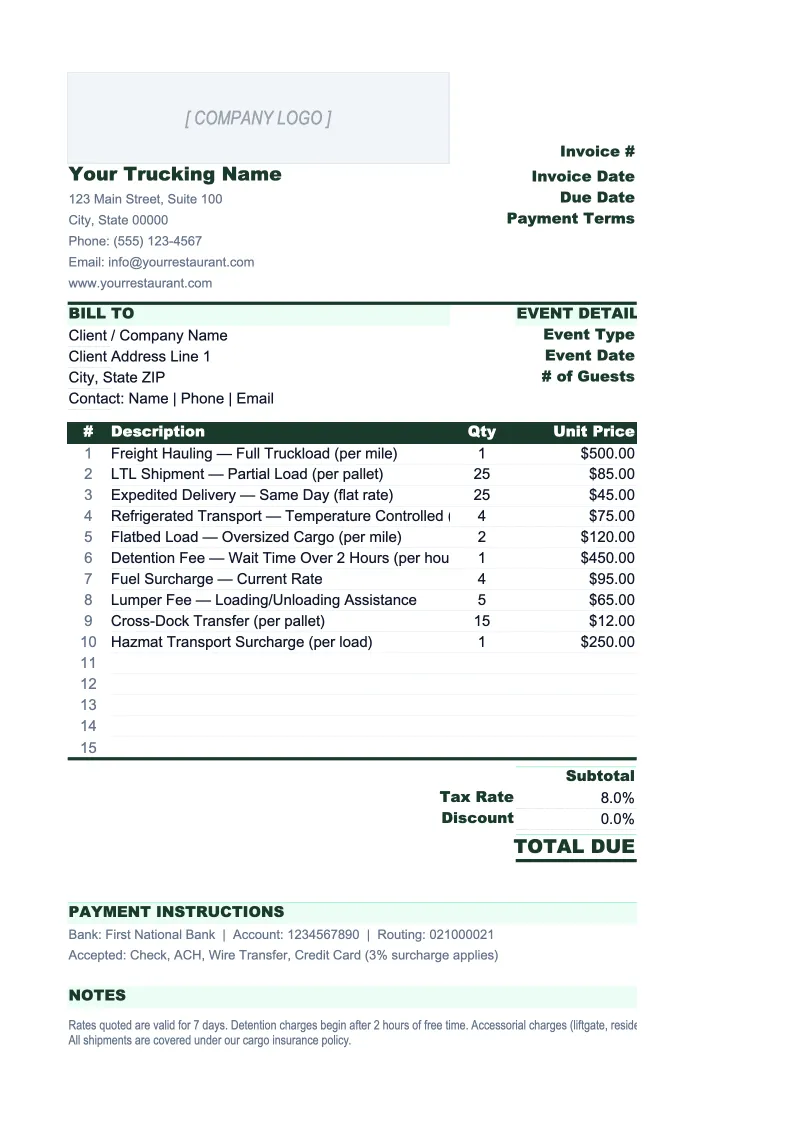
Trucking Invoice Template
Invoice shippers and brokers for freight loads with BOL tracking, fuel surcharge calculation, accessorial charges, and a running load log — built for owner-operators and small fleets.
What's Inside This Trucking Invoice Template
This template includes 4 worksheets, each designed for a specific part of your trucking financial workflow:
Freight Invoice
The print-ready invoice sheet for billing a single load.
Fuel Surcharge Calculator
A dedicated sheet for calculating fuel surcharges based on the DOE weekly diesel price index.
Load Log
A running register of every load invoiced.
Revenue & Cost Summary
A per-load and monthly summary that tracks revenue per mile, cost per mile, and operating ratio — the three metrics every trucking business needs to manage.
Trucking Invoice Template Features
- BOL, PRO number, and load number reference fields on every invoice
- Fuel surcharge calculator using DOE diesel price index and FSC matrix
- Itemized accessorial charges (detention, TONU, liftgate, lumper, layover)
- Load log with payment status tracking and overdue flagging across all invoices
- Revenue per mile vs. cost per mile tracking with operating ratio calculation
- MC/DOT number and carrier authority fields pre-built into the invoice header
How to Use This Trucking Invoice Spreadsheet
Setup takes about 20 minutes for your first load. Download the .xlsx file and open it in Excel or Google Sheets — no macros required. Start with the Freight Invoice sheet: enter your carrier information (company name, MC number, DOT number, address) in the header section — this saves as a template you'll reuse for every invoice. Review the accessorial charge rows and adjust the labels to match the charges you typically see in your lanes. Set your default payment terms in the footer (most carriers use Net 30 or Quick Pay terms with their broker).
For each new load, open the Freight Invoice sheet and fill in the load details: BOL number, load number, broker or shipper name, origin, destination, commodity, and delivery date. Enter the linehaul rate from your rate confirmation. Go to the Fuel Surcharge Calculator, input the current DOE diesel price, and pull the calculated surcharge amount back to the invoice. Add any accessorial charges that applied to the load — detention if you waited more than two hours, liftgate if required, lumper fees if the receiving dock charged for unloading. Save the invoice as a PDF and send it with your signed POD.
Invoice your next load in under 10 minutes
Enter the load details, calculate the fuel surcharge, add accessorials, and send a clean PDF invoice — with a full load log tracking what's paid and what's outstanding.
Why Owner-Operators Need a Proper Invoice Template
Most owner-operators invoice on a rate confirmation and a signed POD — which works fine until a broker disputes a charge, a payment goes 45 days past due, or you try to figure out why last month wasn't profitable. The problem isn't the load; it's that a basic freight invoice doesn't capture the information you need to manage your business. A proper trucking invoice documents the BOL number, load number, PRO number, fuel surcharge method, and each accessorial charge as a separate line item. That documentation is what protects you in a dispute and what factoring companies require before advancing cash.
Fuel surcharges are one of the most misunderstood line items in trucking. Most brokers apply a fuel surcharge as a percentage of the linehaul rate, tied to the DOE weekly diesel index — but the rates vary by broker and the table changes weekly. When fuel represents 21% of your total operating costs and you're running on 3–8% net margins, an incorrectly applied fuel surcharge can flip a profitable load to a losing one. Tracking the surcharge calculation per load, rather than accepting whatever shows up on the rate confirmation, is the difference between knowing your cost structure and guessing at it.
Trucking Industry at a Glance
Financial templates built for trucking companies and owner-operators — pre-loaded with freight billing, fuel surcharge, and per-mile cost categories.
Revenue Drivers
- Linehaul freight rates
- Fuel surcharge revenue
- Accessorial charges
- Dedicated contract lanes
Key Cost Categories
- Driver wages & settlements
- Fuel
- Maintenance & repairs
- Insurance (liability, cargo, physical damage)
- Equipment payments & depreciation
- Permits & compliance fees
Typical Margins
Gross: 12-20% · Net: 2.5-8%
Seasonality
Peak freight volumes in August–October (back-to-school and holiday restocking) and late November–December. Slowest in January–March post-holiday.
Key Performance Indicators
Trucking Invoice Template FAQ
More Trucking Templates
Trucking Balance Sheet Template for Excel
$29
Trucking Budget Template for Excel
$29
Trucking Business Plan Template for Excel
$39
Trucking Cash Flow Template for Excel
$29
Trucking Expense Tracker Template for Excel
$29
Trucking Financial Model Template for Excel
$29
Trucking Income Statement Template for Excel
$29
Trucking KPI Dashboard Template for Excel
$29
Trucking P&L Template for Excel
$29
Trucking Pro Forma Template for Excel
$29
Trucking Project Budget Template for Excel
$29
Trucking Sales Forecast Template for Excel
$29
Trucking Company Valuation Template for Excel
$29
Trucking Invoice Template
$29