Healthcare Project Budget Template
Budget and track healthcare capital projects — clinic build-outs, equipment purchases, EHR implementations, and new service line launches — with a template built around how medical practices actually manage project spending.
What's Inside This Healthcare Project Budget Template
This template includes 6 worksheets, each designed for a specific part of your healthcare financial workflow:
Project Setup
Enter your project details here first: practice name, project type (renovation, equipment purchase, EHR implementation, new service line, etc.), project sponsor, budget authority, total approved budget, and timeline with key milestones.
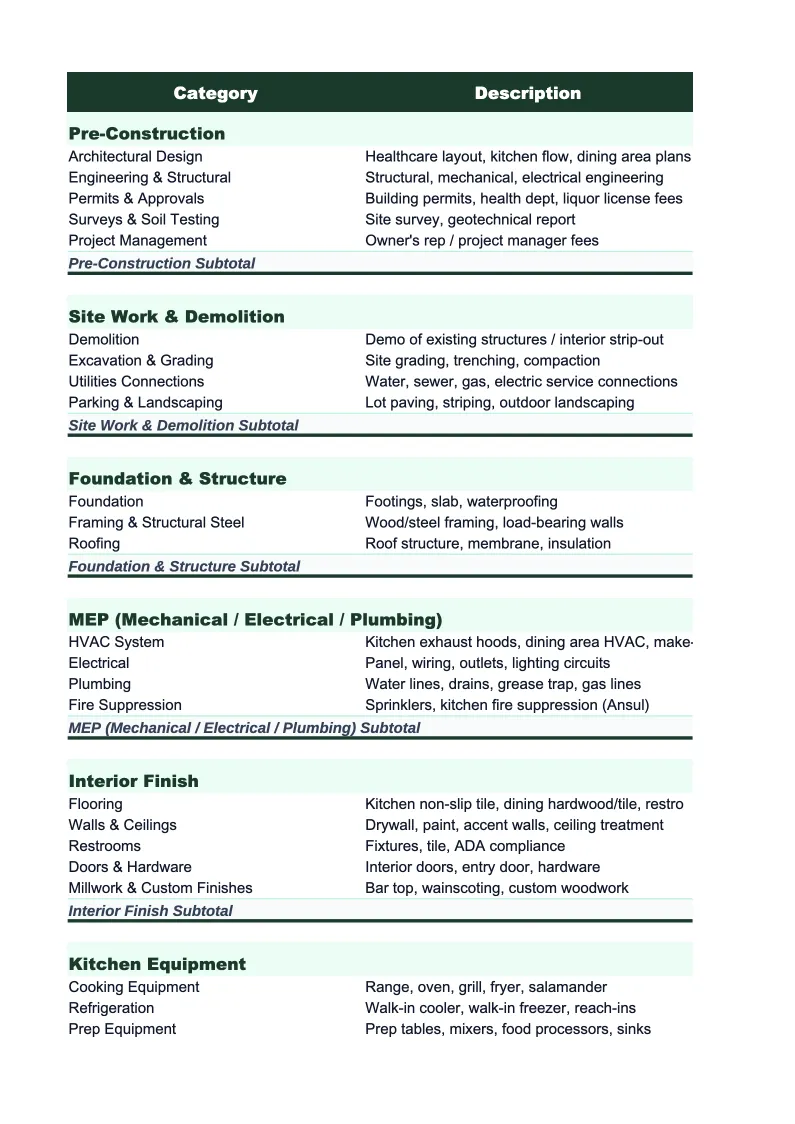
Cost Estimate
The pre-approved project budget broken down by cost category.
Actual Costs
Log project expenses as they occur: invoices from contractors and vendors, equipment purchase orders, consultant fees, software licensing costs, and staff time charged to the project.
Vendor & Procurement Log
A dedicated tracker for healthcare project procurement, which tends to involve more vendors, longer lead times, and more regulatory considerations than most industries.
Budget vs Actual
Side-by-side comparison of your approved budget against actual costs incurred to date, organized by cost category.
Dashboard
A one-page project financial summary with pre-built charts: budget utilization by category, spend-to-date versus total approved budget, and projected final cost versus original budget.
Healthcare Project Budget Template Features
- Pre-built cost categories for healthcare projects: construction, medical equipment, EHR/IT, compliance, staffing, and contingency
- Vendor and procurement log for tracking quotes, POs, and contract balances across multiple vendors
- Budget vs actual variance with cost-to-complete projection for each category
- Projected final cost calculation based on actuals plus remaining estimate
- Funding source field to track whether the project is financed, grant-funded, or cash
- Visual dashboard with spend-to-date and projected variance for executive reporting
How to Use This Healthcare Project Budget Spreadsheet
Start with the Project Setup sheet before entering any numbers. Enter your practice name, project type, approved budget, funding source, and key milestones. This context flows through to other sheets and gives anyone reviewing the file an immediate understanding of scope. Then open the Cost Estimate sheet and review the pre-loaded categories. Healthcare projects vary significantly — a clinic renovation has completely different cost drivers than an EHR implementation — so add or remove line items to match your specific project. Enter your budget amounts with the sources of each estimate (contractor bid, vendor quote, internal estimate) so you have a record of how the numbers were built.
As the project gets underway, log expenses in the Actual Costs sheet whenever invoices arrive or purchase orders are issued. Assign each entry to a cost category and running totals update automatically. Use the Vendor and Procurement Log to track each vendor or contractor separately — this is especially important for equipment purchases and EHR implementations where you'll have multiple POs, milestone payments, and potentially significant change orders over the project timeline. Most healthcare practice managers find it easiest to update the file once a week aligned with their accounts payable cycle.
15 minutes from download to your first healthcare project budget
Download the template, enter your project scope and approved budget, and you have a complete project cost tracker — with vendor log, budget vs actual, and projected variance built in.
Why Healthcare Projects Need a Dedicated Budget Template
Healthcare capital projects carry financial risks that general project budgeting tools aren't built to handle. A clinic build-out isn't just construction — it involves medical-grade plumbing, specialized electrical for imaging and monitoring equipment, HVAC systems designed for infection control, and compliance costs that surface mid-project when inspectors flag issues with the original plans. An EHR implementation isn't just software — it includes data migration, interface development, training across clinical and administrative staff, and months of parallel operation before the old system can be retired. Without a budget structure that reflects these healthcare-specific cost categories, you're likely tracking only a fraction of actual project spend.
The second challenge is procurement complexity. Healthcare practices routinely deal with equipment vendors, installation contractors, biomedical engineering firms, IT integrators, compliance consultants, and clinical trainers — all on the same project. Each of those relationships involves its own quote, purchase order, contract value, and invoice schedule. A single project budget line that says 'medical equipment: $180,000' doesn't capture whether that number includes installation, whether the service contract is included, or whether the biomedical engineering fees are separate. A dedicated procurement log that tracks each vendor relationship independently is what separates a project that closes at budget from one that has a surprise $30,000 variance at the end.
Healthcare Industry at a Glance
Financial templates built for healthcare practices — from private clinics and therapy offices to specialty practices and medical groups. Pre-loaded with billing categories, insurance reimbursement tracking, and healthcare-specific KPIs.
Revenue Drivers
- Insurance reimbursements
- Patient copays and coinsurance
- Out-of-pocket self-pay
- Capitation payments
Key Cost Categories
- Clinical staff salaries
- Administrative and billing staff
- Medical supplies
- Malpractice insurance
- EMR/EHR software
- Facility rent and occupancy
Typical Margins
Gross: 45-65% · Net: 10-25%
Seasonality
Higher patient volume in fall/winter flu season; slower in summer. End-of-year spike as patients meet deductibles.
Key Performance Indicators
Healthcare Project Budget Template FAQ
More Healthcare Templates
Healthcare Balance Sheet Template for Excel
$29
Healthcare Budget Template for Excel
$29
Healthcare Business Plan Template for Excel
$39
Healthcare Cash Flow Template for Excel
$29
Healthcare Expense Tracker Template for Excel
$29
Healthcare Financial Model Template for Excel
$29
Healthcare Income Statement Template for Excel
$29
Healthcare Invoice Template for Excel
$29
Healthcare KPI Dashboard Template for Excel
$29
Healthcare P&L Template for Excel
$29
Healthcare Pro Forma Template for Excel
$29
Healthcare Sales Forecast Template for Excel
$29
Healthcare Practice Valuation Template for Excel
$29
More Project Budget Templates
Healthcare Project Budget Template
$29