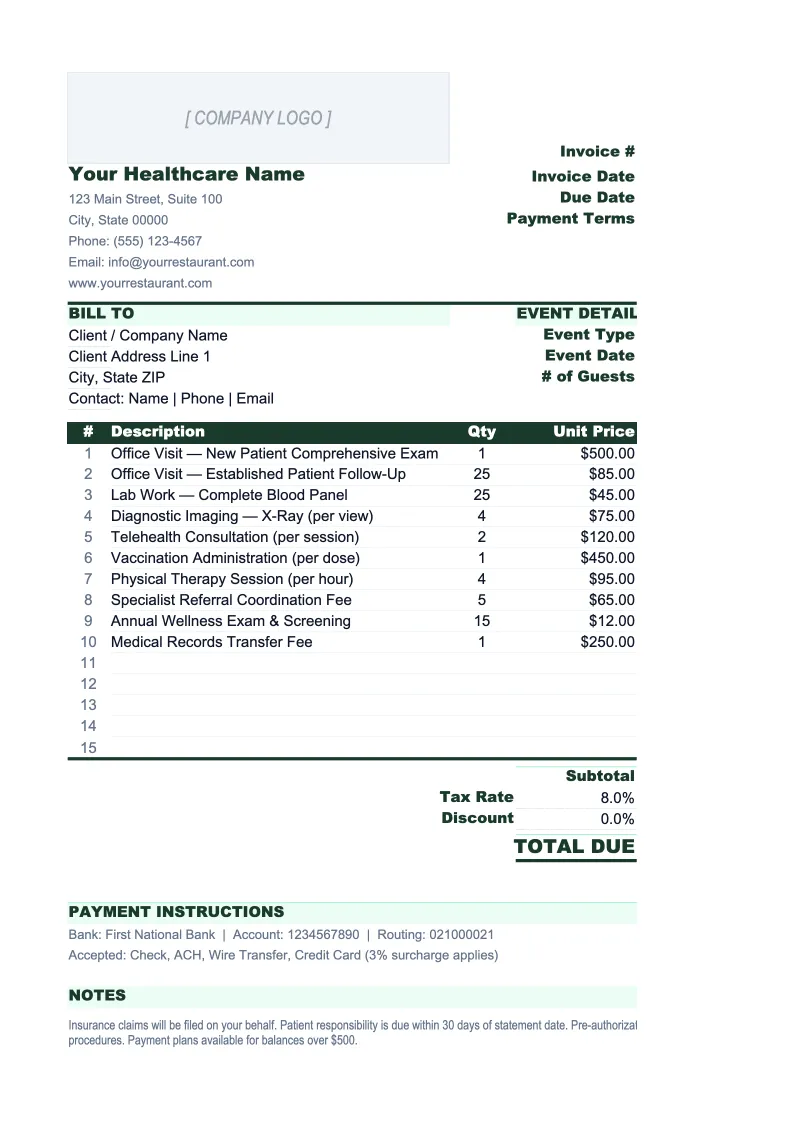
Healthcare Invoice Template
Bill patients and track insurance claims with an invoice template built for healthcare practices — includes patient billing, copay/coinsurance tracking, and an AR aging report.
What's Inside This Healthcare Invoice Template
This template includes 5 worksheets, each designed for a specific part of your healthcare financial workflow:
Patient Invoice
The printable invoice sent to patients after each visit or billing cycle.
Invoice Log
A running register of every invoice issued, organized by patient and billing date.
AR Aging Report
A structured accounts receivable aging report that buckets outstanding balances into the standard intervals: 0–30, 31–60, 61–90, and 90+ days.
Patient List
A patient directory that populates the Patient Invoice sheet via dropdown.
Service Codes
A reference table of your practice's most frequently billed CPT codes with descriptions and standard charges.
Healthcare Invoice Template Features
- Patient invoice with CPT code, billed charge, insurance payment, copay, and balance due
- Invoice log with outstanding balance tracking and aging flags at 30, 60, and 90 days
- AR aging report with 0–30, 31–60, 61–90, and 90+ day buckets
- Patient directory dropdown to auto-fill insurance and billing details
- CPT code reference table to standardize charges and reduce entry errors
- NPI, Tax ID, and insurance fields built into the invoice structure
How to Use This Healthcare Invoice Spreadsheet
Setup takes about 20 minutes. Download the .xlsx file and open it in Excel or Google Sheets. Start with the Patient List sheet — add your active patients with their insurance carrier, policy number, and copay amount. Then go to the Service Codes sheet and enter the CPT codes your practice bills most frequently along with your standard charges. Once those two lookup tables are populated, creating invoices is mostly dropdown selection rather than manual entry, which cuts both the time and the error rate significantly.
To create a patient invoice, go to the Patient Invoice sheet, enter the invoice number and date, and select the patient from the dropdown — their insurance and billing details populate automatically. In the service table, select each CPT code from the dropdown, enter the date of service and units, and record the insurance payment applied and any copay collected at the visit. The balance due calculates automatically. For patients with secondary insurance, add that payment in the second insurance column before finalizing the patient balance. Print or export to PDF to send.
15 minutes from download to your first patient invoice
Set up your patient list and CPT code table once, then generate invoices, track insurance payments, and review AR aging — all in one spreadsheet.
Why Healthcare Practices Need a Structured Invoice Template
Healthcare billing is slower and more complex than most industries because every invoice passes through at least two parties before you collect — the insurance company first, then the patient for their remaining balance. The average practice waits 25–45 days for insurance reimbursement, then waits again for the patient to pay their portion. Without a structured system to track where each claim stands, balances fall through the cracks: insurance pays but the patient balance never gets billed, or a claim denies and nobody follows up. The industry benchmark for days in accounts receivable is under 30 — most practices that don't actively manage their billing cycle run closer to 50.
A healthcare invoice needs to capture information that a generic invoice template doesn't have room for: your NPI and Tax ID (required on every billable claim), the patient's insurance carrier and member ID, CPT codes for each service rendered, and the separate amounts for insurance payment and patient responsibility. The split between what insurance covered and what the patient owes isn't something you can calculate at the end — it has to be tracked per service line, because different services may have different cost-sharing rules under the same plan. A template built for healthcare keeps those fields in the right places so the math works out correctly.
Healthcare Industry at a Glance
Financial templates built for healthcare practices — from private clinics and therapy offices to specialty practices and medical groups. Pre-loaded with billing categories, insurance reimbursement tracking, and healthcare-specific KPIs.
Revenue Drivers
- Insurance reimbursements
- Patient copays and coinsurance
- Out-of-pocket self-pay
- Capitation payments
Key Cost Categories
- Clinical staff salaries
- Administrative and billing staff
- Medical supplies
- Malpractice insurance
- EMR/EHR software
- Facility rent and occupancy
Typical Margins
Gross: 45-65% · Net: 10-25%
Seasonality
Higher patient volume in fall/winter flu season; slower in summer. End-of-year spike as patients meet deductibles.
Key Performance Indicators
Healthcare Invoice Template FAQ
More Healthcare Templates
Healthcare Balance Sheet Template for Excel
$29
Healthcare Budget Template for Excel
$29
Healthcare Business Plan Template for Excel
$39
Healthcare Cash Flow Template for Excel
$29
Healthcare Expense Tracker Template for Excel
$29
Healthcare Financial Model Template for Excel
$29
Healthcare Income Statement Template for Excel
$29
Healthcare KPI Dashboard Template for Excel
$29
Healthcare P&L Template for Excel
$29
Healthcare Pro Forma Template for Excel
$29
Healthcare Project Budget Template for Excel
$29
Healthcare Sales Forecast Template for Excel
$29
Healthcare Practice Valuation Template for Excel
$29
Healthcare Invoice Template
$29