Construction Project Budget Template
Track every dollar on a construction project — materials, labor, subcontractors, and change orders — with a budget template built around how contractors actually run jobs.
What's Inside This Construction Project Budget Template
This template includes 6 worksheets, each designed for a specific part of your construction financial workflow:
Project Setup
Enter your project details here first: project name, client, contract value, start and end dates, project manager, and any notes on scope.
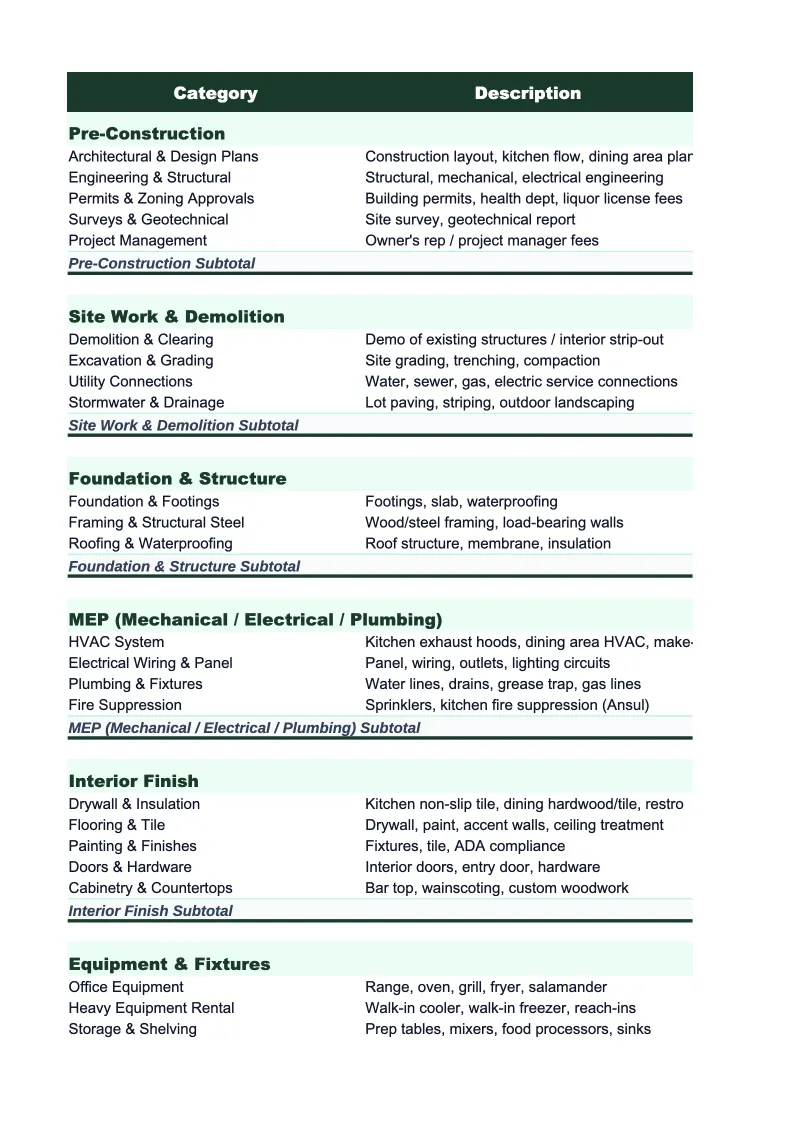
Cost Estimate
The pre-bid or pre-construction budget broken down by cost category.
Actual Costs
Enter costs as they come in: materials purchased, labor hours logged by trade, subcontractor invoices, equipment rentals, and permit fees.
Change Orders
A dedicated log for scope changes and their financial impact.
Budget vs Actual
Side-by-side comparison of your original budget against actual costs incurred to date, organized by cost category.
Dashboard
A one-page project financial summary with pre-built charts: budget utilization by category, cost-to-date vs contract value, and projected margin versus original margin.
Construction Project Budget Template Features
- Pre-built cost categories by construction trade (site work, concrete, MEP, finishes, GC)
- Change order log that updates revised contract value automatically
- Budget vs actual variance with cost-to-complete projection
- Quantity × unit cost estimating structure in the Cost Estimate sheet
- Projected final margin calculation based on actuals plus remaining estimate
- Visual dashboard with budget utilization and margin tracking
How to Use This Construction Project Budget Spreadsheet
Start with the Project Setup sheet before anything else. Enter your project name, client, contract value, and dates — this information flows through to other sheets automatically. Then move to the Cost Estimate sheet and review the pre-loaded categories. Most construction projects will use the majority of these divisions; add or remove line items to match your specific scope. If you're working from an approved bid, enter your bid quantities and unit costs directly. If you're setting up a budget before bidding is complete, use your best estimates and update once subcontractor quotes come in.
As the project gets underway, log costs in the Actual Costs sheet whenever invoices arrive or labor hours are recorded. Assign each entry to a cost category and the totals roll up automatically. Track change orders in the Change Orders sheet as they come up — mark each one as pending until it's formally approved, then update the status. Approved change orders will automatically adjust your revised contract value, so your budget vs actual comparison always reflects current scope. Most project managers find it easiest to update the sheet once a week rather than in real time.
15 minutes from download to your first project budget
Download the template, enter your contract details and estimate, and you have a complete job cost tracker — with change orders, budget vs actual, and projected margin built in.
Why Construction Projects Need a Dedicated Budget Template
Construction is one of the few industries where a project can appear profitable right up until the final weeks — and then close at a loss. Materials overruns, subcontractor change orders, and labor inefficiencies accumulate slowly and only show up at closeout if you're not tracking costs in real time. With net margins in the 2–7% range, a 5% cost overrun on a $500,000 project wipes out the entire profit. A structured project budget isn't a nice-to-have for construction companies — it's the difference between knowing where you stand and finding out when it's too late to do anything about it.
A construction project budget needs to track three distinct things simultaneously: what you estimated, what you've spent, and what you still have left to spend. Most contractors know their total contract value and have a rough sense of costs, but that combination alone doesn't tell you whether you're on track. You need variance by category — so you can see that your concrete costs are 8% over while your electrical is running under, and make decisions accordingly. You also need to account for change orders properly, keeping them separate from the original contract so you can see whether scope growth is actually improving your margin or just adding revenue with thin profit.
Construction Industry at a Glance
Financial templates built for construction companies — from general contractors to specialty trades. Pre-loaded with job costing categories, bid tracking, and project-based financials.
Revenue Drivers
- Project contracts
- Change orders
- Service & maintenance
- Material markups
Key Cost Categories
- Materials
- Labor (direct)
- Subcontractors
- Equipment rental
- Permits & insurance
- Overhead
Typical Margins
Gross: 20-35% · Net: 2-7%
Seasonality
Peak activity spring through fall; winter slowdown in northern climates. Year-end push to close projects.
Key Performance Indicators
Construction Project Budget Template FAQ
More Construction Templates
Construction Balance Sheet Template for Excel
$29
Construction Budget Template for Excel
$29
Construction Business Plan Template for Excel
$39
Construction Cash Flow Template for Excel
$29
Construction Expense Tracker Template for Excel
$29
Construction Financial Model Template for Excel
$29
Construction Income Statement Template for Excel
$29
Construction Invoice Template for Excel
$29
Construction KPI Dashboard Template for Excel
$29
Construction P&L Template for Excel
$29
Construction Pro Forma Template for Excel
$29
Construction Sales Forecast Template for Excel
$29
Construction Business Valuation Template for Excel
$29
More Project Budget Templates
Construction Project Budget Template
$29