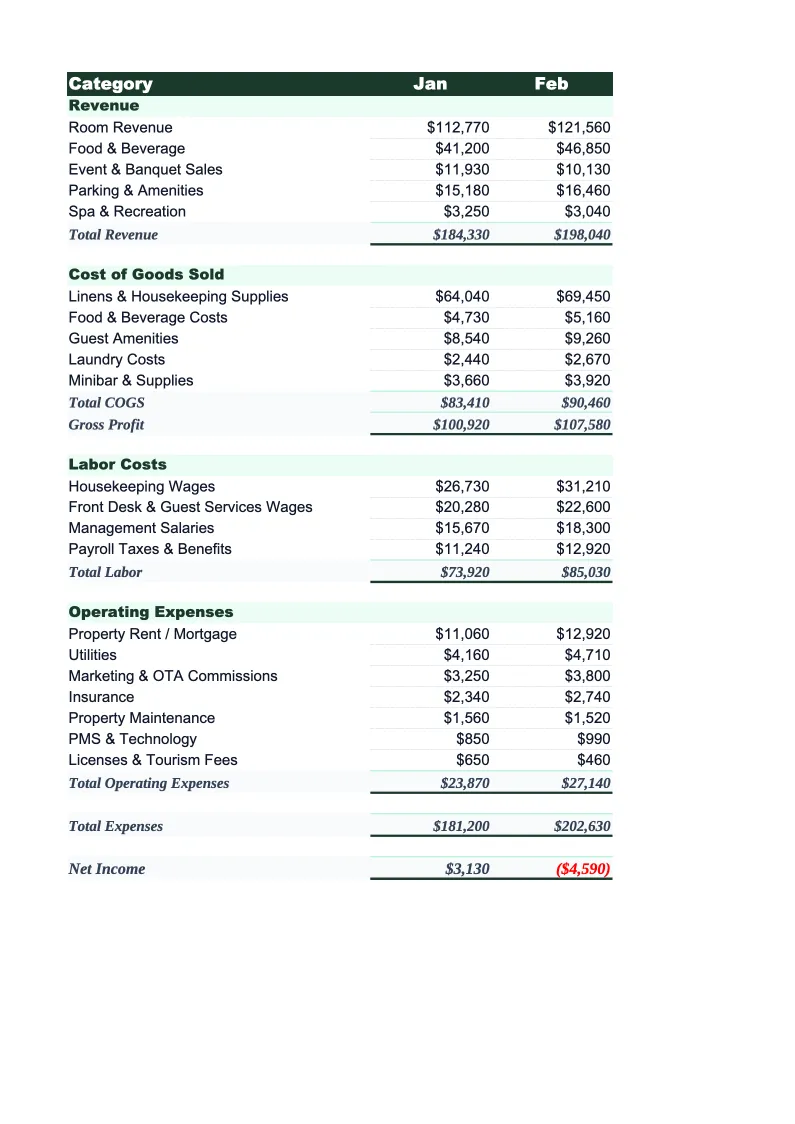
Hotel Budget Template
Plan and track your hotel's finances with a budget built for hospitality — room revenue by ADR and occupancy, department labor, F&B, and OTA commissions all in one spreadsheet.
What's Inside This Hotel Budget Template
This template includes 5 worksheets, each designed for a specific part of your hotel financial workflow:
Monthly Budget
The core planning sheet where you project each month's revenue and expenses using hotel-specific categories.
Annual Summary
A 12-month view that consolidates all monthly budget data automatically.
Budget vs Actual
Track what you planned against what actually happened, line by line.
Department Summary
A department-level profitability breakdown following the standard USALI format used by hotel operators worldwide.
Dashboard
A one-page visual summary with pre-built charts tracking occupancy rate trends, ADR and RevPAR over time, revenue mix by department, and labor cost percentage.
Hotel Budget Template Features
- ADR and occupancy inputs that auto-calculate room revenue
- USALI-format department-level profitability breakdown
- OTA commission tracking as a percentage of room revenue
- RevPAR and GOP% calculated automatically each month
- 12-month annual summary with KPI rollup
- Budget vs actual variance tracking with color-coded flags
How to Use This Hotel Budget Spreadsheet
Getting started takes about 15 minutes. Download the .xlsx file and open it in Excel or Google Sheets — no macros or plugins required. Start with the Monthly Budget sheet: review the pre-loaded revenue and expense categories and adjust any line items that don't match your property's setup. Most hotels keep the USALI department structure as-is and add or rename a few specific line items (like a particular F&B outlet or a branded amenity fee). Set your ADR and occupancy targets for the year in the input cells at the top — room revenue will calculate automatically from there.
Once the structure is set, work through each month's expense budget. Use your prior year actuals as a baseline if you have them, or industry benchmarks if you're in the planning phase. Labor is usually the biggest budget exercise: enter headcount and average wages by department rather than guessing a lump sum. The template tracks labor as a percentage of departmental revenue so you can see immediately if your rooms labor ratio or F&B labor ratio is in line with where it should be. Fill in OTA commission rates for your major channels and the sheet deducts them from net room revenue automatically.
15 minutes from download to your first hotel budget
Download the template, set your ADR and occupancy targets, and see your property's full financial plan — departments, labor, OTA commissions, and all.
Why Every Hotel Needs a Budget Template
Hotel budgeting is more complex than most business types because revenue has two independent variables — ADR and occupancy — and expenses are spread across multiple departments that each need their own profit tracking. A restaurant has food cost and labor. A hotel has rooms labor, F&B labor, spa labor, maintenance, OTA commissions, franchise fees, and a dozen other line items that move differently depending on the season, the channel mix, and group business versus transient. Most operators who skip structured budgeting don't realize their F&B department is losing money until it's a systemic problem.
The hospitality industry uses a standardized accounting framework called USALI (Uniform System of Accounts for the Lodging Industry) for exactly this reason — it gives everyone a common structure for comparing departmental performance. A properly built hotel budget follows this structure: total operated departments (Rooms, F&B, Events, Spa, Other), undistributed expenses (Sales & Marketing, Property & Maintenance, Utilities, Admin & General), and fixed charges (Management Fees, Insurance, Depreciation). RevPAR — Revenue per Available Room — is the single most important top-line metric, and it only makes sense when paired with ADR and occupancy separately. A hotel running 90% occupancy at a low ADR is a different problem than one running 60% occupancy at a premium rate.
Hotel Industry at a Glance
Financial templates built for hotels and hospitality businesses — from independent properties to branded franchises. Pre-loaded with room revenue, F&B, and event billing categories.
Revenue Drivers
- Room revenue (ADR × occupancy)
- Food & beverage
- Meeting & event space
- Spa & wellness
- Parking & ancillary fees
Key Cost Categories
- Labor (rooms, F&B, front office)
- Cost of F&B sold
- OTA & marketing commissions
- Utilities & property maintenance
- Franchise & management fees
- Administrative overhead
Typical Margins
Gross: 65-80% · Net: 10-20%
Seasonality
Business hotels peak weekdays and Q1/Q3; leisure properties peak summer and holidays. January is typically slowest for both segments.
Key Performance Indicators
Hotel Budget Template FAQ
More Hotel Templates
Hotel Balance Sheet Template for Excel
$29
Hotel Business Plan Template for Excel
$39
Hotel Cash Flow Template for Excel
$29
Hotel Expense Tracker Template for Excel
$29
Hotel Financial Model Template for Excel
$29
Hotel Income Statement Template for Excel
$29
Hotel Invoice Template for Excel
$29
Hotel KPI Dashboard Template for Excel
$29
Hotel P&L Template for Excel
$29
Hotel Pro Forma Template for Excel
$29
Hotel Project Budget Template for Excel
$29
Hotel Sales Forecast Template for Excel
$29
Hotel Valuation Template for Excel
$29
Hotel Budget Template
$29