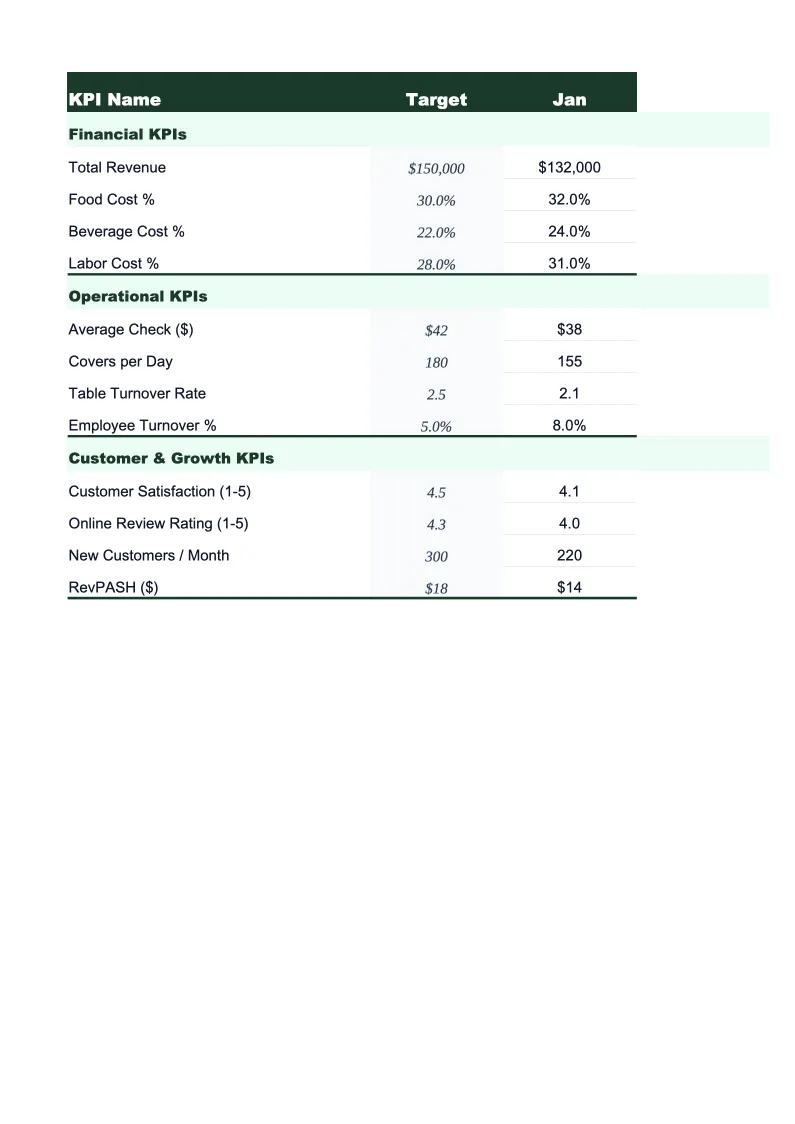
Hotel KPI Dashboard Template
Monitor the numbers that drive hotel profitability — ADR, RevPAR, occupancy rate, GOP%, and F&B revenue per occupied room — in one pre-built Excel dashboard.
What's Inside This Hotel KPI Dashboard Template
This template includes 5 worksheets, each designed for a specific part of your hotel financial workflow:
KPI Dashboard
The main overview sheet displaying every critical hotel performance metric at a glance.
Monthly Input
The data entry sheet where you record your property's operational numbers each month.
Revenue by Department
Breaks total hotel revenue into the departments that drive the business: rooms, food and beverage (further split by restaurant, bar, room service, and banquets), meeting and event space, spa and wellness, parking, and other ancillary income.
Competitive Set Tracker
Compares your property's performance against your competitive set using the standard hospitality indices.
Goals & Benchmarks
Set your annual performance targets for the metrics that matter most to hotel ownership and management: total revenue, ADR, occupancy rate, RevPAR, GOP%, and F&B revenue per occupied room.
Hotel KPI Dashboard Template Features
- Pre-loaded with hotel KPIs: ADR, RevPAR, occupancy rate, TRevPAR, GOP%, and F&B revenue per occupied room
- Competitive set tracker with Market Penetration Index, ADR Index, and RevPAR Index calculations
- Revenue breakdown by department — rooms, F&B (split by outlet), events, spa, and ancillary
- Monthly trend charts for ADR, RevPAR, occupancy, and GOP%
- Annual goals tracker with year-to-date progress and projected year-end totals by KPI
- Color-coded performance indicators — green when on target, amber or red when behind
How to Use This Hotel KPI Spreadsheet
Start by setting up the Goals & Benchmarks sheet with your property's annual targets — total revenue, ADR goal, occupancy rate target, RevPAR, and GOP%. If you have last year's actuals, use those as a baseline and adjust for any rate increases or occupancy improvements you're planning. Then move to the Monthly Input sheet and enter your numbers for the most recent completed month. You'll need your property management system (PMS) occupancy and revenue reports and your departmental expense summaries. The entry process takes about 15 minutes once you know where to pull the numbers.
Each month, return to the Monthly Input sheet and add your new data. The KPI Dashboard, Revenue by Department, and Goals & Benchmarks sheets all update automatically. The Competitive Set Tracker is worth updating at the same time — enter your comp set's ADR, occupancy, and RevPAR from your STR or benchmarking report, and the sheet calculates your market indices. General managers who review their RGI monthly catch pricing and channel mix problems earlier than those who rely on end-of-quarter reports.
15 minutes from download to your first hotel dashboard
Download the template, enter last month's PMS data, and see your ADR, RevPAR, occupancy rate, and GOP% in one view.
Why Every Hotel Needs a KPI Dashboard
Hotel performance management comes down to three numbers that interact with each other constantly: ADR, occupancy, and RevPAR. RevPAR (revenue per available room) is the product of the other two — a $150 ADR at 70% occupancy produces the same RevPAR as a $105 ADR at 100% occupancy, but the profitability is very different. Full houses at discounted rates fill the building but exhaust staff, strain facilities, and often produce worse GOP% than a partially occupied property at strong rates. Understanding whether your RevPAR movement is driven by ADR or occupancy is the difference between managing a hotel and just reacting to one.
Beyond RevPAR, GOP% is the metric ownership cares about most. Gross operating profit percentage measures how much of total revenue flows through to operating profit after all departmental and undistributed expenses — but before fixed charges like debt service and management fees. For full-service hotels, a healthy GOP% typically falls between 30–45% depending on market, segment, and labor costs. For select-service properties with leaner F&B operations, 40–55% is achievable. Tracking GOP% monthly alongside RevPAR tells you whether your top-line performance is actually reaching the bottom line, or whether cost increases are eroding the gains.
Hotel Industry at a Glance
Financial templates built for hotels and hospitality businesses — from independent properties to branded franchises. Pre-loaded with room revenue, F&B, and event billing categories.
Revenue Drivers
- Room revenue (ADR × occupancy)
- Food & beverage
- Meeting & event space
- Spa & wellness
- Parking & ancillary fees
Key Cost Categories
- Labor (rooms, F&B, front office)
- Cost of F&B sold
- OTA & marketing commissions
- Utilities & property maintenance
- Franchise & management fees
- Administrative overhead
Typical Margins
Gross: 65-80% · Net: 10-20%
Seasonality
Business hotels peak weekdays and Q1/Q3; leisure properties peak summer and holidays. January is typically slowest for both segments.
Key Performance Indicators
Hotel KPI Dashboard Template FAQ
More Hotel Templates
Hotel Balance Sheet Template for Excel
$29
Hotel Budget Template for Excel
$29
Hotel Business Plan Template for Excel
$39
Hotel Cash Flow Template for Excel
$29
Hotel Expense Tracker Template for Excel
$29
Hotel Financial Model Template for Excel
$29
Hotel Income Statement Template for Excel
$29
Hotel Invoice Template for Excel
$29
Hotel P&L Template for Excel
$29
Hotel Pro Forma Template for Excel
$29
Hotel Project Budget Template for Excel
$29
Hotel Sales Forecast Template for Excel
$29
Hotel Valuation Template for Excel
$29
More KPI Dashboard Templates
Hotel KPI Dashboard Template
$29