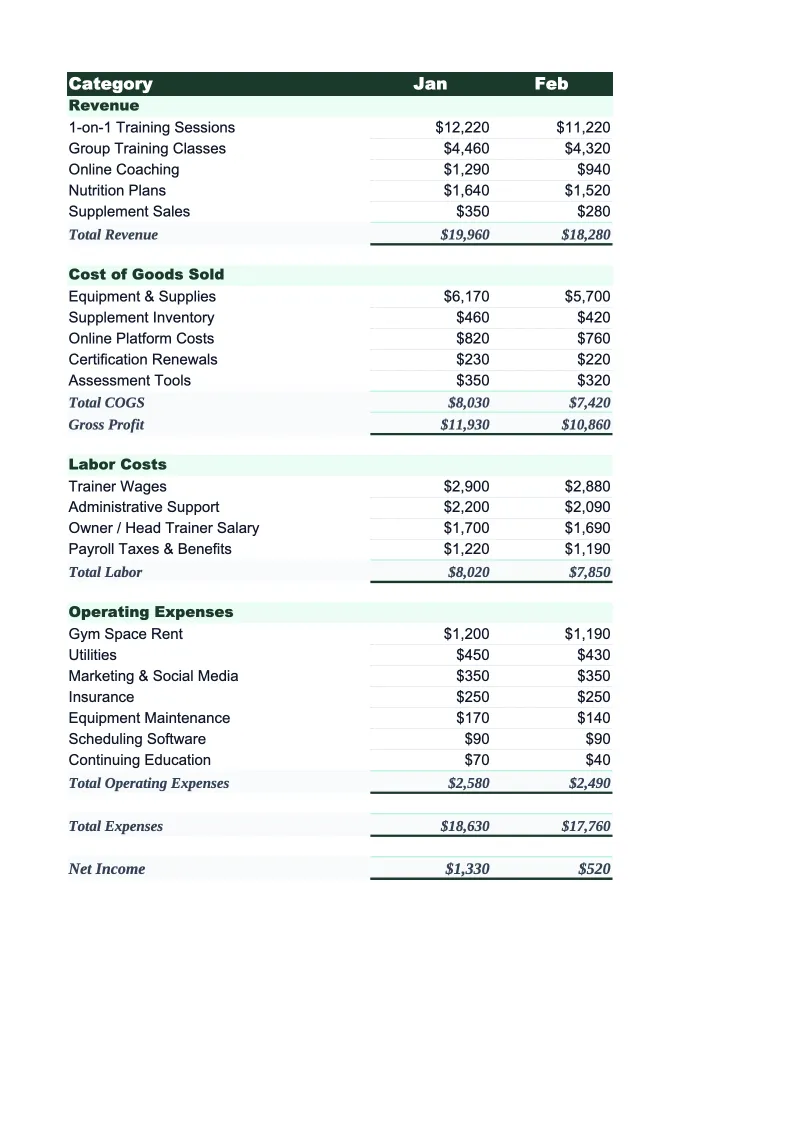
Personal Training Budget Template
Plan and track your personal training business finances with a budget template built around how trainers actually earn and spend — sessions, packages, facility fees, and more.
What's Inside This Personal Training Budget Template
This template includes 4 worksheets, each designed for a specific part of your personal training financial workflow:
Monthly Budget
The core planning worksheet where you map out each month's revenue and expenses in detail.
Annual Summary
A 12-month rollup that pulls from each monthly sheet automatically.
Budget vs Actual
Track what you planned against what actually happened, month by month.
Dashboard
A visual overview with pre-built charts and key metrics for your personal training business.
Personal Training Budget Template Features
- Revenue categories for sessions, packages, group classes, and online coaching
- Monthly budget with 12-month annual rollup
- Budget vs actual variance tracking with color-coded alerts
- Visual dashboard with income stream breakdown and margin tracking
- Net income and gross margin auto-calculations
- Session count and rate inputs for revenue forecasting
How to Use This Personal Training Budget Spreadsheet
Getting started takes about 15 minutes. Download the .xlsx file and open it in Excel or Google Sheets — no macros or plugins required. Start with the Monthly Budget sheet and review the pre-loaded revenue and expense categories. For revenue, update the session rate and average weekly session count to reflect your current pricing. For expenses, enter your actual gym rental fee, software subscriptions, and any other fixed monthly costs. Most trainers keep the category structure as-is and only update the dollar amounts.
Once your categories are set, fill in projected revenue and expenses for the current month. If you're not sure where to start, use last month's bank statements and invoice history as a baseline. For the remaining months, copy forward and adjust for seasonality — plan higher session volume in January and September, and lower volume over summer and the holiday stretch if that matches your pattern. The Annual Summary and Dashboard sheets update automatically.
15 minutes from download to your first budget
Download the template, plug in your session rates and expenses, and see your personal training business's full financial picture — monthly budget, annual rollup, and variance tracking included.
Why Every Personal Trainer Needs a Budget Template
Personal training is a high-margin business on paper — gross margins of 70–85% are common when you're billing sessions directly. But the net margin tells a different story. Gym rental fees, liability insurance, scheduling software, certification renewals, and marketing costs add up fast, especially for trainers working across multiple facilities or building out a client base from scratch. Most trainers know their hourly rate but have no clear picture of what they're actually netting after expenses — and that gap is where budgeting pays off.
A personal training budget needs to account for the income patterns specific to the industry. Revenue doesn't come in evenly: January and September bring a surge of new clients, while summer and the stretch from Thanksgiving through New Year often see higher cancellation rates and lower new sign-ups. If you're running on packages or recurring monthly memberships, you also need to track renewal rates alongside new client acquisition. The budget template breaks revenue out by stream — individual sessions, packages, group classes, and online coaching — so you can see exactly where income is coming from and which channels are growing.
Personal Training Industry at a Glance
Financial templates built for personal trainers and fitness coaches — from solo trainers billing individual clients to studio owners managing packages, group classes, and recurring memberships.
Revenue Drivers
- One-on-one sessions
- Training packages
- Group classes
- Online coaching
- Nutrition coaching add-ons
Key Cost Categories
- Gym rental or facility fees
- Equipment and supplies
- Liability insurance
- Certification and continuing education
- Software and scheduling tools
- Marketing and referral costs
Typical Margins
Gross: 70-85% · Net: 30-55%
Seasonality
January and September are peak sign-up months; summer and the holiday stretch see higher drop-off. Renewal cycles are often tied to 4-, 8-, or 12-week package structures.
Key Performance Indicators
Personal Training Budget Template FAQ
More Personal Training Templates
Personal Training Balance Sheet Template for Excel
$29
Personal Training Business Plan Template for Excel
$39
Personal Training Cash Flow Template for Excel
$29
Personal Training Expense Tracker Template for Excel
$29
Personal Training Financial Model Template for Excel
$29
Personal Training Income Statement Template for Excel
$29
Personal Training Invoice Template for Excel
$29
Personal Training KPI Dashboard Template for Excel
$29
Personal Training P&L Template for Excel
$29
Personal Training Pro Forma Template for Excel
$29
Personal Training Project Budget Template for Excel
$29
Personal Training Sales Forecast Template for Excel
$29
Personal Training Business Valuation Template for Excel
$29
Personal Training Budget Template
$29