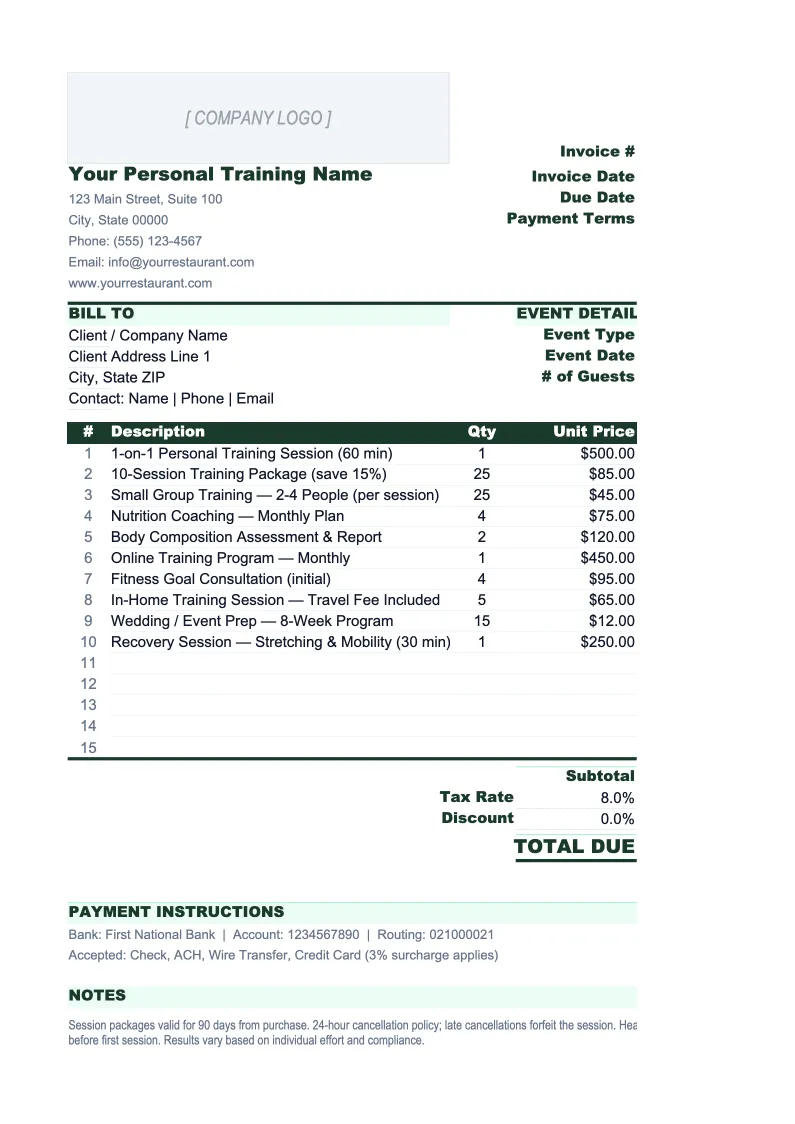
Personal Training Invoice Template
Invoice individual sessions, training packages, and recurring memberships from a single spreadsheet built for personal trainers.
What's Inside This Personal Training Invoice Template
This template includes 4 worksheets, each designed for a specific part of your personal training financial workflow:
Invoice
The main invoice sheet where you fill in client details, session or package information, and payment terms.
Client Tracker
A running log of every invoice you've sent, organized by client.
Package Calculator
A helper sheet for pricing and structuring training packages.
Invoice Log
A monthly summary that pulls totals from the Client Tracker automatically.
Personal Training Invoice Template Features
- Pre-built rows for sessions, packages, group classes, and add-on services
- Client tracker with payment status and overdue flagging
- Package calculator for bulk session pricing and discount scenarios
- Monthly invoice log with revenue breakdown by service type
- Auto-calculated subtotals, tax, and totals on the invoice sheet
- Invoice numbering system with date-based or sequential formatting
How to Use This Personal Training Invoice Spreadsheet
Setup takes under 15 minutes. Download the .xlsx file and open it in Excel or Google Sheets. Start by entering your business details on the Invoice sheet — your name, business name, address, phone, and email. If you have a logo, drop it into the placeholder in the top-left corner. Set your default tax rate if you charge tax on services, and update the payment terms (Net 7, Net 14, or 'Due on receipt' are the most common for personal trainers). This information saves into the template and carries into every new invoice you create.
To generate a new invoice, copy the Invoice sheet (right-click the tab, 'Move or Copy') so your original stays clean, then fill in the client details and line items. Use the pre-built rows to itemize: enter the service description (e.g., 'Personal training session — 60 min'), quantity, and rate. If you're invoicing a package, enter the package name and total package price as a single line item, or break it out by session. Once the invoice looks right, export it as PDF (File → Export) before sending. Log it in the Client Tracker with the invoice number, date, and amount.
15 minutes from download to your first invoice
Download the template, enter your details, and send a professional invoice to your next client — with a full payment tracker built in.
Why Personal Trainers Need a Dedicated Invoice Template
Most personal trainers start by sending invoices from their phone — a PDF template, a note in Venmo, or a scheduling app with basic billing. That works for five clients. At ten clients, you're losing track of who paid for which package. At fifteen, you're guessing your monthly revenue and chasing late payments you forgot about. A structured invoice template isn't just about looking professional — it's about knowing exactly where your money is at any given time without spending an hour cross-referencing your bank account.
Personal training billing is more complicated than most service businesses because of how packages work. A client buys 10 sessions upfront. They use 3 in the first month, skip a week, use 5 more over the next six weeks. Did you invoice correctly? Did you apply the right per-session rate? Is the package expired? Without a dedicated template, these details live in text threads and your memory. A proper invoice setup documents the package terms at purchase, tracks session usage, and makes it easy to invoice the final balance or a renewal when the package runs out.
Personal Training Industry at a Glance
Financial templates built for personal trainers and fitness coaches — from solo trainers billing individual clients to studio owners managing packages, group classes, and recurring memberships.
Revenue Drivers
- One-on-one sessions
- Training packages
- Group classes
- Online coaching
- Nutrition coaching add-ons
Key Cost Categories
- Gym rental or facility fees
- Equipment and supplies
- Liability insurance
- Certification and continuing education
- Software and scheduling tools
- Marketing and referral costs
Typical Margins
Gross: 70-85% · Net: 30-55%
Seasonality
January and September are peak sign-up months; summer and the holiday stretch see higher drop-off. Renewal cycles are often tied to 4-, 8-, or 12-week package structures.
Key Performance Indicators
Personal Training Invoice Template FAQ
More Personal Training Templates
Personal Training Balance Sheet Template for Excel
$29
Personal Training Budget Template for Excel
$29
Personal Training Business Plan Template for Excel
$39
Personal Training Cash Flow Template for Excel
$29
Personal Training Expense Tracker Template for Excel
$29
Personal Training Financial Model Template for Excel
$29
Personal Training Income Statement Template for Excel
$29
Personal Training KPI Dashboard Template for Excel
$29
Personal Training P&L Template for Excel
$29
Personal Training Pro Forma Template for Excel
$29
Personal Training Project Budget Template for Excel
$29
Personal Training Sales Forecast Template for Excel
$29
Personal Training Business Valuation Template for Excel
$29
Personal Training Invoice Template
$29