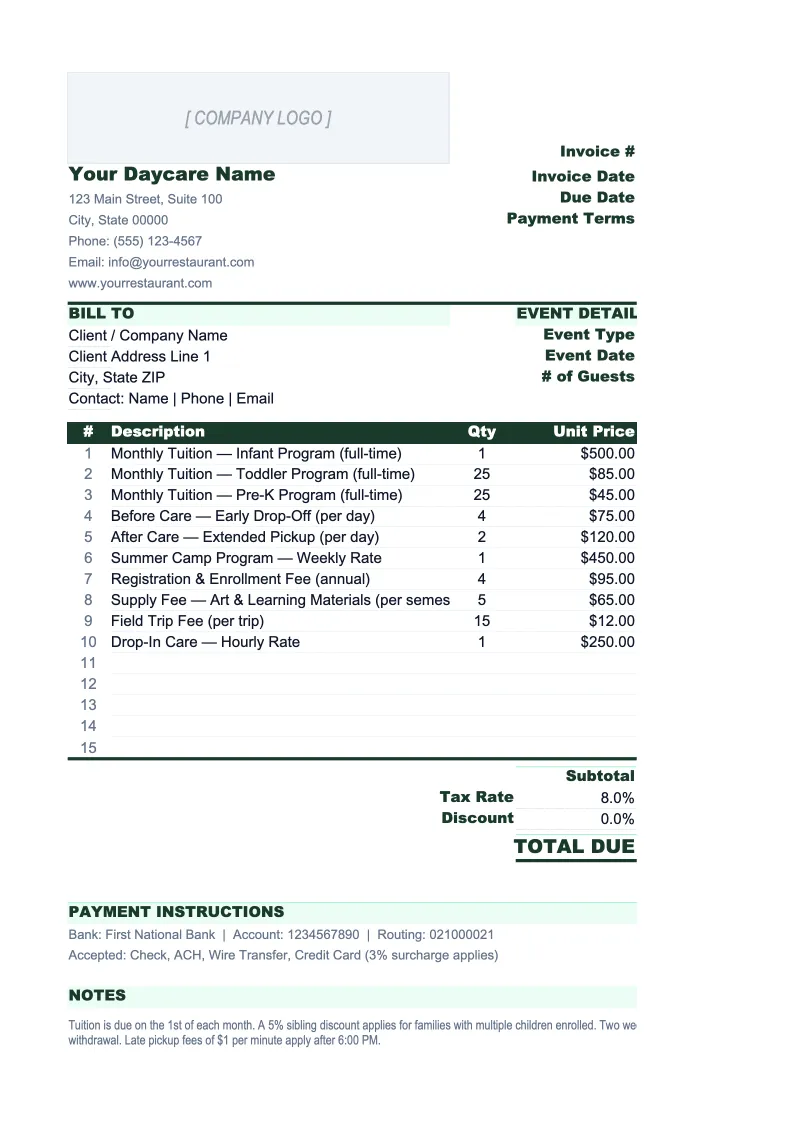
Daycare Invoice Template
Bill families for tuition, subsidies, late pickup fees, and enrichment programs — with a family ledger and year-end receipt generator built for childcare providers.
What's Inside This Daycare Invoice Template
This template includes 5 worksheets, each designed for a specific part of your daycare financial workflow:
Invoice
The printable invoice sheet built around how childcare centers actually bill.
Family Directory
A master record of every enrolled family — parent names, emergency contacts, child names, dates of birth, enrollment date, care schedule (full-time, part-time, or drop-in), age group, tuition rate, subsidy program (if any), sibling discount, and preferred payment method.
Subsidy Tracker
A dedicated sheet for managing government subsidy and voucher payments, which arrive separately from family tuition and on their own schedule.
Family Ledger
A running account for each enrolled family that records every charge, credit, and payment throughout the year.
Year-End Receipt
A printable annual summary for each family showing total tuition paid, total subsidy credits applied, and the net amount paid out-of-pocket — formatted for parents to use when claiming the IRS Form 2441 Child and Dependent Care Credit or submitting for dependent care FSA reimbursement.
Daycare Invoice Template Features
- Tuition line items for infant, toddler, preschool, and school-age rates — with before/after care and enrichment fees
- Subsidy and voucher deduction lines so invoices show both total charges and family co-pay
- Family dropdown that auto-fills tuition rate, sibling discounts, and subsidy authorization numbers
- Subsidy tracker reconciling agency billing against actual payments received — by authorization period
- Family ledger with 30-day overdue flagging and full transaction history for every enrolled family
- Year-end tax receipt generator with EIN and license number fields for Form 2441 and FSA claims
How to Use This Daycare Invoice Spreadsheet
Setup takes about 25 minutes. Download the .xlsx file and open it in Excel or Google Sheets. Start with the Family Directory: add each enrolled family with their child's name, age group, care schedule, and tuition rate. If any families receive government subsidies, enter the authorization number, co-pay amount, and agency share for each. Then add your center's name, address, EIN, and license number to the Invoice sheet header — these fields persist across every invoice you generate. Once the directory is complete, creating any invoice means selecting the family from the dropdown, entering the billing period, and adding any one-time charges like late pickup fees or field trip costs. The tuition rate, discounts, and subsidy deductions fill in automatically.
At the start of each billing cycle, work through the Family Directory row by row to generate invoices for every enrolled family. For families on government subsidy programs, also log the billing submission in the Subsidy Tracker — enter the billing period, amount billed to the agency, and authorization number. As payments come in, mark invoices as paid in the Family Ledger and record the payment date and amount. For subsidy payments, log what the agency actually paid in the Subsidy Tracker and compare it against what you billed — discrepancies need to be flagged before the next reimbursement cycle, because most subsidy agencies won't process corrections more than 60-90 days after the period end.
Bill every family correctly — every billing cycle
Set up your family directory once, and generate tuition invoices, subsidy reconciliations, and year-end tax receipts from a single spreadsheet.
Why Daycare Centers Need a Structured Invoice Template
Billing is one of the most time-consuming and error-prone parts of running a daycare — not because the math is complicated, but because every family's situation is slightly different. One child gets a sibling discount. Another family splits payment between a parent and a grandparent. Three families are on the state subsidy program, each with a different co-pay and authorization number. A parent disputes a late pickup fee from two weeks ago. Generic invoice templates aren't built for any of this, which is why most daycare directors end up maintaining a patchwork of handwritten records, spreadsheet tabs, and billing software that doesn't quite match their policy. A template pre-structured around how childcare billing actually works eliminates most of the manual tracking.
Government subsidy billing adds a layer of complexity that catches many operators off guard. Subsidy agencies pay on their own schedule — often 30-60 days after the billing period — and they pay based on authorized attendance, not actual enrollment. If a subsidized child was absent more days than your subsidy agreement allows, the agency may recalculate the payment downward. If you don't track what you billed versus what you received for each authorization period, you can end up carrying receivables you've already mentally counted as revenue. The Subsidy Tracker in this template reconciles billing submissions against actual payments, which is how you catch discrepancies before they become write-offs.
Daycare Industry at a Glance
Financial templates built for daycare centers and childcare providers — pre-loaded with tuition billing categories, subsidy tracking, and the KPIs that determine whether a center is actually making money.
Revenue Drivers
- Weekly/monthly tuition by age group
- Government subsidies and voucher programs
- Before/after school care
- Drop-in and part-time care
- Enrichment classes and summer programs
Key Cost Categories
- Payroll and benefits (50-70% of revenue)
- Rent and occupancy
- Food and meals program
- Supplies and curriculum materials
- Insurance and licensing
- Utilities
- Marketing and enrollment
Typical Margins
Gross: 30-50% · Net: 10-16%
Seasonality
Peak enrollment in August-September (school year start) and January-February. Summer dip for school-age programs. Revenue is more stable than attendance because most centers bill flat tuition regardless of days attended.
Key Performance Indicators
Daycare Invoice Template FAQ
More Daycare Templates
Daycare Balance Sheet Template for Excel
$29
Daycare Budget Template for Excel
$29
Daycare Business Plan Template for Excel
$39
Daycare Cash Flow Template for Excel
$29
Daycare Expense Tracker Template for Excel
$29
Daycare Financial Model Template for Excel
$29
Daycare Income Statement Template for Excel
$29
Daycare KPI Dashboard Template for Excel
$29
Daycare P&L Template for Excel
$29
Daycare Pro Forma Template for Excel
$29
Daycare Project Budget Template for Excel
$29
Daycare Sales Forecast Template for Excel
$29
Daycare Business Valuation Template for Excel
$29
Daycare Invoice Template
$29