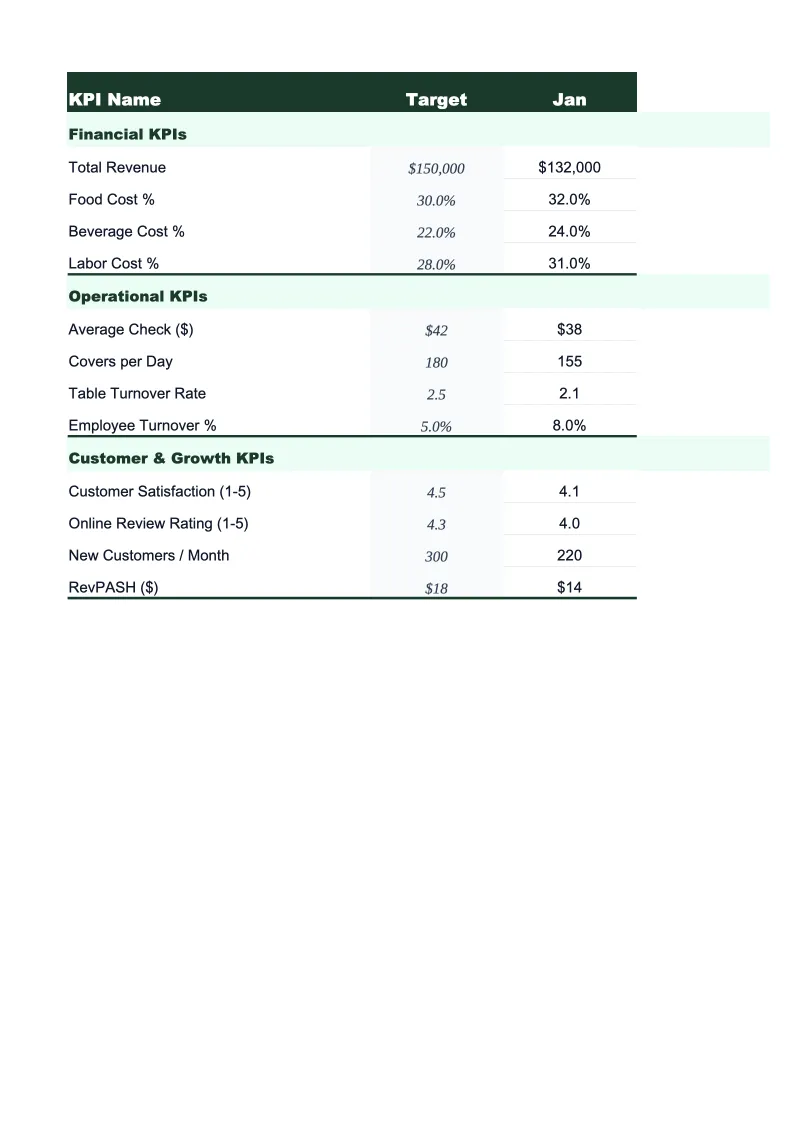
Daycare KPI Dashboard Template
Monitor your daycare's occupancy rate, labor cost ratio, tuition collection, and enrollment trends with a KPI dashboard built around how childcare centers actually measure success.
What's Inside This Daycare KPI Dashboard Template
This template includes 5 worksheets, each designed for a specific part of your daycare financial workflow:
Dashboard
The main summary view pulls your most important KPIs into one screen — occupancy rate, labor cost ratio, tuition collection rate, average revenue per enrolled child, and staff-to-child ratios.
Enrollment Tracker
Track current enrollment versus licensed capacity by age group — infant, toddler, preschool, pre-K, and school-age.
Financial KPIs
This sheet breaks down the financial metrics that drive daycare profitability.
Staff Metrics
Childcare staff-to-child ratios are regulated at the state level and violations carry serious licensing consequences.
Monthly Trends
A rolling 12-month view of all core KPIs so you can see which direction each metric is moving.
Daycare KPI Dashboard Template Features
- Occupancy rate by age group with licensed capacity tracking
- Labor cost ratio monitoring with state ratio compliance check
- Tuition collection rate and outstanding balance tracking by room
- Revenue per enrolled child benchmarked against industry averages
- Subsidy and voucher revenue tracked separately from private tuition
- 12-month rolling KPI trend charts that update automatically
How to Use This Daycare KPI Spreadsheet
Download the file and open it in Excel or Google Sheets — no setup, macros, or plugins needed. Start with the Enrollment Tracker: enter your licensed capacity for each age group and your current enrolled headcount. The occupancy rate and staff ratio calculations on the Dashboard will populate immediately. Then review the age group labels and rename any that don't match your center's room structure. Most centers find the defaults work as-is or need one or two adjustments.
Each month, work through three sheets in about 20 minutes. In Financial KPIs, enter your tuition billed and collected, total labor hours and cost, and any subsidy payments received. In Staff Metrics, update your headcount and note any staff changes. In Enrollment Tracker, update your current enrollment count per room. That's it — the Dashboard recalculates all your KPIs and the Monthly Trends charts update automatically to include the new month.
15 minutes from download to your first KPI review
Download the template, enter your enrollment and payroll numbers, and see your daycare's occupancy rate, labor cost ratio, and tuition collection rate on one screen.
Why Every Daycare Needs a KPI Dashboard
Most daycare directors manage their center with a combination of intuition, enrollment software reports, and a monthly bank balance check. The problem is that each of those gives you a different piece of the picture, and none of them shows you the metrics that actually predict whether your center is financially healthy. Occupancy rate tells you if you're filling seats. Labor cost ratio tells you if you're staffing correctly for that occupancy. Tuition collection rate tells you if the revenue on paper is actually showing up in your account. A KPI dashboard brings those numbers together in one place.
The childcare industry has some specific benchmarks worth knowing. A well-run center typically runs 85–95% occupancy — below 80% and you're probably losing money at standard tuition rates, above 95% and you're operating without a buffer for natural turnover. Labor is the dominant cost, typically 50–70% of revenue, and most state licensing requirements mandate minimum staff-to-child ratios that vary by age group. An infant room requires one caregiver for every three or four children depending on the state; preschool rooms might allow one to ten. Getting caught under ratio is a licensing risk; overstaffing by one person in a room is hundreds of dollars in weekly payroll that goes unnoticed without tracking.
Daycare Industry at a Glance
Financial templates built for daycare centers and childcare providers — pre-loaded with tuition billing categories, subsidy tracking, and the KPIs that determine whether a center is actually making money.
Revenue Drivers
- Weekly/monthly tuition by age group
- Government subsidies and voucher programs
- Before/after school care
- Drop-in and part-time care
- Enrichment classes and summer programs
Key Cost Categories
- Payroll and benefits (50-70% of revenue)
- Rent and occupancy
- Food and meals program
- Supplies and curriculum materials
- Insurance and licensing
- Utilities
- Marketing and enrollment
Typical Margins
Gross: 30-50% · Net: 10-16%
Seasonality
Peak enrollment in August-September (school year start) and January-February. Summer dip for school-age programs. Revenue is more stable than attendance because most centers bill flat tuition regardless of days attended.
Key Performance Indicators
Daycare KPI Dashboard Template FAQ
More Daycare Templates
Daycare Balance Sheet Template for Excel
$29
Daycare Budget Template for Excel
$29
Daycare Business Plan Template for Excel
$39
Daycare Cash Flow Template for Excel
$29
Daycare Expense Tracker Template for Excel
$29
Daycare Financial Model Template for Excel
$29
Daycare Income Statement Template for Excel
$29
Daycare Invoice Template for Excel
$29
Daycare P&L Template for Excel
$29
Daycare Pro Forma Template for Excel
$29
Daycare Project Budget Template for Excel
$29
Daycare Sales Forecast Template for Excel
$29
Daycare Business Valuation Template for Excel
$29
More KPI Dashboard Templates
Daycare KPI Dashboard Template
$29