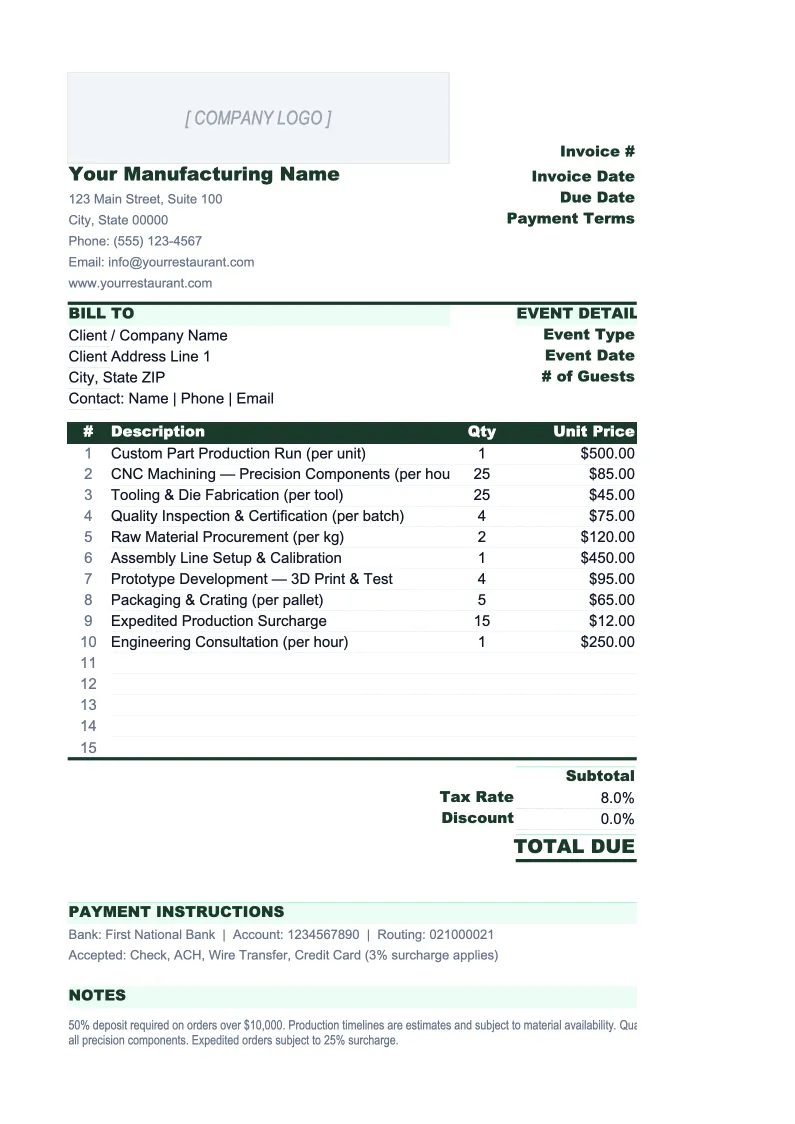
Manufacturing Invoice Template
Invoice customers for production runs, tooling, setup fees, and outside processing — with PO reference tracking, material surcharges, and a full invoice log built for manufacturers.
What's Inside This Manufacturing Invoice Template
This template includes 4 worksheets, each designed for a specific part of your manufacturing financial workflow:
Invoice
The print-ready invoice built around how manufacturers actually bill.
Invoice Log
A running register of every invoice issued across all customers and jobs.
Tooling & Setup Log
A dedicated tracker for tooling charges, molds, dies, fixtures, and CNC programming fees billed to customers.
Customer Price List
A per-customer price list that feeds directly into the Invoice sheet via lookup formulas.
Manufacturing Invoice Template Features
- Separate line item rows for production, setup fees, tooling, outside processing, and material surcharges
- Bill-to and ship-to address fields — standard for manufacturing where they often differ
- PO number and work order reference fields on every invoice
- Tooling and setup log that tracks one-time charges and amortized tooling by customer
- Customer price list with volume tier lookups that populate invoice pricing automatically
- Invoice log with overdue flagging and outstanding receivables total across all customers
How to Use This Manufacturing Invoice Spreadsheet
Setup takes about 20 minutes. Download the .xlsx file and open it in Excel or Google Sheets. Start with the Customer Price List sheet — enter your part numbers and the negotiated prices for each customer. If you have multiple customers on different pricing tiers, create one section per customer. This one-time setup means every future invoice pulls the correct price automatically when you enter the customer name and part number, eliminating the most common billing error in manufacturing. Then update the Invoice sheet header with your company name, address, EIN, and default payment terms.
To create an invoice, open the Invoice sheet and enter the customer name, their PO number, your internal job or work order number, the invoice date, and the ship-to address. Add line items for each billable component: production units (part number, quantity, unit price from the price list), setup fees if applicable, any outside processing charges passed through from subcontractors, and material surcharges if your contract includes commodity price adjustments. The net amount due, early payment discount, and freight charges calculate automatically. When done, export to PDF and log the invoice in the Invoice Log.
Set up once, invoice accurately every run
Load your customer price lists, and every future invoice pulls the right price, tracks the right PO, and logs every outstanding receivable in one place.
Why Manufacturers Need a Purpose-Built Invoice Template
Manufacturing invoicing is more complex than most industries because a single invoice can contain five different billing types at once: a production run at a negotiated per-unit price, a setup charge for the job, a material surcharge tied to a commodity index, an outside processing pass-through from a heat treater, and freight on top. Generic invoice templates have none of this structure — they're designed for consultants billing hourly or retailers billing for single items. The result for manufacturers is hours spent reformatting templates, billing errors when the wrong price tier gets used, and tooling or setup charges that slip through unbilled because there's no system for tracking them.
Every manufacturing invoice should tie back to a customer purchase order. This isn't just good practice — most manufacturing customers will not pay an invoice that doesn't reference their PO number, and many require the PO number to match exactly. The ship-to address matters just as much as the bill-to address, particularly for distributors and OEM customers who receive goods at a different location than their accounts payable department. Material surcharges and freight terms (FOB origin vs. FOB destination) need to be explicit on the invoice to avoid disputes. Tooling fees deserve their own line item, not just because they're large, but because they often have different billing timing than production runs — sometimes invoiced upfront, sometimes amortized, sometimes billed on first production ship.
Manufacturing Industry at a Glance
Financial templates built for manufacturers — from job shops and contract fabricators to production facilities. Pre-loaded with cost categories, billing structures, and KPIs specific to how manufacturers track materials, labor, and overhead.
Revenue Drivers
- Product sales
- Contract/job shop work
- Tooling and setup fees
- NRE charges
- Material markups
- Aftermarket parts and service
Key Cost Categories
- Raw materials / direct materials
- Direct labor
- Manufacturing overhead
- Outside processing / subcontracting
- Equipment depreciation
- SG&A
Typical Margins
Gross: 20-35% · Net: 4-10%
Seasonality
Q1 weakest across most segments. Q3/Q4 strongest for consumer goods and construction materials manufacturers. Automotive suppliers follow OEM model-year shutdowns. Industrial equipment sees Q4 budget-spend surge.
Key Performance Indicators
Manufacturing Invoice Template FAQ
More Manufacturing Templates
Manufacturing Balance Sheet Template for Excel
$29
Manufacturing Budget Template for Excel
$29
Manufacturing Business Plan Template for Excel
$39
Manufacturing Cash Flow Template for Excel
$29
Manufacturing Expense Tracker Template for Excel
$29
Manufacturing Financial Model Template for Excel
$29
Manufacturing Income Statement Template for Excel
$29
Manufacturing KPI Dashboard Template for Excel
$29
Manufacturing P&L Template for Excel
$29
Manufacturing Pro Forma Template for Excel
$29
Manufacturing Project Budget Template for Excel
$29
Manufacturing Sales Forecast Template for Excel
$29
Manufacturing Business Valuation Template for Excel
$29
Manufacturing Invoice Template
$29