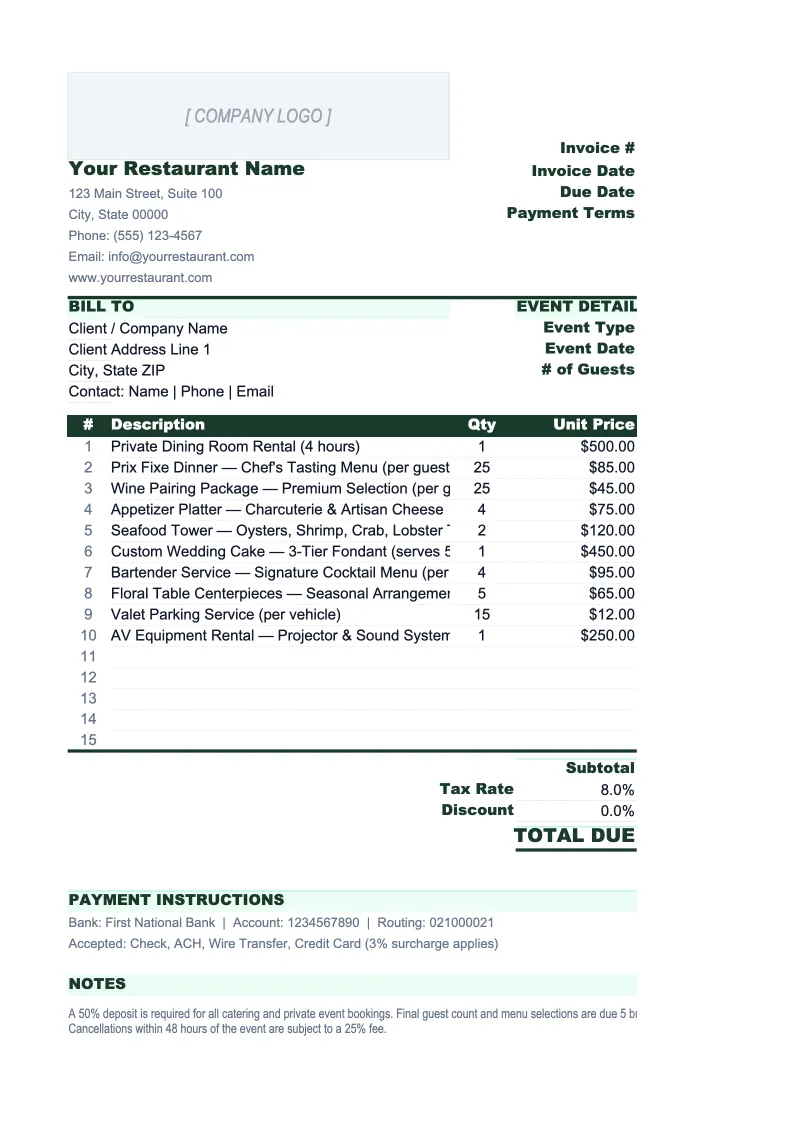
Restaurant Invoice Template
Invoice catering clients and corporate accounts with a template built for food service — per-person pricing, gratuity, deposit tracking, and a log of every outstanding bill.
What's Inside This Restaurant Invoice Template
This template includes 5 worksheets, each designed for a specific part of your restaurant financial workflow:
Invoice
The main printable invoice for catering events, corporate dining accounts, and wholesale food orders.
Invoice Log
A running register of every invoice issued, designed for catering departments and restaurants with multiple active accounts.
Client List
A directory of your catering clients and wholesale accounts that populates the Invoice sheet via dropdown.
Catering Menu & Rates
A lookup table of your standard catering packages, per-person rates, and à la carte items.
Deposit Tracker
A dedicated sheet for managing deposits on booked events — the financial piece of catering operations that most generic invoice templates ignore.
Restaurant Invoice Template Features
- Per-person pricing with auto-calculated subtotals for events of any size
- Gratuity and service charge calculated as a configurable percentage of food and beverage
- Deposit tracking: balance due updates automatically when deposit is applied
- Client dropdown that auto-fills billing address and payment terms
- Catering menu and rate card to enforce consistent pricing across events
- Invoice log with outstanding balance and overdue flagging for active accounts
How to Use This Restaurant Invoice Spreadsheet
Setup takes about 20 minutes. Download the .xlsx file and open it in Excel or Google Sheets — no macros or plugins needed. Start with the Catering Menu & Rates sheet: enter your standard packages, per-person rates, à la carte items, and any flat-fee services like delivery or staffing. Then populate the Client List with your regular corporate accounts and event venues. Once those two tables are complete, creating any new invoice is a matter of selecting from dropdowns rather than typing from scratch.
To create an invoice, go to the Invoice sheet, enter the invoice number and event details (date, venue, guest count), and select the client from the dropdown. In the line items section, pick each item from the Catering Menu dropdown, enter the quantity or headcount, and the rate and total fill in automatically. Add your service charge percentage and the gratuity calculates itself. If a deposit has been received, enter it in the deposit field and the balance due updates immediately. Print or export to PDF to send — the layout is formatted to look clean on a standard page.
Send your next catering invoice in under 10 minutes
Set up your catering menu and client list once, then create professional invoices for any event — with per-person pricing, gratuity, deposit tracking, and a full log of outstanding bills.
Why Restaurants Need a Dedicated Invoice Template
Most restaurants use invoices in one of three situations: catering and private events billed to corporate clients or event hosts, wholesale food supply to other businesses, and on-account dining for corporate accounts. In all three cases, a generic invoice template creates friction. Catering invoices need per-person pricing, gratuity, and deposit tracking — none of which appear on a standard business invoice. Wholesale food orders need itemized product lines with unit prices and delivery charges. The result is that most restaurant operators either cobble something together in Word or spend 30 minutes reformatting a generic spreadsheet before every event.
Restaurant catering invoices carry two risks that don't apply to most service businesses. The first is pricing errors: quoting a 200-person event at the wrong per-person rate, forgetting to include gratuity, or applying tax to non-taxable catering services are all costly mistakes that are hard to correct after the fact. The second is deposit exposure: catering operations routinely commit food costs, labor, and equipment rental weeks before the event date. Without a system to confirm deposits are received before you start prepping, you're extending unsecured credit to clients who haven't yet committed. This template addresses both by building the deposit workflow into the invoice system rather than treating it as a separate accounting task.
Restaurant Industry at a Glance
Financial templates built for restaurants — from fast-casual to fine dining. Pre-loaded with food cost categories, labor splits, and industry-standard KPIs.
Revenue Drivers
- Dine-in sales
- Takeout & delivery
- Catering
- Alcohol sales
Key Cost Categories
- Food costs (COGS)
- Labor
- Rent & occupancy
- Utilities
- Marketing
- Equipment & maintenance
Typical Margins
Gross: 60-70% · Net: 3-9%
Seasonality
Higher revenue in summer and holiday seasons; January-February typically slowest months.
Key Performance Indicators
Restaurant Invoice Template FAQ
More Restaurant Templates
Restaurant Balance Sheet Template for Excel
$29
Restaurant Budget Template for Excel
$29
Restaurant Business Plan Template for Excel
$39
Restaurant Cash Flow Template for Excel
$29
Restaurant Expense Tracker Template for Excel
$29
Restaurant Financial Model Template for Excel
$29
Restaurant Income Statement Template for Excel
$29
Restaurant KPI Dashboard Template for Excel
$29
Restaurant P&L Template for Excel
$29
Restaurant Pro Forma Template for Excel
$29
Restaurant Project Budget Template for Excel
$29
Restaurant Sales Forecast Template for Excel
$29
Restaurant Valuation Template for Excel
$29
Restaurant Invoice Template
$29