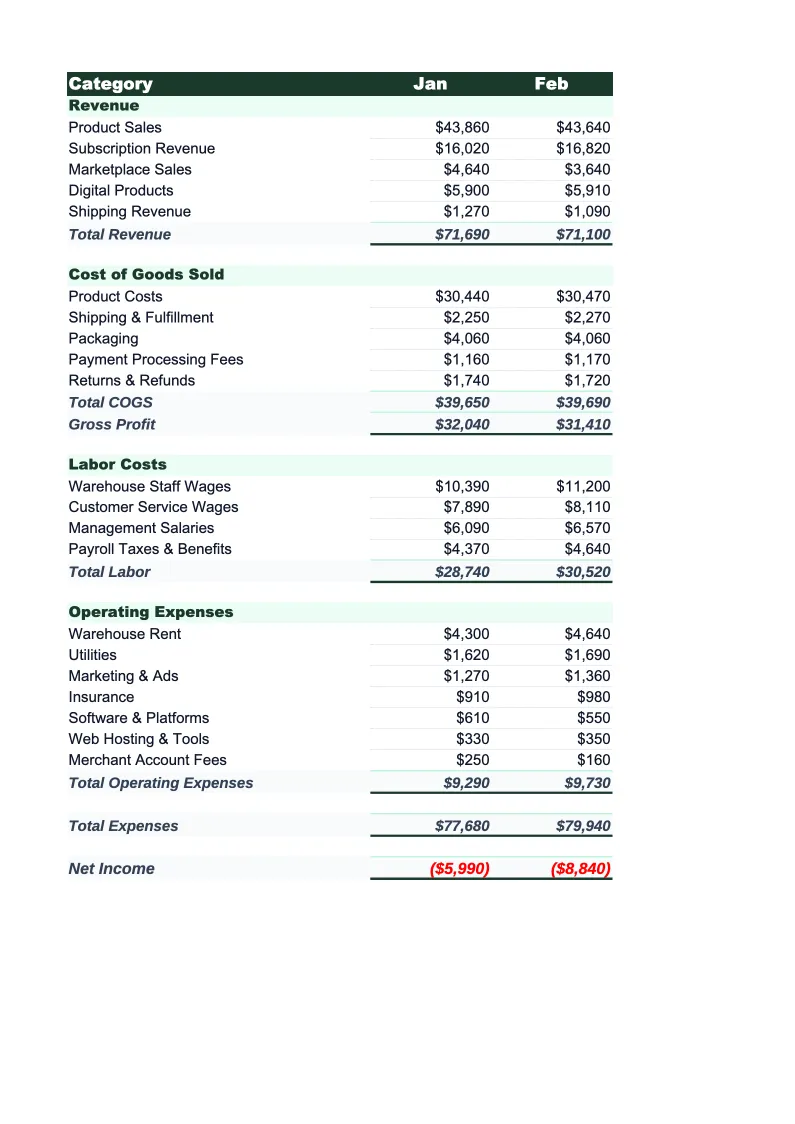
Ecommerce Budget Template
Plan and track your online store's finances with a budget template built for ecommerce. Pre-loaded with COGS, fulfillment, platform fees, and ad spend categories.
What's Inside This Ecommerce Budget Template
This template includes 5 worksheets, each designed for a specific part of your ecommerce financial workflow:
Monthly Budget
The core worksheet where you plan each month's revenue and expenses.
Annual Summary
A 12-month rollup that pulls from each monthly sheet automatically.
Budget vs Actual
Track what you planned against what actually happened.
SKU Margin
A product-level margin worksheet where you enter your cost per unit, selling price, fulfillment cost, and marketplace or payment fees for each SKU or product category.
Dashboard
A visual overview with pre-built charts showing revenue by channel, gross margin trend, ad spend as a percentage of revenue, and fulfillment costs as a percentage of revenue.
Ecommerce Budget Template Features
- Revenue split by channel: DTC, marketplace, wholesale, and subscription
- COGS, packaging, fulfillment, and 3PL fee tracking
- Ad spend budget by channel: Meta, Google, influencer/affiliate
- Platform and marketplace fee calculations (Shopify, Amazon, Etsy)
- SKU-level margin worksheet for product profitability analysis
- Gross margin and contribution margin auto-calculations
How to Use This Ecommerce Budget Spreadsheet
Getting started takes about 15 minutes. Download the .xlsx file and open it in Excel or Google Sheets — no macros or plugins required. Start with the Monthly Budget sheet: review the pre-loaded revenue channels and expense categories, then adjust them to match your store's setup. If you only sell on Shopify DTC and don't use Amazon, remove the marketplace rows. If you use a 3PL, make sure the fulfillment section matches your rate card. Most store owners keep 80% of the categories as-is and modify a handful of line items.
Once the structure looks right, enter your projected revenue and expenses for the current month. Use last month's bank statements and your ad platform reports as a baseline — the numbers don't need to be perfect to be useful. Then fill in the SKU Margin sheet with your top products or product categories: enter cost per unit, selling price, and variable fees. This gives you a clear picture of which products are carrying the margin and which ones are quietly losing money after fulfillment and fees.
15 minutes from download to your first ecommerce budget
Download the template, plug in your channels and costs, and see your store's full financial picture — monthly budget, SKU margins, and variance tracking included.
Why Every Ecommerce Business Needs a Budget Template
Ecommerce margins are thin and move fast. Most online stores operate at 30–55% gross margin and 5–15% net margin — which means a 5% increase in ad costs or fulfillment rates can cut your net profit in half. The biggest problem isn't that store owners don't know this. It's that without a structured budget, the numbers are spread across Shopify analytics, Meta Ads Manager, Google Ads, Amazon Seller Central, and a 3PL dashboard — and nobody is looking at the full picture in one place.
A proper ecommerce budget breaks spending into the categories that actually drive profitability. COGS and packaging are your foundation — gross margin tells you how much room you have before variable and fixed costs. Fulfillment and 3PL fees are often underestimated: a $30 product with $8 shipping and $4 in packaging leaves $18 before you've spent a dollar on acquiring the customer. Platform fees compound on top of that: Shopify's 2.9% + $0.30 per transaction, Amazon's 15% referral fee, and any FBA fees if you use fulfillment by Amazon. Then ad spend, which is the variable you have the most control over but also the most leverage to misallocate.
Ecommerce Industry at a Glance
Financial templates built for ecommerce businesses — from Shopify stores to Amazon sellers. Pre-loaded with SKU-level line items, platform fee categories, return tracking, and the metrics that drive online retail profitability.
Revenue Drivers
- Direct-to-consumer product sales
- Wholesale and B2B orders
- Marketplace sales (Amazon, eBay, Etsy)
- Subscription or bundle revenue
Key Cost Categories
- Cost of goods sold (inventory)
- Shipping and fulfillment
- Payment processing fees
- Platform and marketplace fees
- Returns and refunds
- Digital advertising and customer acquisition
Typical Margins
Gross: 30-55% · Net: 5-15%
Seasonality
Heavy Q4 concentration around Black Friday, Cyber Monday, and holiday gifting. Many categories also spike in January (post-holiday), back-to-school (August), and Mother's Day.
Key Performance Indicators
Ecommerce Budget Template FAQ
More Ecommerce Templates
Ecommerce Balance Sheet Template for Excel
$29
E-commerce Business Plan Template for Excel
$39
Ecommerce Cash Flow Template for Excel
$29
Ecommerce Expense Tracker Template for Excel
$29
Ecommerce Financial Model Template for Excel
$29
Ecommerce Income Statement Template for Excel
$29
Ecommerce Invoice Template for Excel
$29
Ecommerce KPI Dashboard Template for Excel
$29
Ecommerce P&L Template for Excel
$29
Ecommerce Pro Forma Template for Excel
$29
Ecommerce Project Budget Template for Excel
$29
Ecommerce Sales Forecast Template for Excel
$29
Ecommerce Business Valuation Template for Excel
$29
Ecommerce Budget Template
$29