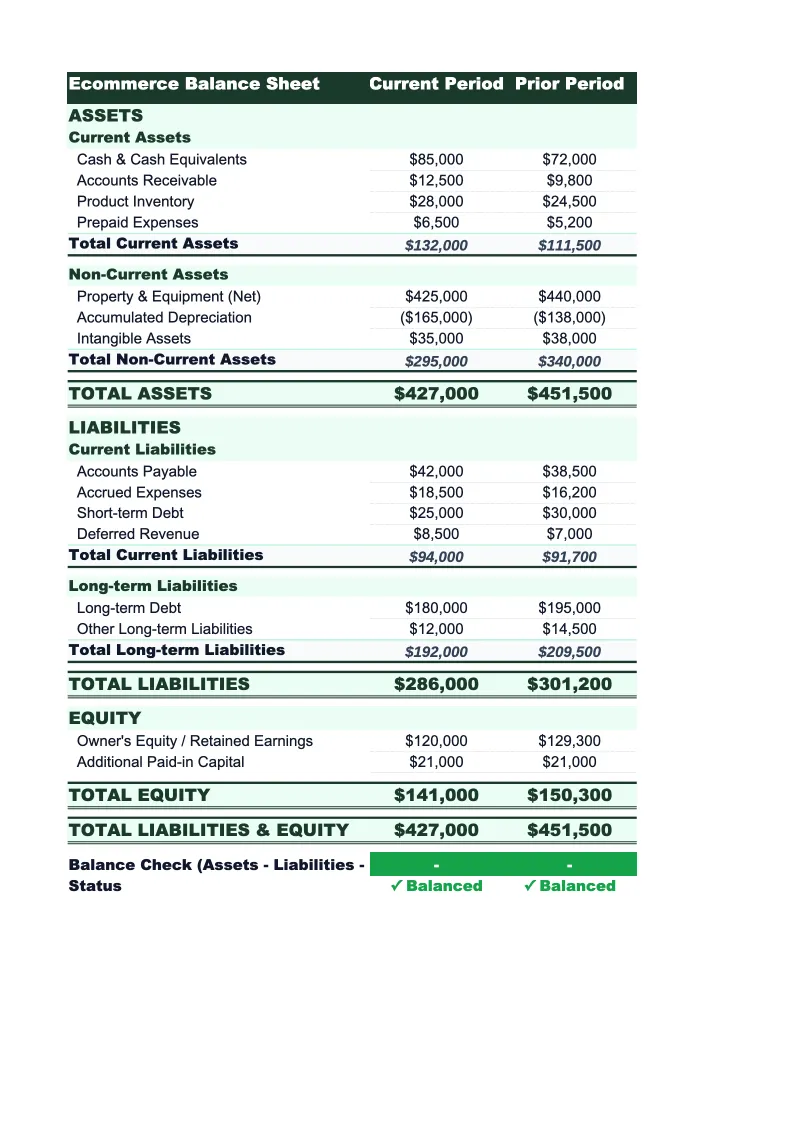
Ecommerce Balance Sheet Template
Track what your ecommerce business owns and owes with a balance sheet built for online retail — inventory, marketplace payouts, supplier payables, and equity all in one place.
What's Inside This Ecommerce Balance Sheet Template
This template includes 4 worksheets, each designed for a specific part of your ecommerce financial workflow:
Balance Sheet
The main snapshot of your ecommerce business's financial position at a specific date.
Inventory Detail
A supporting worksheet where you record inventory value by SKU, product category, or supplier.
Period Comparison
A side-by-side view of your balance sheet across two to four periods — quarter-over-quarter or year-over-year.
Notes & Ratios
A reference sheet that auto-calculates key balance sheet ratios from your main sheet data.
Ecommerce Balance Sheet Template Features
- Inventory detail worksheet with SKU-level tracking and auto-totals
- Marketplace payout receivables as a separate current asset line item
- Sales tax payable and deferred revenue for gift cards and unfulfilled orders
- Period comparison view showing quarter-over-quarter or year-over-year changes
- Auto-calculated current ratio, quick ratio, and debt-to-equity ratio
- Pre-built equity section with owner's equity and retained earnings
How to Use This Ecommerce Balance Sheet Spreadsheet
Download the .xlsx file and open it in Excel or Google Sheets — no plugins or macros required. Start with the Inventory Detail sheet: enter your product SKUs or categories with their unit costs and quantities on hand. This feeds directly into the current assets section of the Balance Sheet, so you don't have to enter inventory totals manually. For most Shopify or WooCommerce stores, you can pull the inventory report from your platform and paste the values in under 10 minutes.
Once inventory is set, move to the main Balance Sheet and work through the remaining asset and liability sections. Your cash balance comes from your bank and PayPal accounts. Marketplace payouts receivable is the amount Shopify, Amazon, or other platforms owe you but haven't transferred yet — check your platform's payout schedule. For liabilities, pull your latest credit card and supplier invoice statements, enter your outstanding sales tax balance, and note any unfulfilled orders that represent deferred revenue. The equity section fills in automatically once assets and liabilities are complete.
15 minutes from download to your first ecommerce balance sheet
Download the template, enter your inventory and account balances, and get a clean snapshot of your store's financial position — with key ratios calculated automatically.
Why Every Ecommerce Business Needs a Balance Sheet Template
Most ecommerce businesses spend their early months focused on revenue and ad spend, not balance sheets. That's understandable — the income statement tells you if you're profitable. But the balance sheet tells you if you're solvent, and for online retail, those two numbers can diverge quickly. A store can be profitable on paper while sitting on three months of slow-moving inventory, a rising credit card balance, and $40,000 in marketplace payouts that won't hit the bank for another two weeks. The balance sheet is what surfaces that gap.
Ecommerce balance sheets have a few line items that don't appear on generic templates. Inventory is typically the largest current asset for product-based businesses, and it needs to be tracked by SKU or category to be actionable — a single 'inventory' total doesn't tell you what's selling and what's sitting. Marketplace payouts receivable is another ecommerce-specific item: the money Amazon, Shopify, or other platforms hold before disbursing to you can be significant, especially after a high-volume period. On the liability side, deferred revenue for gift cards and unfulfilled orders is an accounting requirement that generic templates often miss. Sales tax payable is real money you're holding for state governments and needs to appear correctly if you're operating in multiple states.
Ecommerce Industry at a Glance
Financial templates built for ecommerce businesses — from Shopify stores to Amazon sellers. Pre-loaded with SKU-level line items, platform fee categories, return tracking, and the metrics that drive online retail profitability.
Revenue Drivers
- Direct-to-consumer product sales
- Wholesale and B2B orders
- Marketplace sales (Amazon, eBay, Etsy)
- Subscription or bundle revenue
Key Cost Categories
- Cost of goods sold (inventory)
- Shipping and fulfillment
- Payment processing fees
- Platform and marketplace fees
- Returns and refunds
- Digital advertising and customer acquisition
Typical Margins
Gross: 30-55% · Net: 5-15%
Seasonality
Heavy Q4 concentration around Black Friday, Cyber Monday, and holiday gifting. Many categories also spike in January (post-holiday), back-to-school (August), and Mother's Day.
Key Performance Indicators
Ecommerce Balance Sheet Template FAQ
More Ecommerce Templates
Ecommerce Budget Template for Excel
$29
E-commerce Business Plan Template for Excel
$39
Ecommerce Cash Flow Template for Excel
$29
Ecommerce Expense Tracker Template for Excel
$29
Ecommerce Financial Model Template for Excel
$29
Ecommerce Income Statement Template for Excel
$29
Ecommerce Invoice Template for Excel
$29
Ecommerce KPI Dashboard Template for Excel
$29
Ecommerce P&L Template for Excel
$29
Ecommerce Pro Forma Template for Excel
$29
Ecommerce Project Budget Template for Excel
$29
Ecommerce Sales Forecast Template for Excel
$29
Ecommerce Business Valuation Template for Excel
$29
More Balance Sheet Templates
Ecommerce Balance Sheet Template
$29