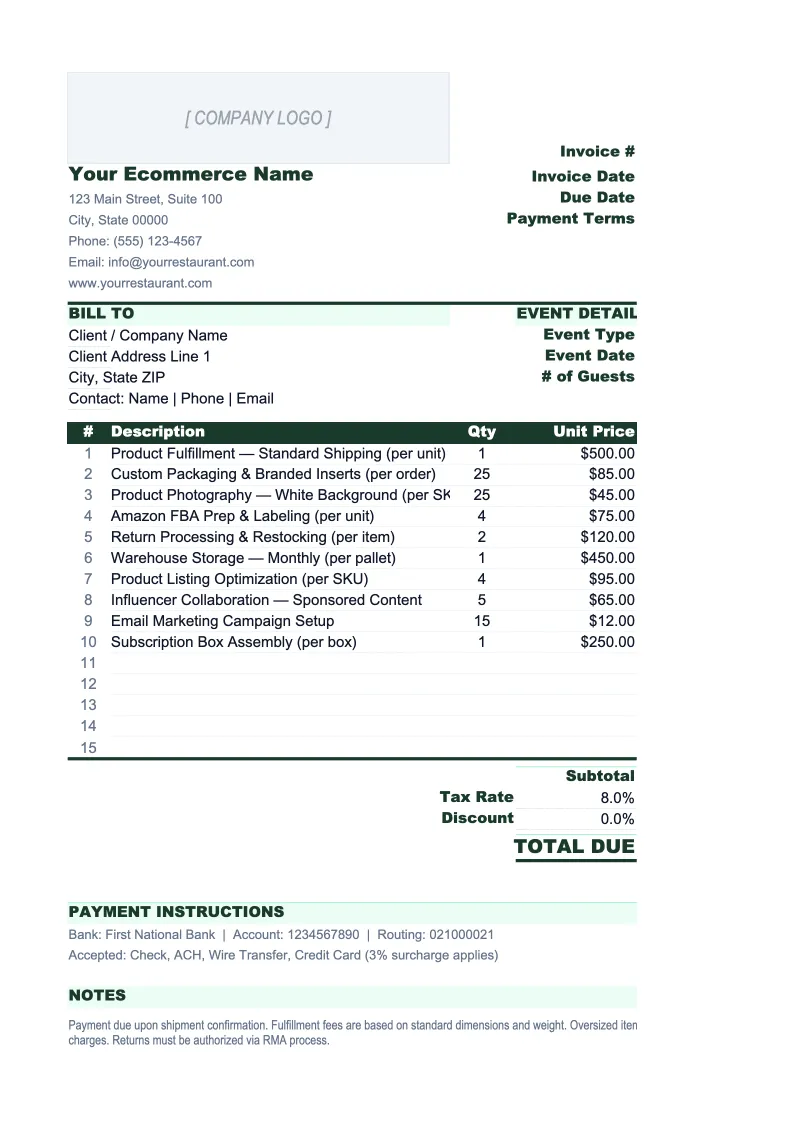
Ecommerce Invoice Template
Invoice wholesale buyers and B2B customers with a template built for ecommerce — SKU line items, variant tracking, shipping and platform fee breakdowns, and a full order log.
What's Inside This Ecommerce Invoice Template
This template includes 4 worksheets, each designed for a specific part of your ecommerce financial workflow:
Invoice
The print-ready invoice for a single order.
Product Catalog
A lookup table that stores your product master data so you never re-enter SKU details on each invoice.
Order Log
A running register of every invoice you've sent, with payment status and outstanding balance tracking.
Returns Tracker
A dedicated sheet for logging product returns and refunds, which is a higher-priority concern for ecommerce than most other business types.
Ecommerce Invoice Template Features
- SKU and variant line items with auto-populated names and prices from the Product Catalog
- Wholesale and B2B discount column — applies per line item with net price calculation
- Tax rate cell that supports different rates for domestic, interstate, and international orders
- Order Log with payment status, overdue flagging, and real-time outstanding balance totals
- Returns Tracker with return reason categories and return rate calculation by SKU
- Product Catalog with retail and wholesale price tiers for up to 2,000 SKUs
How to Use This Ecommerce Invoice Spreadsheet
Setup takes about 20 minutes the first time. Download the .xlsx file and open it in Excel or Google Sheets. Start with the Product Catalog sheet: add your SKUs, product names, variant descriptions, costs, and prices. You don't need to enter every product before creating your first invoice — add SKUs as you use them and the catalog grows naturally. Once a SKU is in the catalog, it auto-fills the Invoice sheet every time you type that code, so you stop re-entering product names and checking price lists manually.
For each new B2B or wholesale invoice, fill in the customer's billing and shipping addresses, their PO number if they have one, and the invoice date and payment terms. Enter SKUs and quantities in the line item table — the product name, variant, and price pull from the catalog automatically. Apply any wholesale discount in the discount column. Adjust the tax rate cell if the buyer is in a different state or is tax-exempt. When the invoice looks correct, export to PDF and send it, then log it in the Order Log with a status of Outstanding.
Invoice your next wholesale order in under 10 minutes
Enter the SKUs, apply the wholesale discount, confirm the shipping and tax — and send a clean, itemized invoice that covers every line item on the order.
Why Ecommerce Businesses Need a Proper Invoice Template
Ecommerce businesses often operate without a formal invoicing process because their consumer sales run through a platform that handles billing automatically. The gap shows up when wholesale or B2B orders come in — a retail buyer places a $4,000 order, and the seller tries to invoice it with a generic template that has no SKU field, no variant column, and no way to apply a wholesale discount. The invoice goes out looking amateur, and the buyer either delays payment or comes back with questions about the line items. An ecommerce-specific template with product catalog lookup and wholesale price tiers solves that problem without requiring a software subscription.
The other category that generic templates miss is returns. Ecommerce return rates typically run between 10% and 30% depending on the product category — fashion and apparel average around 20–30%, electronics around 15–20%, and home goods around 10–15%. That means for every 10 invoices sent, 1 to 3 result in at least a partial refund. Without a structured returns log, it's easy to issue refunds without tracking which SKUs drive them. A single product with a 40% return rate can quietly erode your gross margin while revenue looks fine. The Returns Tracker in this template is designed specifically for that problem: log each return, categorize the reason, and review return rate by SKU every month.
Ecommerce Industry at a Glance
Financial templates built for ecommerce businesses — from Shopify stores to Amazon sellers. Pre-loaded with SKU-level line items, platform fee categories, return tracking, and the metrics that drive online retail profitability.
Revenue Drivers
- Direct-to-consumer product sales
- Wholesale and B2B orders
- Marketplace sales (Amazon, eBay, Etsy)
- Subscription or bundle revenue
Key Cost Categories
- Cost of goods sold (inventory)
- Shipping and fulfillment
- Payment processing fees
- Platform and marketplace fees
- Returns and refunds
- Digital advertising and customer acquisition
Typical Margins
Gross: 30-55% · Net: 5-15%
Seasonality
Heavy Q4 concentration around Black Friday, Cyber Monday, and holiday gifting. Many categories also spike in January (post-holiday), back-to-school (August), and Mother's Day.
Key Performance Indicators
Ecommerce Invoice Template FAQ
More Ecommerce Templates
Ecommerce Balance Sheet Template for Excel
$29
Ecommerce Budget Template for Excel
$29
E-commerce Business Plan Template for Excel
$39
Ecommerce Cash Flow Template for Excel
$29
Ecommerce Expense Tracker Template for Excel
$29
Ecommerce Financial Model Template for Excel
$29
Ecommerce Income Statement Template for Excel
$29
Ecommerce KPI Dashboard Template for Excel
$29
Ecommerce P&L Template for Excel
$29
Ecommerce Pro Forma Template for Excel
$29
Ecommerce Project Budget Template for Excel
$29
Ecommerce Sales Forecast Template for Excel
$29
Ecommerce Business Valuation Template for Excel
$29
Ecommerce Invoice Template
$29