Food Truck Budget Template
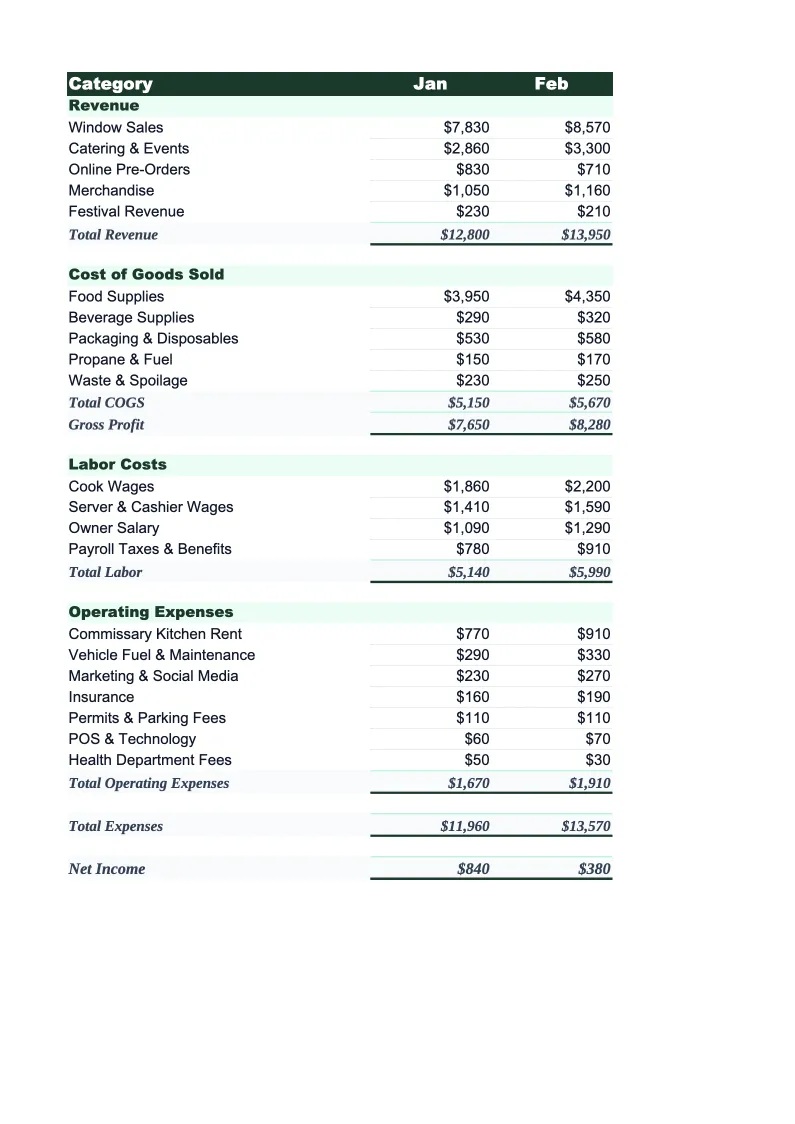
Plan and track your food truck's finances with a budget built for mobile food operators — commissary fees, fuel, permits, and event revenue all pre-loaded.
What's Inside This Food Truck Budget Template
This template includes 4 worksheets, each designed for a specific part of your food truck financial workflow:
Monthly Budget
The core planning sheet where you project each month's revenue and expenses across food truck-specific categories.
Annual Summary
A 12-month rollup that pulls from each monthly sheet automatically, giving you a full-year view of revenue, costs, and profit without touching a single formula.
Budget vs Actual
Enter your actual figures each month alongside your original budget projections and this sheet calculates dollar and percentage variance for every line item.
Dashboard
A visual summary with pre-built charts showing revenue by service type, food cost percentage, key expense trends, and net margin over time.
Food Truck Budget Template Features
- Pre-built revenue categories: street stops, catering, events, and rallies
- Commissary kitchen fee tracking as a standalone expense line
- Fuel and vehicle maintenance budget with auto-totals
- Permit, license, and health inspection cost tracking
- Food cost percentage auto-calculated against revenue
- 12-month annual rollup with seasonal trend visibility
How to Use This Food Truck Budget Spreadsheet
Getting started takes about 15 minutes. Download the .xlsx file and open it in Excel or Google Sheets — no macros or add-ons required. Start with the Monthly Budget sheet: review the pre-loaded revenue and expense categories and adjust any line items that don't match your operation. If you don't use a commissary kitchen, delete that row. If you have a generator fuel line separate from truck fuel, add it. Most food truck operators keep about 80% of the default categories and tweak the rest to fit their setup.
Once the categories are right, enter your projected revenue and expenses for the current month. If you're new to budgeting, pull last month's bank statements and POS reports and work backward — use those numbers as your baseline for the next month's projections. Copy the structure forward for the rest of the year, and adjust months where you know revenue will shift: summer peaks for street service, slower winter months, or a big festival you've already booked. The Annual Summary and Dashboard sheets update automatically.
15 minutes from download to your first budget
Download the template, plug in your numbers, and see your food truck's full financial picture — revenue by service type, expense breakdown, and variance tracking included.
Why Every Food Truck Needs a Budget Template
Food truck budgeting has a few wrinkles that a generic spreadsheet won't account for. Revenue is split across multiple service types — street stops, catering gigs, corporate events, and festivals — and each one has a different cost profile. A catering event has predictable food costs and guaranteed revenue but requires logistics and sometimes staff. A street stop has variable foot traffic and weather risk. Without a budget that separates these, you can't tell which part of your business is actually profitable.
The cost side of a food truck business is also more fragmented than a brick-and-mortar restaurant. Commissary kitchen fees are a fixed or semi-fixed cost that has no equivalent in traditional food service. Fuel is a direct operating cost that scales with your route. Permits vary by city and event type, and they add up fast if you're operating across multiple jurisdictions. On top of that, food cost percentage should stay in the 28–35% range — the same target as a restaurant — but mobile operators often lose track because they're ordering in smaller quantities and the math gets messy.
Food Truck Industry at a Glance
Financial templates built for food truck operators — from single-unit street vendors to multi-truck fleets. Pre-loaded with commissary fees, fuel costs, permit categories, and event-based revenue tracking.
Revenue Drivers
- Street service (lunch/dinner stops)
- Private catering events
- Corporate events
- Food truck rallies and festivals
Key Cost Categories
- Food costs (COGS)
- Commissary kitchen fees
- Fuel and vehicle maintenance
- Permits and licenses
- Labor
- Payment processing and POS fees
Typical Margins
Gross: 60-70% · Net: 6-15%
Seasonality
Peak revenue in spring and summer; heavily weather-dependent. Winter months significantly slower in northern climates. Event catering provides revenue stability year-round.
Key Performance Indicators
Food Truck Budget Template FAQ
More Food Truck Templates
Food Truck Balance Sheet Template for Excel
$29
Food Truck Business Plan Template for Excel
$39
Food Truck Cash Flow Template for Excel
$29
Food Truck Expense Tracker Template for Excel
$29
Food Truck Financial Model Template for Excel
$29
Food Truck Income Statement Template for Excel
$29
Food Truck Invoice Template for Excel
$29
Food Truck KPI Dashboard Template for Excel
$29
Food Truck P&L Template for Excel
$29
Food Truck Pro Forma Template for Excel
$29
Food Truck Project Budget Template for Excel
$29
Food Truck Sales Forecast Template for Excel
$29
Food Truck Valuation Template for Excel
$29
Food Truck Budget Template
$29