Food Truck Invoice Template
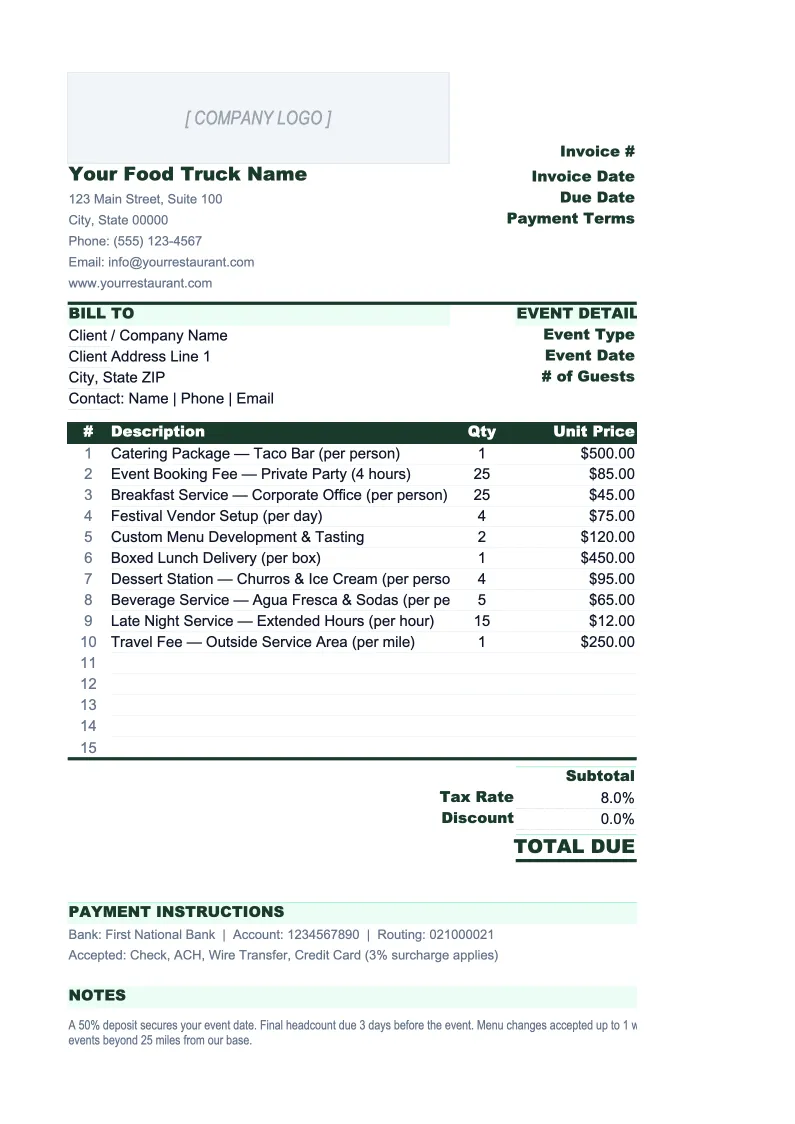
Invoice corporate clients and event hosts with a template built for food truck catering — per-person or flat-fee pricing, travel surcharges, minimum headcount enforcement, and a full log of outstanding bills.
What's Inside This Food Truck Invoice Template
This template includes 5 worksheets, each designed for a specific part of your food truck financial workflow:
Invoice
The main printable invoice for food truck catering events, corporate stops, and private parties.
Invoice Log
A running ledger of every invoice issued — designed for operators with multiple recurring corporate stops and events on the calendar.
Client & Event List
A directory of your repeat catering clients and corporate accounts that feeds the Invoice sheet via dropdown.
Menu & Rate Card
A lookup table of your standard catering packages, per-person rates, and any flat-fee add-ons.
Deposit Tracker
A dedicated sheet for tracking deposits on booked catering events — the piece that most food truck operators manage manually, and where unpaid event costs most often occur.
Food Truck Invoice Template Features
- Per-person and flat-fee line items for event catering with auto-calculated subtotals
- Travel and fuel surcharge row calculated from mileage or distance zone
- Minimum booking amount field that flags if an event falls below your threshold
- Client dropdown that auto-fills billing address and payment terms for repeat accounts
- Menu and rate card lookup for consistent pricing across all catering quotes and invoices
- Invoice log with outstanding balance totals and overdue flagging for active accounts
How to Use This Food Truck Invoice Spreadsheet
Setup takes about 20 minutes. Download the .xlsx file and open it in Excel or Google Sheets — no macros or plugins needed. Start with the Menu & Rate Card sheet: enter your catering packages, per-person rates, and flat-fee options, along with your travel surcharge structure. Then populate the Client & Event List with your regular corporate accounts and event planners. Once those two tables are complete, generating any new invoice is primarily a matter of selecting from dropdowns rather than typing figures from memory.
To create an invoice, open the Invoice sheet, enter the invoice number and event details (date, location, headcount), and select the client from the dropdown. Pick your menu items from the rate card dropdown, enter the quantity or headcount for per-person items, and the rates and line totals fill in automatically. Enter the mileage to the event location and the travel surcharge calculates itself. If a deposit has been received, enter it in the deposit field and the balance due updates immediately. The minimum booking check will highlight if the total falls below your threshold. Print or export to PDF to send to the client.
Send your next catering invoice in under 10 minutes
Set up your menu and client list once, then create professional invoices for any event — with per-person pricing, travel surcharges, deposit tracking, and a full log of what's outstanding.
Why Food Trucks Need a Dedicated Invoice Template
Food trucks bill clients for catering in a way that doesn't fit a standard business invoice. A generic invoice template has no concept of per-person pricing, travel surcharges, or minimum order requirements — the three things that appear on almost every food truck catering quote. The result is operators who spend 30–45 minutes formatting a Word document before every event, quoting inconsistent prices, or forgetting to include the mileage charge. Over a season with 30 events, that's real money left on the table and real time that could go to running service.
The numbers that matter in food truck catering are food cost percentage (target: 28–35% of revenue), labor as a share of event revenue (typically 20–30%), and your break-even headcount for each event. At a per-person rate of $15 and a food cost of $5.50 per head, a 50-person minimum event generates about $750 in contribution margin before labor and travel costs — but only if the travel surcharge actually covers your fuel and time. Food trucks that don't itemize travel costs separately routinely absorb $50–$150 per event in unrecovered transportation costs that never show up in the math.
Food Truck Industry at a Glance
Financial templates built for food truck operators — from single-unit street vendors to multi-truck fleets. Pre-loaded with commissary fees, fuel costs, permit categories, and event-based revenue tracking.
Revenue Drivers
- Street service (lunch/dinner stops)
- Private catering events
- Corporate events
- Food truck rallies and festivals
Key Cost Categories
- Food costs (COGS)
- Commissary kitchen fees
- Fuel and vehicle maintenance
- Permits and licenses
- Labor
- Payment processing and POS fees
Typical Margins
Gross: 60-70% · Net: 6-15%
Seasonality
Peak revenue in spring and summer; heavily weather-dependent. Winter months significantly slower in northern climates. Event catering provides revenue stability year-round.
Key Performance Indicators
Food Truck Invoice Template FAQ
More Food Truck Templates
Food Truck Balance Sheet Template for Excel
$29
Food Truck Budget Template for Excel
$29
Food Truck Business Plan Template for Excel
$39
Food Truck Cash Flow Template for Excel
$29
Food Truck Expense Tracker Template for Excel
$29
Food Truck Financial Model Template for Excel
$29
Food Truck Income Statement Template for Excel
$29
Food Truck KPI Dashboard Template for Excel
$29
Food Truck P&L Template for Excel
$29
Food Truck Pro Forma Template for Excel
$29
Food Truck Project Budget Template for Excel
$29
Food Truck Sales Forecast Template for Excel
$29
Food Truck Valuation Template for Excel
$29
Food Truck Invoice Template
$29