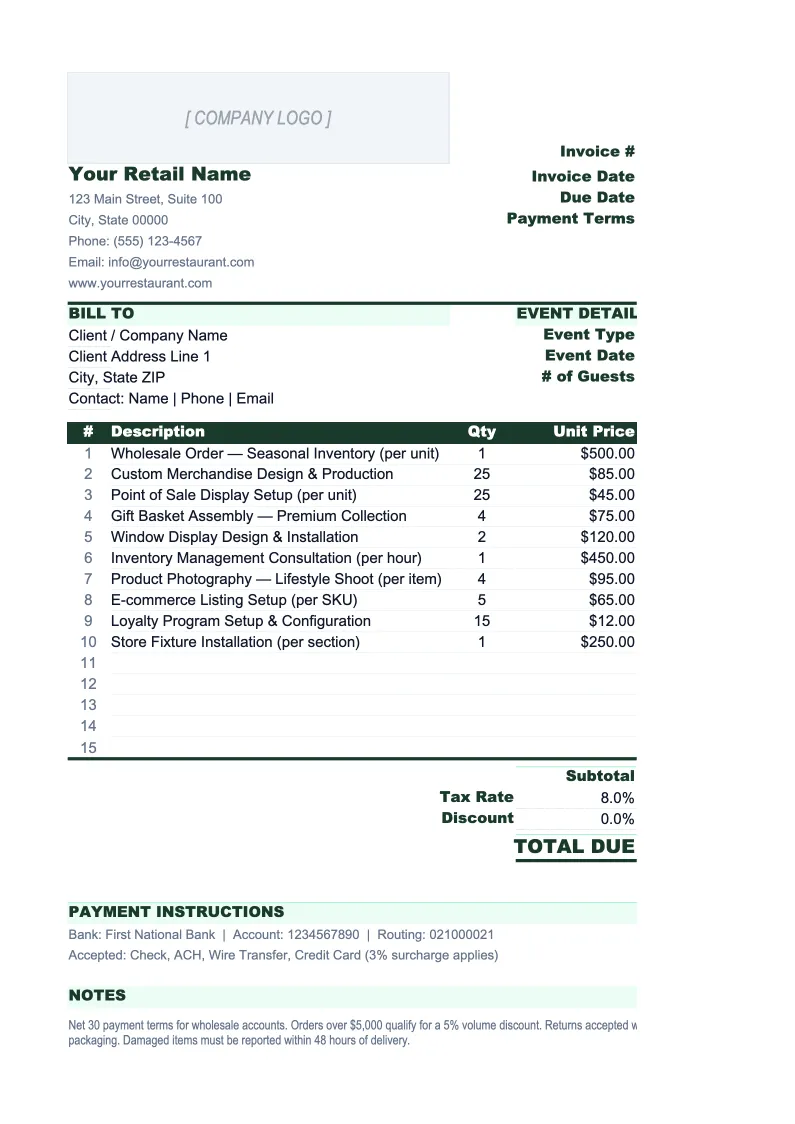
Retail Invoice Template
Invoice wholesale buyers, B2B customers, and special-order accounts with a template built for retail — SKU-level line items, trade discounts, tax by jurisdiction, and a full order log.
What's Inside This Retail Invoice Template
This template includes 4 worksheets, each designed for a specific part of your retail financial workflow:
Invoice
The print-ready invoice for a single order.
Product Catalog
A lookup table that stores your product master data so you never have to re-enter SKU details on each invoice.
Order Log
A running register of every invoice sent, tracking which orders are paid, which are outstanding, and how much is owed in total.
Sales Summary
A monthly revenue summary that aggregates your order data by customer, product category, or both.
Retail Invoice Template Features
- SKU-level line items with auto-populated descriptions and prices from the Product Catalog
- Trade discount column for wholesale and account customers — applies per line item
- Tax rate cell that calculates sales tax across the full order for any state or jurisdiction
- Order Log with payment status tracking, overdue flagging, and outstanding balance totals
- Product Catalog with up to 2,000 SKUs including cost, retail price, and wholesale price
- Monthly Sales Summary with gross profit and gross margin percentage auto-calculation
How to Use This Retail Invoice Spreadsheet
Setup takes about 20 minutes the first time. Download the .xlsx file and open it in Excel or Google Sheets. Start with the Product Catalog sheet: add your SKUs, product descriptions, units of measure, costs, and prices. You don't need to enter every product before creating your first invoice — add products as you use them and the catalog will grow naturally. Once a SKU is in the catalog, it auto-populates the Invoice sheet every time you enter that code, so you never have to retype a product name or look up a price again.
For each new invoice, fill in the customer's billing and shipping address, their PO number if they have one, and the invoice date and payment terms. Enter SKU codes in the line item table and quantities — the description and unit price pull from the Product Catalog automatically. Enter any trade discount for this customer's account in the discount column. Check the tax rate cell at the bottom and adjust it if the customer's state or jurisdiction has a different rate. When the invoice looks correct, print it or export to PDF and send it. Log the invoice in the Order Log with a status of Outstanding.
Invoice your next wholesale order in under 10 minutes
Enter the SKUs, apply the trade discount, check the tax rate — and send a clean, itemized invoice that covers every line item on the order.
Why Retail Businesses Need a Proper Invoice Template
Most retail invoice templates are built for freelancers — they have a single service line and a due date. That structure doesn't work for retail because retail invoices are fundamentally different: they have multiple SKUs, unit prices that need to match a price list, trade discounts that vary by account, and tax rules that depend on the customer's location and the product category. When a retailer invoices a wholesale buyer with a generic template, they typically spend 10–15 minutes manually entering product details for each invoice, and pricing errors from typing prices by hand are common. A retail-specific template with a product catalog and SKU lookup eliminates both problems.
The other dimension that generic templates miss is accounts receivable management. Retail businesses that sell to trade accounts — interior designers, property managers, B2B buyers, boutique chains — routinely have 20–50 open invoices at any given time with different due dates and partial payment histories. Without an order log that tracks payment status across all open invoices, it's easy to let Net 30 invoices slide to Net 60 or beyond without realizing it. The cash flow impact compounds quickly: if your average wholesale order is $1,200 and you have 15 outstanding invoices, that's $18,000 in receivables that your bank account doesn't reflect. Tracking it in a structured log, not a mental list, is what keeps accounts from going stale.
Retail Industry at a Glance
Financial templates built for retail businesses — from independent boutiques to specialty stores. Pre-loaded with product cost tracking, wholesale invoicing, and retail-specific KPIs.
Revenue Drivers
- In-store sales
- Online/e-commerce sales
- Wholesale orders
- Custom and special orders
Key Cost Categories
- Cost of goods sold
- Labor (sales staff)
- Rent & occupancy
- Inventory shrinkage
- Marketing & advertising
- Shipping & fulfillment
Typical Margins
Gross: 40-60% · Net: 2-6%
Seasonality
Q4 holiday season typically accounts for 20-30% of annual revenue; back-to-school (August) and spring sales are secondary peaks.
Key Performance Indicators
Retail Invoice Template FAQ
More Retail Templates
Retail Balance Sheet Template for Excel
$29
Retail Budget Template for Excel
$29
Retail Business Plan Template for Excel
$39
Retail Cash Flow Template for Excel
$29
Retail Expense Tracker Template for Excel
$29
Retail Financial Model Template for Excel
$29
Retail Income Statement Template for Excel
$29
Retail KPI Dashboard Template for Excel
$29
Retail P&L Template for Excel
$29
Retail Pro Forma Template for Excel
$29
Retail Project Budget Template for Excel
$29
Retail Sales Forecast Template for Excel
$29
Retail Business Valuation Template for Excel
$29
Retail Invoice Template
$29