SaaS Invoice Template
Invoice customers for subscriptions, seat-based licenses, usage overages, and professional services — with a recurring billing schedule and full invoice log built in.
What's Inside This SaaS Invoice Template
This template includes 5 worksheets, each designed for a specific part of your saas financial workflow:
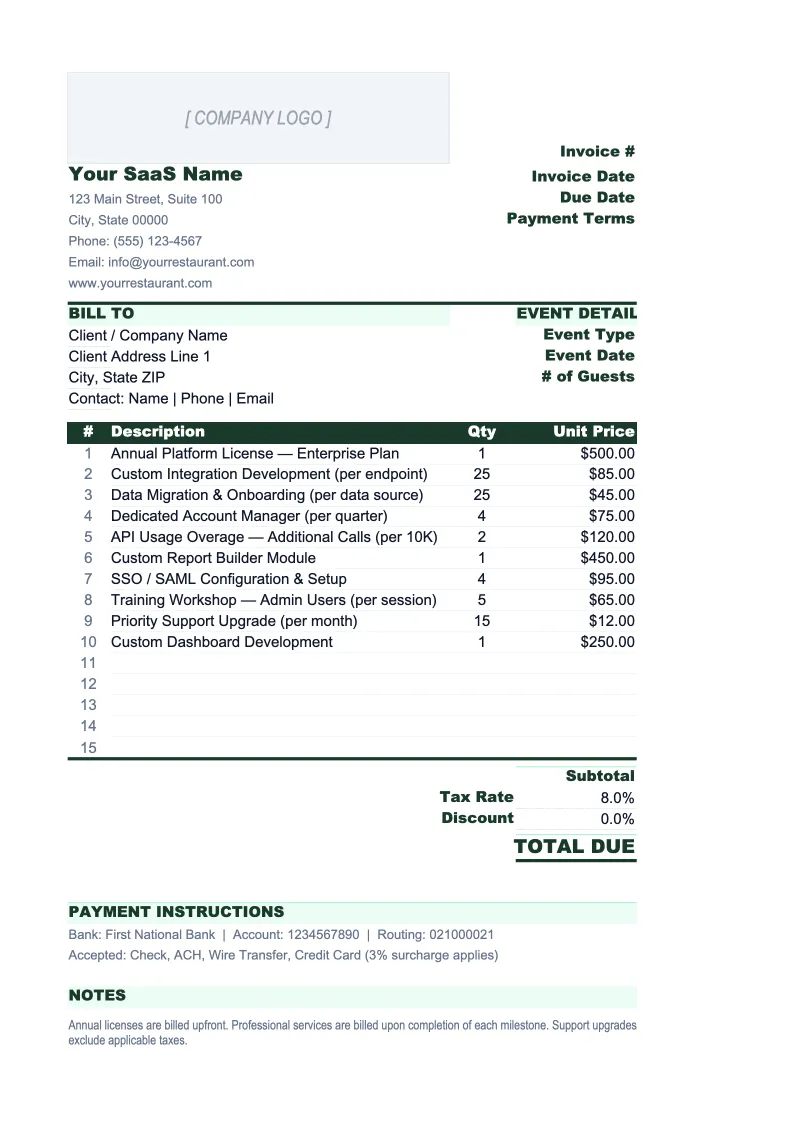
Invoice
The printable invoice sheet structured for SaaS billing complexity.
Invoice Log
A running register of every invoice issued across your customer base.
Customer List
A customer directory that feeds the Invoice sheet via dropdown.
Subscription Schedule
A monthly billing calendar showing every customer's next invoice date, billing amount, plan tier, and contract renewal date.
Usage Log
A tracker for usage-based billing metrics — API calls, storage, active seats, events, or whatever unit your product prices on.
SaaS Invoice Template Features
- Invoice line items for subscriptions, seats, usage overages, and professional services
- Contract reference fields — account number, renewal date, PO/cost center — for enterprise AP requirements
- Customer dropdown that auto-fills billing address, terms, and plan details
- Invoice log with MRR invoiced, total collected, and overdue flagging
- Subscription schedule with renewal alerts and projected MRR
- Usage log for calculating overage charges by customer and billing period
How to Use This SaaS Invoice Spreadsheet
Setup takes about 20 minutes. Download the .xlsx file and open it in Excel or Google Sheets. Start with the Customer List sheet — add each of your current customers with their billing contact, address, AP email, payment terms, plan tier, and any PO or cost center numbers they require. Then populate the Subscription Schedule with their billing dates and amounts. Once those two sheets are set up, the Invoice sheet will work with dropdowns instead of manual entry, and the schedule gives you a built-in billing calendar so nothing slips through.
To generate an invoice, go to the Invoice sheet and enter the invoice number, select the customer from the dropdown, and confirm the billing period. Fill in the applicable line items — subscription fee, seat count if seat-based, usage overages pulled from the Usage Log, and any professional services or one-time charges for that period. The totals block calculates subtotal, discount, and tax automatically. Export to PDF and send to the billing contact listed in the Customer List. For monthly recurring customers, most of the line items stay the same — it's usually just the usage overage row that changes.
Send your next subscription invoice in under 10 minutes
Set up your customer list and subscription schedule once, then generate any invoice in minutes — with the right line items, enterprise fields, and a full log of what's been paid.
Why SaaS Companies Need a Proper Invoice Template
SaaS invoicing looks straightforward until you're managing 50 customers on different plans, billing cycles, and pricing models. Some customers pay monthly; others are on annual contracts invoiced monthly. Some are on flat-rate subscriptions; others have seat-based or usage-based components that change every period. A few enterprise customers have strict AP requirements — PO numbers, cost center codes, specific invoice formats — and will hold payment until the invoice matches exactly what their system expects. Using a generic invoice template for this creates errors: missed line items, wrong amounts, invoices sent to the wrong contact, and delayed payment from formatting issues.
The SaaS billing structure that works is one that separates line item types rather than mixing them into a single undifferentiated table. Subscription fees are fixed and predictable; usage overages require calculation from a separate log each period; professional services may be hourly or milestone-based. Keeping these in distinct sections with their own subtotals makes the invoice readable for the customer and auditable for your own finance team. It also makes disputes easier to resolve — when a customer questions an overage charge, you can reference the Usage Log and show exactly which billing period and usage figure the charge is based on.
SaaS Industry at a Glance
Financial templates built for software-as-a-service businesses managing subscription billing, ARR growth, and recurring revenue operations.
Revenue Drivers
- monthly recurring revenue (MRR)
- annual contract value (ACV)
- seat-based or usage-based billing
- professional services and onboarding fees
- add-ons and tier upgrades
Key Cost Categories
- cloud infrastructure (AWS, GCP, Azure)
- employee salaries and benefits (engineering, sales, CS, marketing)
- customer acquisition (ads, events, SDR costs)
- SaaS tools and subscriptions
- payment processing fees
- R&D and product development
Typical Margins
Gross: 60-80% · Net: -5% to 20% depending on growth stage
Seasonality
Relatively flat month-to-month with Q4 spikes from enterprise budget cycles. Annual contract renewals cluster in January and July.
Key Performance Indicators
SaaS Invoice Template FAQ
More SaaS Templates
SaaS Balance Sheet Template for Excel
$29
SaaS Budget Template for Excel
$29
SaaS Business Plan Template for Excel
$39
SaaS Cash Flow Template for Excel
$29
SaaS Expense Tracker Template for Excel
$29
SaaS Financial Model Template for Excel
$29
SaaS Income Statement Template for Excel
$29
SaaS KPI Dashboard Template for Excel
$29
SaaS P&L Template for Excel
$29
SaaS Pro Forma Template for Excel
$29
SaaS Project Budget Template for Excel
$29
SaaS Sales Forecast Template for Excel
$29
SaaS Valuation Template for Excel
$29
SaaS Invoice Template
$29