SaaS Cash Flow Template
Track when subscription revenue actually lands in your bank account — MRR collections, annual contract timing, refunds, and cloud infrastructure spend — with a cash flow template built for SaaS billing cycles.
What's Inside This SaaS Cash Flow Template
This template includes 6 worksheets, each designed for a specific part of your saas financial workflow:
13-Week Cash Flow
A rolling 13-week cash flow view that maps when subscription revenue actually hits your bank account, not when it's recognized.
Annual Cash Flow
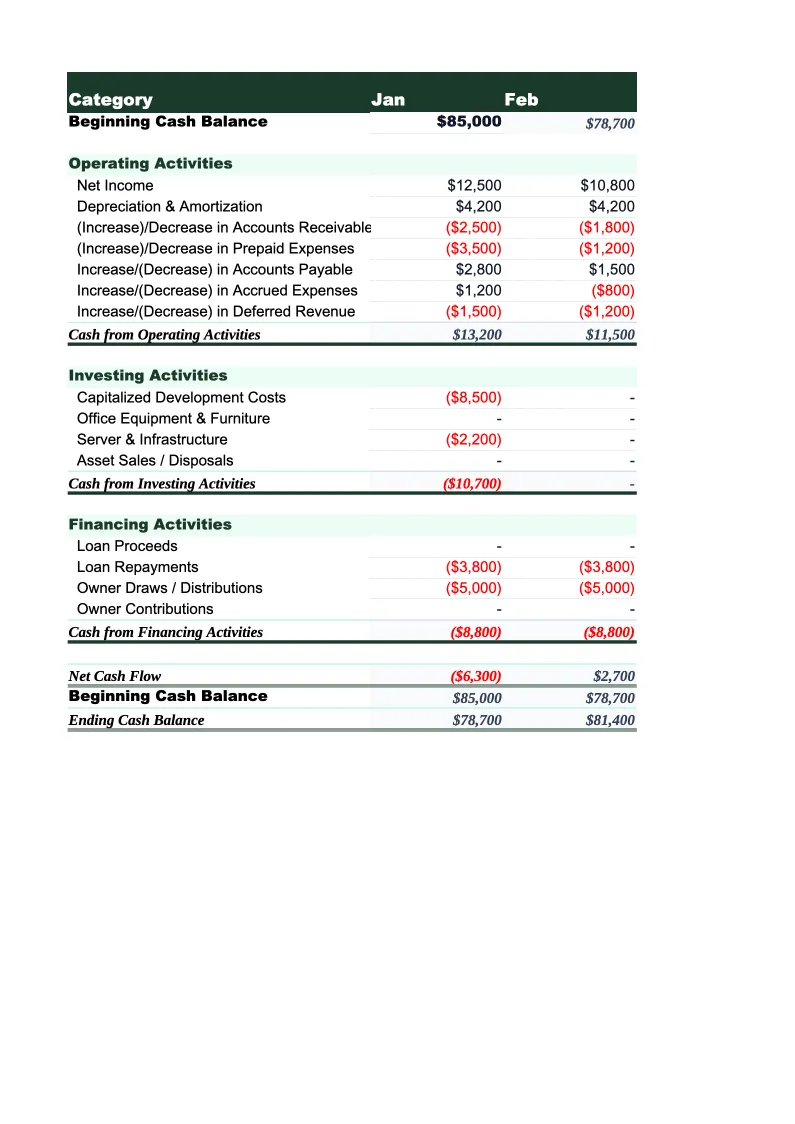
A month-by-month cash flow statement covering the full fiscal year, organized into three standard sections: operating activities (subscription cash receipts, services revenue, minus payroll, infrastructure, acquisition, and G&A costs), investing activities (software capitalization, hardware, and strategic investments), and financing activities (venture rounds, convertible notes, loans, or owner distributions).
MRR to Cash Bridge
A reconciliation worksheet that bridges your recognized MRR to actual cash collected — the two numbers that are most often confused in SaaS.
Burn Rate & Runway
A dedicated burn rate analysis worksheet that calculates your gross burn (total cash out), net burn (cash out minus cash in), and runway in months at both current burn and projected burn.
Annual Contract Timing
A cash timing worksheet for annual and multi-year contracts.
Dashboard
A one-page summary with charts for monthly cash balance trend, gross and net burn rate over time, and a runway indicator showing months of runway at current spend.
SaaS Cash Flow Template Features
- MRR-to-cash bridge reconciling recognized revenue against actual bank collections and failed payments
- Annual contract timing sheet mapping ACV cash receipt by payment terms and renewal date
- Burn rate and runway calculator with sensitivity table for cost cuts and revenue acceleration
- 13-week rolling cash flow with separate rows for monthly subscribers, annual contracts, and professional services
- Runway indicator with 18/9-month thresholds for board-ready cash position reporting
- Payment processing fee rows reflecting Stripe/Braintree rates on gross subscription volume
How to Use This SaaS Cash Flow Spreadsheet
Start with the 13-Week Cash Flow sheet. Download the file, open it in Excel or Google Sheets, and enter your current cash balance in the starting balance cell. Then populate the inflow rows: pull your weekly or monthly subscription cash collections from your billing platform (Stripe, Chargebee, or Recurly will have a 'cash collected' report separate from recognized revenue), your expected professional services invoices, and any one-time fees. For outflows, enter your payroll run dates and amounts, your AWS or cloud infrastructure bill cycle, and your SaaS tool renewal schedule. This first pass takes 30-45 minutes and gives you a 13-week forward cash view.
Once the 13-week sheet is set up, move to the MRR to Cash Bridge. Enter your billing system's MRR figures for the past 3-6 months, then apply your actual collection rate — check your billing platform's failed payment report to see what percentage of invoices go uncollected each month. If you have significant annual contract volume, work through the Annual Contract Timing sheet as well, entering each deal with its payment terms. These two sheets together will show you where your cash-versus-MRR gap comes from and how to close it by improving dunning, tightening payment terms, or shifting more customers to annual upfront billing.
15 minutes from download to your first SaaS cash position
Download the template, enter your current cash balance and monthly billing collections, and see your SaaS company's 13-week cash position — MRR collection lag, burn rate, and runway included.
Why SaaS Companies Need a Dedicated Cash Flow Template
SaaS companies have a unique cash flow challenge: their financial metrics look healthy — MRR growing, churn low, gross margin excellent — while their bank account tells a different story. The gap between recognized revenue and collected cash is larger in SaaS than almost any other business model. Monthly subscribers pay on card, but failed card rates run 5-10% of gross volume each month. Annual contracts are recognized ratably, but if payment terms are net-30 or net-60, the cash doesn't arrive for weeks. Pre-revenue-stage companies can be spending $200K/month in cash while their income statement shows $150K in recognized MRR. Without a cash flow template that maps the timing, you're managing the wrong number.
The SaaS cash flow cycle has three timing gaps worth modeling explicitly. First, the collection gap: even with good dunning, 5-15% of monthly MRR fails to collect in the billing month. Stripe's Smart Retries recover most of it, but over a 30-90 day window — meaning some MRR counted in month 1 actually arrives as cash in month 2 or 3. Second, the annual contract timing gap: a $60K annual deal signed December 31 with net-30 terms means $60K of cash arrives in late January — often a full quarter after the MRR was counted. Third, the payroll and infrastructure concentration: SaaS companies typically pay 50-70% of their expenses on two dates — the 15th and last day of the month for payroll, and on a monthly cycle for cloud costs. This concentration means specific days are high-risk for cash balance dips.
SaaS Industry at a Glance
Financial templates built for software-as-a-service businesses managing subscription billing, ARR growth, and recurring revenue operations.
Revenue Drivers
- monthly recurring revenue (MRR)
- annual contract value (ACV)
- seat-based or usage-based billing
- professional services and onboarding fees
- add-ons and tier upgrades
Key Cost Categories
- cloud infrastructure (AWS, GCP, Azure)
- employee salaries and benefits (engineering, sales, CS, marketing)
- customer acquisition (ads, events, SDR costs)
- SaaS tools and subscriptions
- payment processing fees
- R&D and product development
Typical Margins
Gross: 60-80% · Net: -5% to 20% depending on growth stage
Seasonality
Relatively flat month-to-month with Q4 spikes from enterprise budget cycles. Annual contract renewals cluster in January and July.
Key Performance Indicators
SaaS Cash Flow Template FAQ
More SaaS Templates
SaaS Balance Sheet Template for Excel
$29
SaaS Budget Template for Excel
$29
SaaS Business Plan Template for Excel
$39
SaaS Expense Tracker Template for Excel
$29
SaaS Financial Model Template for Excel
$29
SaaS Income Statement Template for Excel
$29
SaaS Invoice Template for Excel
$29
SaaS KPI Dashboard Template for Excel
$29
SaaS P&L Template for Excel
$29
SaaS Pro Forma Template for Excel
$29
SaaS Project Budget Template for Excel
$29
SaaS Sales Forecast Template for Excel
$29
SaaS Valuation Template for Excel
$29
SaaS Cash Flow Template
$29