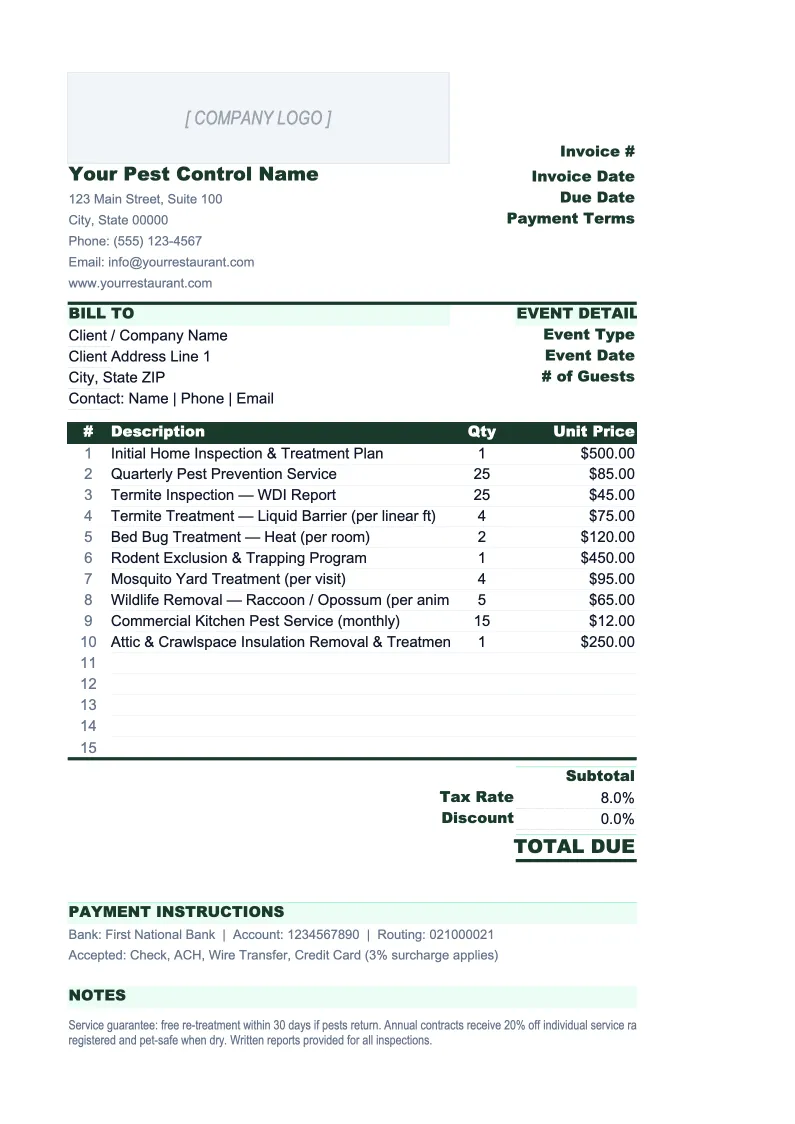
Pest Control Invoice Template
Invoice pest control clients faster with a template built for how pest management businesses actually bill — recurring service contracts, one-time treatments, and required pesticide disclosure in one sheet.
What's Inside This Pest Control Invoice Template
This template includes 4 worksheets, each designed for a specific part of your pest control financial workflow:
Invoice
The customer-facing invoice form with fields for client name, service address, billing address, and contract or account reference number.
Estimate
A pre-service estimate form in the same three-section layout as the invoice, designed to be filled out before treatment begins and signed by the client.
Invoice Log
A running record of every invoice issued, with columns for invoice number, date, client name, service address, service type (GPP recurring, termite, bed bug, rodent, mosquito, commercial), recurring or one-time flag, materials total, service total, tax, total billed, and payment status.
Settings
A configuration sheet where you enter company information once — business name, address, phone, email, pesticide applicator license number, and any state contractor license numbers — so it populates on every invoice automatically.
Pest Control Invoice Template Features
- Three billing sections per invoice: recurring GPP contracts, one-time treatments, and pesticide disclosure — each with independent subtotals
- Pesticide Disclosure section with fields for chemical name, EPA registration number, application rate, and re-entry interval (REI) for regulatory compliance
- Estimate sheet in matching format for client authorization before treatment — with signature line and authorization date
- Invoice Log tracking service type (GPP, termite, bed bug, rodent, commercial) for gross margin analysis by service line
- Applicator license number field that auto-populates on every invoice from the Settings sheet
- Configurable fuel surcharge and emergency service surcharge — flat dollar or percentage of service total
How to Use This Pest Control Invoice Spreadsheet
Start with the Settings sheet — enter your company name, address, phone, email, and your pesticide applicator license number. If your state also requires a contractor license number on service documents, add that here too. Set your standard service rates for recurring GPP visits and your common one-time treatment types, your tax rate, and any fuel or surcharge amounts. This takes about ten minutes and everything flows into the invoice automatically. Then open the Estimate sheet and fill in the scope and pricing for your next job before the technician heads out.
When a job is ready to invoice, open the Invoice sheet and fill in the client details and contract or account reference at the top. Work through the three sections in order: list any recurring services with their contract rate and service date, add any one-time treatments with the type, area treated, and pricing, then fill in the Pesticide Disclosure section with the products applied. This section is not optional — it is a regulatory requirement in most states, and having it on the invoice keeps you compliant without a separate service record. The totals, surcharge, tax, and balance due all calculate automatically. Export to PDF and email or print for the client.
15 minutes from download to your first invoice
Download the template, enter your company details and license number, and start invoicing clients with a layout that handles recurring contracts, one-time treatments, and pesticide disclosure in one sheet.
Why Pest Control Businesses Need a Proper Invoice Template
Pest control invoicing is more regulated than most service trades. Technicians are licensed applicators, and every service document they leave with a client carries legal weight — it is simultaneously an invoice and a pesticide application record under EPA FIFRA and state pesticide laws. Most states require the technician to leave written documentation of what was applied, the EPA registration number, the application rate, the target pest, and the re-entry interval. Operators who handle this on a separate form and a separate invoice create double the paperwork and double the chance of missing something. Combining the pesticide disclosure directly into the invoice form keeps the process clean, creates one document for the client file, and makes compliance automatic rather than an afterthought.
The billing structure in pest control is also split in a way most invoice templates can't handle cleanly. Recurring GPP contract clients pay a flat rate per visit or per month — the invoice is simple, but the service date and contract reference need to be explicit so there's no confusion about what visit is being billed. One-time treatment clients — termite, bed bug, rodent exclusion — need a fully itemized invoice that justifies the larger one-time charge: service type, area treated, square footage for termite work, treatment method, and warranty terms. Mixing these two billing styles on a generic invoice forces you to rebuild the structure every time. A template with dedicated sections for each eliminates that problem and produces invoices that are clear to clients and easy to match against service records.
Pest Control Industry at a Glance
Financial templates built for pest control businesses — from solo operators to multi-route companies. Pre-loaded with recurring contract, termite, and specialty treatment categories.
Revenue Drivers
- Recurring GPP contracts
- Termite treatments and monitoring
- Bed bug and specialty treatments
- Rodent control and exclusion
- Mosquito and tick programs
- Commercial pest control contracts
Key Cost Categories
- Technician wages and payroll taxes
- Pesticides, rodenticides, and materials
- Vehicle fuel and fleet maintenance
- Liability and commercial auto insurance
- Pesticide applicator license fees
- Route management and CRM software
Typical Margins
Gross: 45-60% · Net: 10-20%
Seasonality
Spring through fall drives new contract sign-ups and mosquito/tick program revenue; core GPP and commercial contracts provide year-round base revenue; termite swarm season (March–June) is a major driver of new termite treatment sales.
Key Performance Indicators
Pest Control Invoice Template FAQ
More Pest Control Templates
Pest Control Balance Sheet Template for Excel
$29
Pest Control Budget Template for Excel
$29
Pest Control Business Plan Template for Excel
$39
Pest Control Cash Flow Template for Excel
$29
Pest Control Expense Tracker Template for Excel
$29
Pest Control Financial Model Template for Excel
$29
Pest Control Income Statement Template for Excel
$29
Pest Control KPI Dashboard Template for Excel
$29
Pest Control P&L Template for Excel
$29
Pest Control Pro Forma Template for Excel
$29
Pest Control Project Budget Template for Excel
$29
Pest Control Sales Forecast Template for Excel
$29
Pest Control Business Valuation Template for Excel
$29
Pest Control Invoice Template
$29